microphone not working

My AirPod 2nd Generation Airpod microphone is not working. I have tried switching off of automatic to left or right but it did not help. I believe it could be an issue with a connection to my iPhone 14 Pro Max because I never had a problem until I switched phones. I have disconnected and repaired them multiple times and cleaned them to the best of my ability. My old phone was an iPhone 12.

iPhone 14 Pro Max

Posted on Aug 30, 2023 11:19 AM

Reply
Question marked as Top-ranking reply

Posted on Aug 31, 2023 10:49 AM

Hello GlennWith2Ns,


Thanks for reaching out to Apple Support Communities. We see you have some questions about your microphone not working as expected, and we'd like to help. From here, we'd recommend resetting your AirPods, as this can sometimes help with the issue you're seeing: How to reset your AirPods and AirPods Pro - Apple Support


How to reset your AirPods and AirPods Pro
You might need to reset your AirPods if they won't charge, or to fix a different issue.

1. Put your AirPods in their charging case, and close the lid.
2. Wait 30 seconds.
3. Open the lid of your charging case, and put your AirPods in your ears.
4. Go to Settings > Bluetooth. Or go to Settings > [your AirPods].
* If your AirPods appear there as connected, tap the More Info button  next to your AirPods, tap Forget This Device, then tap again to confirm.
* If your AirPods don't appear there, continue to the next step. 
5. Put your AirPods in their charging case, and keep the lid open. 
6. Press and hold the setup button on the back of the case for about 15 seconds, until the status light on the front of the case flashes amber, then white.*
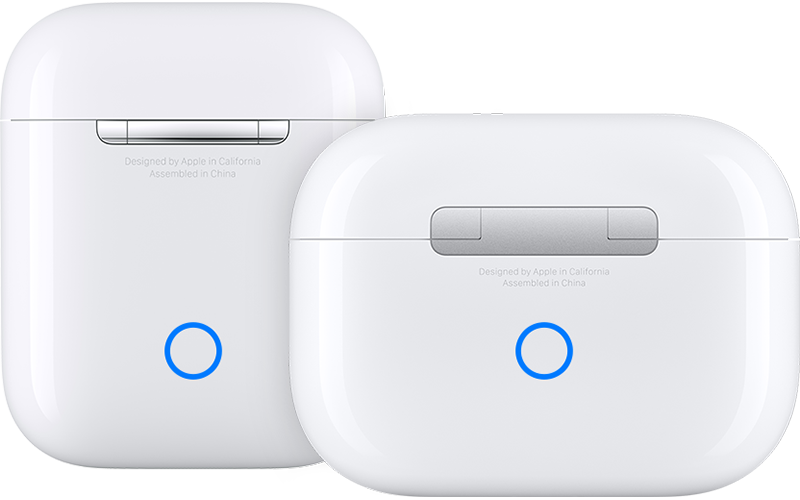
AirPods charging cases
7. Reconnect your AirPods: With your AirPods in their charging case and the lid open, place your AirPods close to your iPhone or iPad. Follow the steps on your device's screen.
AirPods can be associated with one Apple ID. If you want to use AirPods (3rd generation) or AirPods Pro (1st or 2nd generation) that someone else has used, they first need to remove the AirPods from their Apple ID.

If you still need help, please reach out to Apple Support: Get Support


Regards.

1 reply
Question marked as Top-ranking reply

Aug 31, 2023 10:49 AM in response to GlennWith2Ns

Hello GlennWith2Ns,


Thanks for reaching out to Apple Support Communities. We see you have some questions about your microphone not working as expected, and we'd like to help. From here, we'd recommend resetting your AirPods, as this can sometimes help with the issue you're seeing: How to reset your AirPods and AirPods Pro - Apple Support


How to reset your AirPods and AirPods Pro
You might need to reset your AirPods if they won't charge, or to fix a different issue.

1. Put your AirPods in their charging case, and close the lid.
2. Wait 30 seconds.
3. Open the lid of your charging case, and put your AirPods in your ears.
4. Go to Settings > Bluetooth. Or go to Settings > [your AirPods].
* If your AirPods appear there as connected, tap the More Info button  next to your AirPods, tap Forget This Device, then tap again to confirm.
* If your AirPods don't appear there, continue to the next step. 
5. Put your AirPods in their charging case, and keep the lid open. 
6. Press and hold the setup button on the back of the case for about 15 seconds, until the status light on the front of the case flashes amber, then white.*
AirPods charging cases
7. Reconnect your AirPods: With your AirPods in their charging case and the lid open, place your AirPods close to your iPhone or iPad. Follow the steps on your device's screen.
AirPods can be associated with one Apple ID. If you want to use AirPods (3rd generation) or AirPods Pro (1st or 2nd generation) that someone else has used, they first need to remove the AirPods from their Apple ID.

If you still need help, please reach out to Apple Support: Get Support


Regards.

This thread has been closed by the system or the community team. You may vote for any posts you find helpful, or search the Community for additional answers.

microphone not working

Welcome to Apple Support Community
A forum where Apple customers help each other with their products. Get started with your Apple Account.