
Repair needed in UK for ipod nano 7th generation 2015.. probably battery needs replacing?

The ipod will not take a charge, will not switch on, and will not respond to any sequence of buttons pressed..

iPod nano

Posted on Sep 11, 2023 9:36 AM

Reply
Question marked as Top-ranking reply

Posted on Sep 12, 2023 8:36 AM

Hello Bill Carte,


We understand that your iPod nano is unresponsive. To ensure that we're covering all of our bases, we suggest that you complete the following steps. Doing so, may be able to resolve the issue:


"Force restart your iPod

If your iPod doesn't respond, use the following instructions to force restart it. Find out which model of iPod you have.


iPod nano (7th generation)

  1. Press and hold both the Sleep/Wake button and Home button until the screen turns off.
  2. Wait for your device to restart.
  3. Still need help? Plug into power, then try again.


Charge your device 

If your iPod still won't respond, it might have low battery. Charge your iPod for at least 30 minutes:

  1. Connect your iPod to the charging cable that came with your device. 
  2. Plug the other end of the cable into power: Use a USB adapter plugged into a wall outlet or a USB 2.0 or 3.0 port on a computer (not a keyboard) that's on and not in sleep mode. Or you can use a USB hub, docking station, or other Apple-certified power accessory.
  3. Wait a few minutes until a charging screen appears or until the status light on your iPod shuffle turns orange. 

Don't see the charging screen or orange light after 30 minutes? Here's what to do:

  • Check that you have firm cable connections. Remove any debris from all ports.
  • Try a different charging cable, power adapter, and power source. Don't use an adapter or cable that shows any sign of damage.
  • If your device still doesn't turn on, it might need repair. Contact Apple Support.


If your iPod turns on but gets stuck during startup

If your iPod still won't respond, gets stuck during startup, or persistently displays an Apple logo or red X here's what to do:
  1. If you're using a Mac with macOS Mojave or earlier or a PC, make sure that your computer has the latest version of iTunes.
  2. If you have an iPod nano or iPod classic, put your iPod in Disk Mode.
  3. On a Mac with macOS Catalina or later, open a Finder window. On a Mac with macOS Mojave or earlier or a PC, open iTunes. Then connect your iPod directly to your computer.
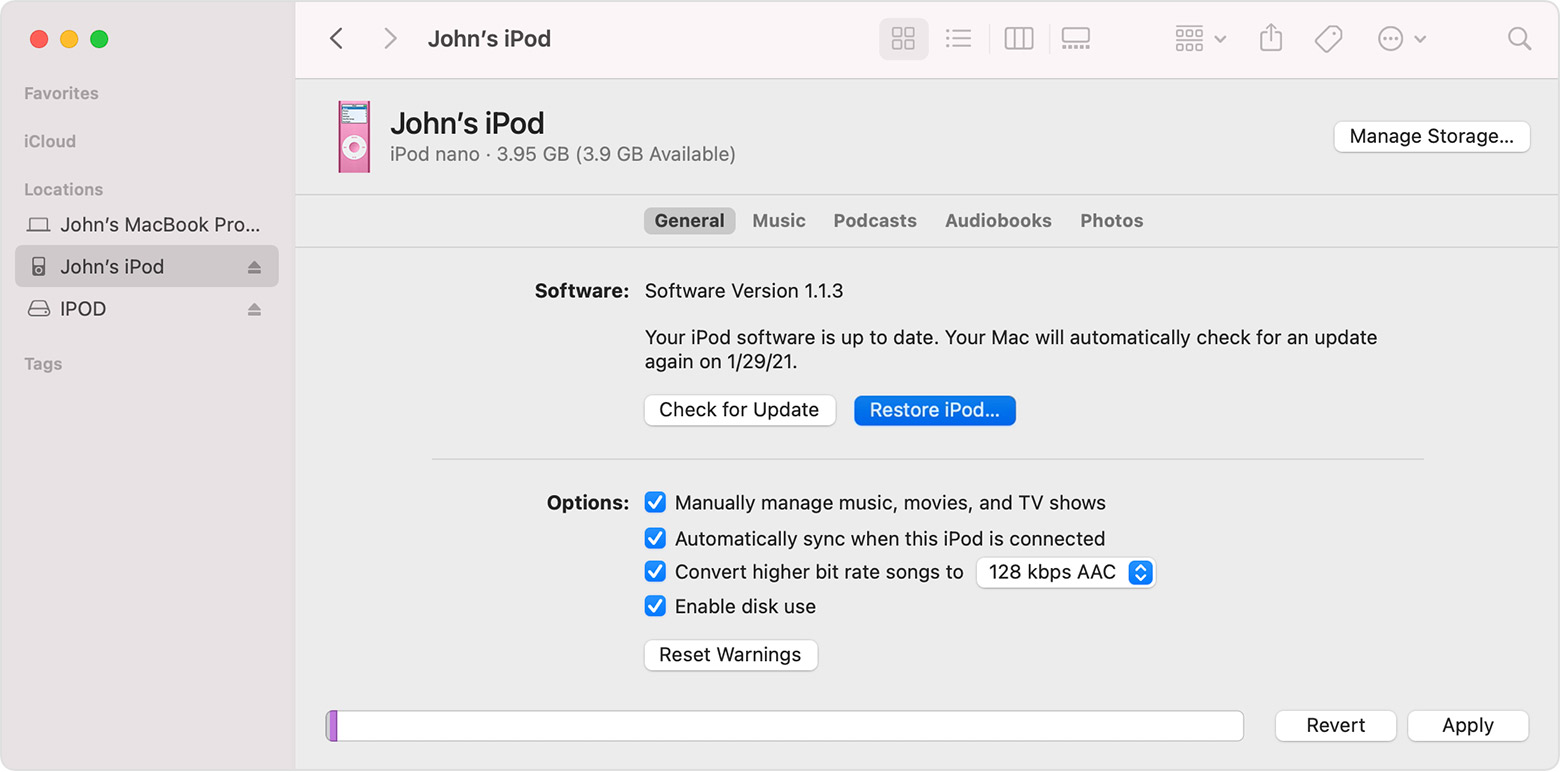
  4. Find your iPod in the Finder or iTunes, then select Restore iPod.

A Finder window showing the General tab with the Restore iPod button selected."


More details here: If your iPod won't turn on or seems frozen


We noticed that Apple no longer provides hardware service for your device. Therefore, we suggest reaching out to an Apple Authorized Service Provider, if the issue persists. You can find more details here: Obtaining service for your Apple product after an expired warranty


Find Locations - Service & Support


All the best.


1 reply
Question marked as Top-ranking reply

Sep 12, 2023 8:36 AM in response to Bill Carter

Hello Bill Carte,


We understand that your iPod nano is unresponsive. To ensure that we're covering all of our bases, we suggest that you complete the following steps. Doing so, may be able to resolve the issue:


"Force restart your iPod

If your iPod doesn't respond, use the following instructions to force restart it. Find out which model of iPod you have.


iPod nano (7th generation)

  1. Press and hold both the Sleep/Wake button and Home button until the screen turns off.
  2. Wait for your device to restart.
  3. Still need help? Plug into power, then try again.


Charge your device 

If your iPod still won't respond, it might have low battery. Charge your iPod for at least 30 minutes:

  1. Connect your iPod to the charging cable that came with your device. 
  2. Plug the other end of the cable into power: Use a USB adapter plugged into a wall outlet or a USB 2.0 or 3.0 port on a computer (not a keyboard) that's on and not in sleep mode. Or you can use a USB hub, docking station, or other Apple-certified power accessory.
  3. Wait a few minutes until a charging screen appears or until the status light on your iPod shuffle turns orange. 

Don't see the charging screen or orange light after 30 minutes? Here's what to do:

  • Check that you have firm cable connections. Remove any debris from all ports.
  • Try a different charging cable, power adapter, and power source. Don't use an adapter or cable that shows any sign of damage.
  • If your device still doesn't turn on, it might need repair. Contact Apple Support.


If your iPod turns on but gets stuck during startup

If your iPod still won't respond, gets stuck during startup, or persistently displays an Apple logo or red X here's what to do:

  1. If you're using a Mac with macOS Mojave or earlier or a PC, make sure that your computer has the latest version of iTunes.
  2. If you have an iPod nano or iPod classic, put your iPod in Disk Mode.
  3. On a Mac with macOS Catalina or later, open a Finder window. On a Mac with macOS Mojave or earlier or a PC, open iTunes. Then connect your iPod directly to your computer.
  4. Find your iPod in the Finder or iTunes, then select Restore iPod.

A Finder window showing the General tab with the Restore iPod button selected."


More details here: If your iPod won't turn on or seems frozen


We noticed that Apple no longer provides hardware service for your device. Therefore, we suggest reaching out to an Apple Authorized Service Provider, if the issue persists. You can find more details here: Obtaining service for your Apple product after an expired warranty


Find Locations - Service & Support


All the best.


This thread has been closed by the system or the community team. You may vote for any posts you find helpful, or search the Community for additional answers.

Repair needed in UK for ipod nano 7th generation 2015.. probably battery needs replacing?

Welcome to Apple Support Community
A forum where Apple customers help each other with their products. Get started with your Apple Account.