Why won't Notifications turn on my iPhone screen

I have an iPhone 14 Pro Max running iOS 16.6.1.


Whenever I get any sort of notifcation I hear the sound but the screen doesn't turn on.


A few things it isn't:


  • Silent switch on phone is in ringer position.
  • DND mode is OFF.
  • Notification Scheduled Summary is OFF.
  • The specific notifications have lock screen toggled on.


Keep in mind, I get the notification SOUND no problem. The screen just doesn't turn on. But when I go and tilt the phone up, the notification is there.


Any ideas?


[Re-Titled by Moderator]

Posted on Sep 17, 2023 8:06 PM

Reply
Question marked as Top-ranking reply

Posted on Feb 8, 2025 4:09 PM

...Why won't Notifications turn on my iPhone screen


I was told that if you have notifications on apple watch then they show there and do not show on iPhone.


Try turning off your watch and see if they now show on iPhone...


84 replies

Sep 17, 2023 10:48 PM in response to Jandus

You might not be getting notifications on your iPhone for a few reasons. Here are some of the most common causes:


  • Do Not Disturb mode is turned on. Do Not Disturb mode silences all notifications, so ensure it's turned off. You can do this by swiping down from the top of your screen and tapping the crescent moon icon.
  • You're in Focus mode. Focus modes are like the Do Not Disturb mode, but they can be customized to block notifications from specific apps or people. To check if you're in Focus mode, swipe down from the top of your screen and tap the Focus icon.
  • You've turned off notifications for a specific app. You can turn off notifications for individual apps in the Settings app. To do this, go to Settings > Notifications and scroll down to the app you want to change. Toggle the Allow Notifications switch to the off position.
  • Your iPhone is in Airplane mode. Airplane mode turns off all wireless connections, including cellular data and Wi-Fi. This means that you won't be able to receive notifications if your iPhone is in Airplane mode.
  • Your iPhone is not connected to the internet. If your iPhone is not connected to the internet, you won't be able to receive notifications from apps that need to connect to the internet to send notifications.


If you've checked all of these things and you're still not getting notifications, you can try restarting your iPhone. If that doesn't work, you can contact Apple support for help.



Have you enabled Scheduled Summary?


Settings > Notifications > [Select the App that you are having trouble receiving immediate notifications]


See the pic below for a few examples. Please select immediate delivery.
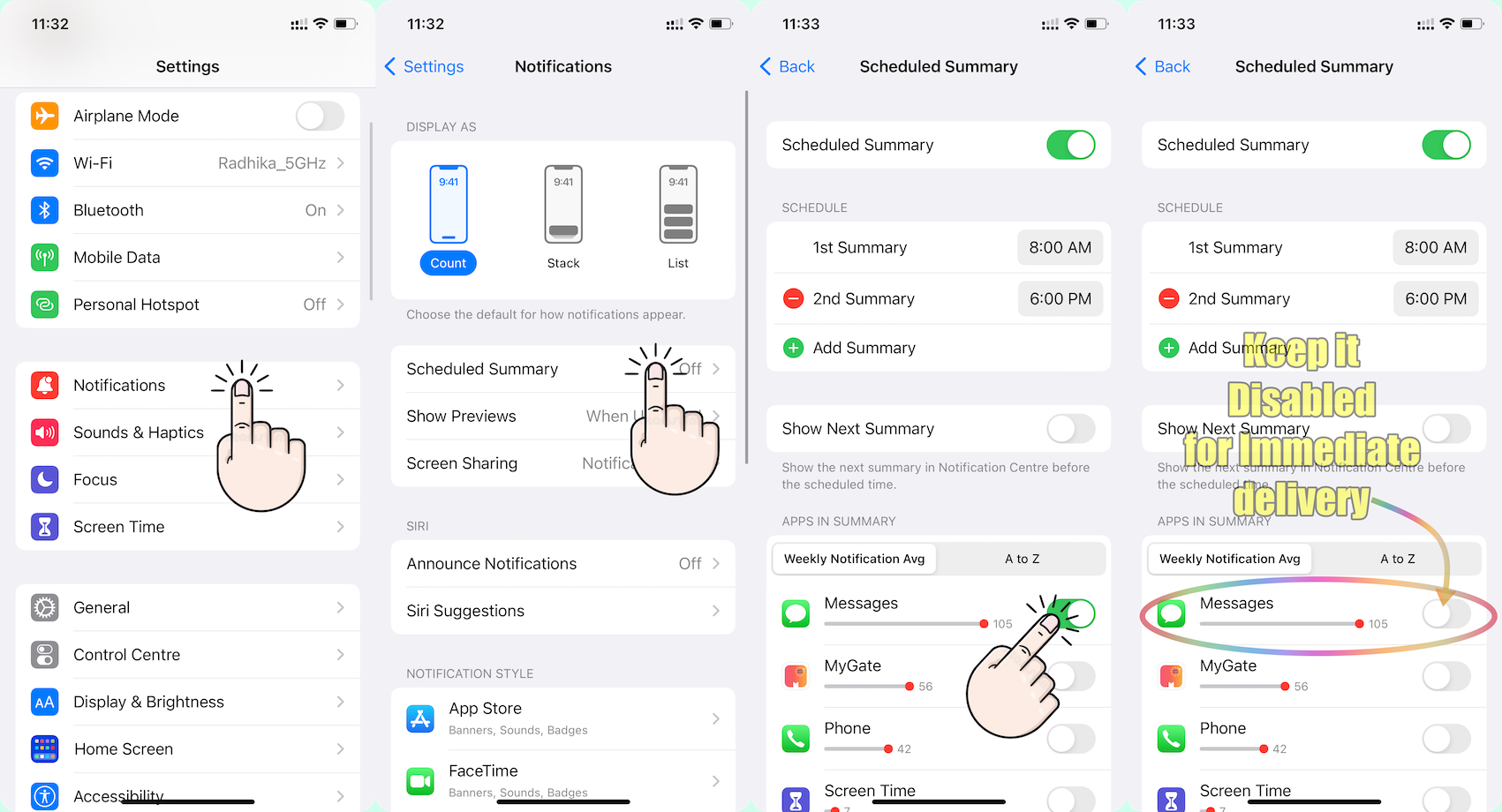


Go to Settings and tap Notifications. Select an app under Notification Style. Under Alerts, choose the alert style that you want. If you turn on Allow Notifications, choose when you want the notifications delivered — immediately or in the scheduled notification summary.


Use notifications on your iPhone, iPad, and iPod touch


Change notification settings on iPhone

  1. Go to Settings > Notifications.
  2. To schedule a notifications summary, tap Scheduled Summary, then turn on Scheduled Summary. ... 
  3. To choose when you want most notification previews to appear, tap Show Previews, select an option—Always, When Unlocked, or Never—then tap.

More items...


Change notification settings on iPhone - Apple Support (IN)


You can allow access to Notification Center on the Lock Screen. Go to Settings > Face ID & Passcode (on an iPhone with Face ID) or Touch ID & Passcode (on other iPhone models). Enter your passcode. Scroll down and turn on Notification Center (below Allow Access When Locked).


View and respond to notifications on iPhone - Apple Support (IN)


Here are some additional tips for troubleshooting notification problems on your iPhone:

  • Make sure that your iPhone is not in silent mode.
  • Check the notification settings for individual apps to make sure that they are turned on.
  • Make sure that your iPhone is connected to a Wi-Fi network or cellular data network.
  • Restart your iPhone.
  • Update your iPhone to the latest version of iOS.
  • Contact Apple support for help.


Oct 9, 2024 5:14 AM in response to Jandus

I had extensive calls with Apple support for 2 weeks now. They advised to delete/erase my iPhone through iTunes and re-install the iOS from there. I did and nothing changed. I tried also to set it up as new from iTunes but the issue persists.

Apple run diagnostics in my device and they didn't flag any hardware issue. In the last call I had, they gathered a lot of screenshots from notification settings and they told me that they had escalate the issue.

Yesterday the called me again to check if the issue has been fixed with 18.0.1 iOS but it has not.

When I asked to confirm if it's an iOS bug or a hardware failure they told that it's still under investigation and they will come back to me with a response as soon as they figure out if it has to do with iOS bug.

I also asked if they have similar cases in our country Apple Support line and they told me that very recently it happened to an iPhone 16 device (which of course it totally and brand new)!

I will update when I have their feedback.


Nov 23, 2023 12:52 PM in response to JAB-11

I think there is a bug related to the operation of the proximity sensor. In the first screen replacement, my proximity sensor was not working. However, all other features were working, including the screen waking up when notified. When the sensor was changed, the screen did not wake up when notified. Although different screens and sensors were tried, the result did not change. I am sure that this problem is software. Since I bought my phone from abroad, I cannot change the screen at Apple Service even by paying a fee in accordance with Apple policies. When I receive service from private services, I receive an important screen message. I have suspicions that this notification creates a bug in the notification centre. For now, I am waiting for the notification to be deleted from the settings.

Jan 19, 2025 11:23 PM in response to Jandus

For me the solutions was to set Settings -> Home Screen & App Library and set Show in App Library to ON - the notifications were shown on the lock screen. However I was having a different issue with the SMS. It turned out that if I don't check for new SMS I would never know that they have arrived (even the small number in red was not displayed). Then I have checked the notifications for Messages and it turned out that the notifications were turned off. That's quite odd as I have transferred all of my settings from my iPhone 12 to the new one.


If you are using just one app to test the notifications, check if indeed the notifications are turned on for this specific app.

Apr 30, 2024 12:11 PM in response to Jandus

Same issue. I'm wondering if it has something to do with the fact that I'm not looking directly at the screen? Is that a setting option? I know that I had to turn on the feature for siri to work even if my face wasn't looking at the screen (when my phone was in my pocket or upside down on a table) so I'm wondering if this is a similar setting? I read a comment that said disabling notifs on apple watch resolves the issue but I don't want to keep my watch notifs off at all times.

Nov 15, 2024 12:52 PM in response to gtas27

Update: Apple support called me and asked if they issue had been resolved with iOS 18.1 beacuse engineers team told that the have a patch for it in 18.1.

of course the issue persisted. I was told to remove screen protector/tempered glass and wait a few hours to check if notifications would wake up screen. Nothing changed. I notified Apple again and they told me they will come back next week.

Have any of you resolved the issue by updating to iOS 18.1??

Dec 8, 2024 3:58 AM in response to Rhiius

Welcome to the club! Definetely it’s an iOS bug because Apple run a lot of diagnostics (remotely though) to my device and nothing was flagged as a hardware issue. After update to iOS 18.1.1 I also noticed a delay to my screen to wake up when I tap on it.

Tomorrow iOS 18.2 will be released and fingers crossed to have this resolved!

Dec 15, 2024 5:09 PM in response to Jandus

Just started having this issue after switching from an iPhone 11 to a 15 Plus. Transferred everything to my 15 Plus and now notifications aren't making a noise or turning on my screen! My 11 never had this issue. Tried restarting and force restarting, updating to 18.2, fiddling with the notifications, Focus, and DND settings and still can't get it to work. I'll probably have to try resetting all my settings, removing the screen protector, and starting all over again, but it's unfortunate that Apple hasn't seemed to acknowledge this issue any sooner.

Jan 15, 2025 7:07 AM in response to Shillah

It appears mostly on iPhone 14 series. I haven't it either with my ex iPhone XS. Possibly it has to do with the Dynamic Island they introduced in 14 series. Till now in this thread most of us have an iPhone 14 series and as far as I remember there is one or two persons with iPhone 15. In my country (Greece), I was told by Apple support that this happened also to a new iPhone 16.

By the way, all of us with this issue have bought a new device? An used one? Or a refurbished one? I'm just asking to see if there is a common factor to all of us except 14 series.

Nov 21, 2023 12:13 AM in response to nephi80

I'm having the same problem, the touchscreen broke out of nowhere. It was replaced with an original 2nd hand screen and the proximity and light sensor were also replaced. This problem occurred after the screen replacement. It was sent to the repair center again and although different screens and sensors were tried, the problem did not improve. No fault was detected in the logic board. Press and hold in the notification center and wallpaper change also does not work. I think the problem is caused by iOS 17.1. There may be a bug in the notification center. I would appreciate if anyone who can find a solution shares it.

This thread has been closed by the system or the community team. You may vote for any posts you find helpful, or search the Community for additional answers.

Why won't Notifications turn on my iPhone screen

Welcome to Apple Support Community
A forum where Apple customers help each other with their products. Get started with your Apple Account.



