Cannot switch Apple Watch faces after 10.0.1 update

Since updating my Series 7 watch, I am unable to swipe left or right to access other saved watch faces. Anyone else experience the same problem and/or know how to resolve?


thanks!

Apple Watch Series 7

Posted on Sep 22, 2023 12:54 PM

Reply
Question marked as Top-ranking reply

Posted on Sep 22, 2023 1:08 PM

Customize the watch face - Apple Support

Includes instructions to switch faces.


If you are unhappy with this change, send feedback to:

https://www.apple.com/feedback/watch

241 replies

Dec 2, 2023 9:00 AM in response to pcniles

No one is talking to you or about you Bob Harris. Sorry for any confusion.

TO: pcniles Apple gave the option to turn off Always On feature. This time they just changed everyone's private property without permission or ability to refuse. You are entitled to your own belief that this is ok. But for me, this is far from ok. And I am willing to bet you they change this back.

Dec 10, 2023 6:33 AM in response to Mariacris64

Mariacris64 wrote:

It’s so annoying that you updated to be better and you can’t use your screens like usual 👎🏼👎🏼👎🏼. Please revise this and put it like it was before .

There is no “You” here. This is a user-to-user technical support forum. Apple is not here, and the volunteers that answer questions did not make these UI changes.


However, you can send feedback to Apple, and if enough users send feedback, it will eventually reach a decision maker, and them maybe desired changes will happen


Feedback - Watch - Apple


Dec 12, 2023 1:36 PM in response to Dah•veed

Dah•veed wrote:

Because it's not connected to the Internet of Things, I have to change the time twice a year!

The clock on my stove is the one and only time-telling device in my house that doesn't change automatically. I've found that not having to change the time on clocks makes the time changes much easier on me. If I could turn the clock off on the stove, I would. I just haven't figured out how. I did figure out how to not have the time displayed on the microwave.

Dec 12, 2023 1:46 PM in response to IdrisSeabright

The stove and microwave in our home are Wifi connected, so the time changes on them automatically as do our cars and our thermostat. It's makes changing the time easy. I don't have to do it :-)


I can start cooking in my oven from anyplace I have an internet connection. I love technology. Yes, I do!


But back to the subject of swiping watch faces. I guess the clock app is an OK place to put the setting, because that's where Apple chose to put it. But honestly, there are other places it might have made more sense, like Display & Brightness or maybe even in the Face Gallery itself or a setting in General all by itself. But what do I know? And interestingly, you can't change the setting on your Apple Watch App on your iPhone. It can only be changed on the watch directly.

Dec 12, 2023 1:59 PM in response to IdrisSeabright

We would adopt you and your cats in a heartbeat, my dear!


I change my watch face almost daily, to match either the band I'm wearing (which is also changed almost daily) to match whatever color shirt I've selected. So just swiping between the faces being brought back was good for me, though I never complained about the change in WatchOS 10. Changes in settings rarely, if EVER upset me. That I can handle. But you'll NOT ever catch me wearing a band which doesn't coordinate with my watch face or attire. No, that's just not imaginable!


You sure you can handle being adopted by the severely OCD!! LOL

Dec 30, 2023 7:05 PM in response to gwesq

gwesq wrote:

This update is awful. Thanks for pointing out how to change watch face. I also have an jssue with swioing UP to find things like flashligbt, battery power. All I see are Tips! And I cant even read the tips as the font is so bad. Why does Apple have to fix what isn not broken!?!

Apple is not here. This is a user-to-user technical support forum.


But you can send Apple feedback via:

Feedback - Watch - Apple


If enough users send feedback, it is more likely a decision maker will see it, and maybe take action.


And to get the Control Center you press this button (see picture)
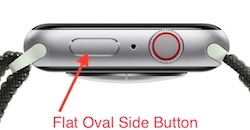

DO NOT hold the button, as that brings up Emergency services


Settings -> Accessibility -> Side Button Click Speed “Side Button Click Speed” can adjust the press and release timing, so you get the Control Center display every time. Adjusting The "Side Button Click Speed" is also useful for Apple Pay’s double press and release. There is “Default” (sub second timing of needed), “Slow” (up to a second between press and release), and “Slowest” (up to 2 seconds between press and release). I like the “Slow” setting. NOTE: Slow and Slowest settings do not mean you have to wait a full second or 2 seconds between press and release. It just means you do not need to be super fast.


Jan 1, 2024 1:46 PM in response to lobsterghost1

Did that last night and then was able to scroll to my different watch faces. Woke up this morning and unable to do that again. Watch charged overnight, was at 100% at 9 AM, now down to 85%. THis update is AWFUL.


AND - went to the link provided on this site to notify apple. The drop down menu does not have 10.2, and the "Comments" section is greyed out, not allowing me to tell them what the problem is.


[Edited by Moderator]

This thread has been closed by the system or the community team. You may vote for any posts you find helpful, or search the Community for additional answers.

Cannot switch Apple Watch faces after 10.0.1 update

Welcome to Apple Support Community
A forum where Apple customers help each other with their products. Get started with your Apple Account.

