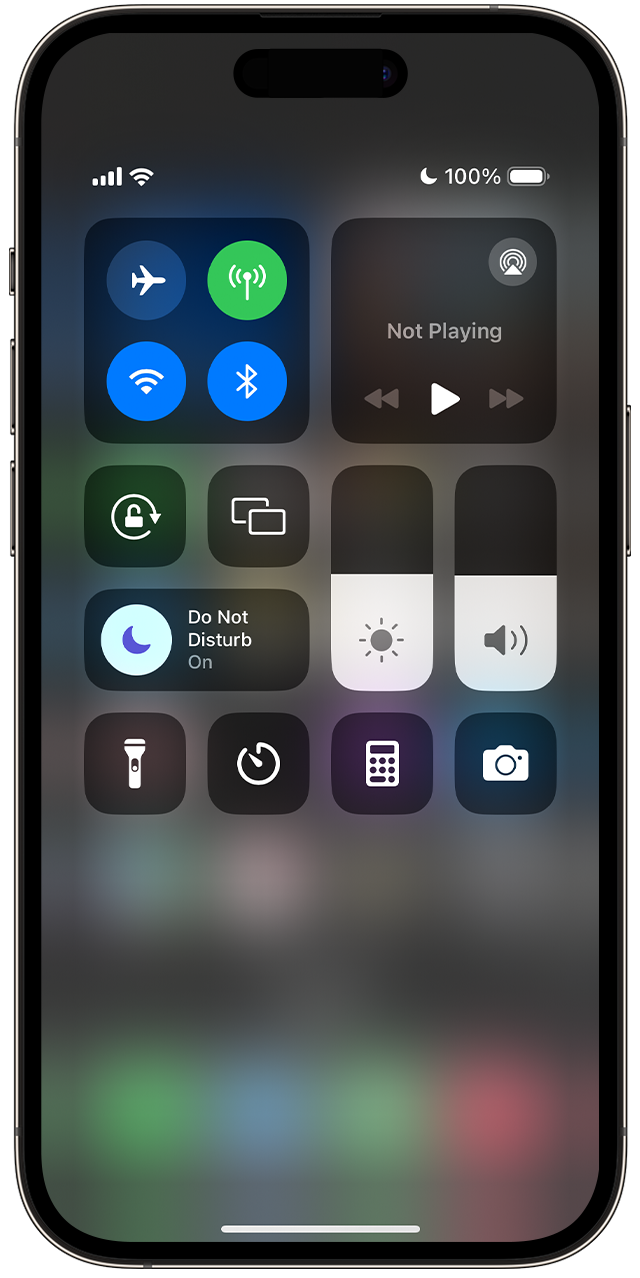
How do I turn it off or deactivate it?
I upgraded my iPhone to IOS 17, and now 'Do Not Disturb' is showing as active...I would like to deactivate. There is no option to select 'Off' from my phone.
iPhone 14 Pro Max
I upgraded my iPhone to IOS 17, and now 'Do Not Disturb' is showing as active...I would like to deactivate. There is no option to select 'Off' from my phone.
iPhone 14 Pro Max
Hi dzwoodson,
Here are instructions for turning off Do Not Disturb on your iPhone:
Use Control Center to turn Do Not Disturb on or off
1. Swipe down from the top of your Home Screen to open Control Center.
2. Tap the Focus button where the Do Not Disturb crescent moon appears. If there is no moon icon, Do Not Disturb is currently turned off.
3. Tap Do Not Disturb to turn the feature on or off.
You can also ask Siri to turn Do Not Disturb on or off.
How to turn Do Not Disturb on or off on your iPhone - Apple Support
Cheers!
How do I turn it off or deactivate it?