airpods wont connect to iphone 15 pro

I have airpods pro gen 1 that i have had for about 2 weeks, i got my first iphone (15 pro) and everytine i try to connect them it shows "connection failed" I have been able to pair them to older iphones such as 12 and 14. I also tried to connect them to ny brothers iphone 15 pro and it said the same thing. Any ideas???

iPhone 15 Pro, iOS 17

Posted on Sep 25, 2023 8:10 AM

Reply
Question marked as Top-ranking reply

Posted on Sep 30, 2023 5:24 AM

Hello willh21,


Thank you for reaching out in Apple Support Communities. There are steps available that can help connect a set of AirPods when they're unable to connect to your iPhone. Our recommendation is for you to follow these helpful steps:


If you can't connect to your iPhone or iPad
1. Update your iPhone or iPad to the latest version of iOS or iPadOS.
2. Put both AirPods in the charging case and make sure that both AirPods are charging.
3. To make sure that Bluetooth is on, go to Settings > Bluetooth.
4. If your AirPods are connected, make sure that they're selected as your audio device. If your AirPods appear in the list of devices but they don't connect, go to the next step.
5. Close the lid, wait 15 seconds, then open the lid.
6. Press and hold the setup button on the back of the charging case for up to 10 seconds. The status light on the front of the charging case should flash white, which means that your AirPods are ready to connect.
AirPods charging cases
7. Hold the charging case, with your AirPods inside and the lid open, next to your iPhone or iPad.
8. Follow the steps on the screen of your iPhone or iPad.
9. If you still can't connect, reset your AirPods or contact Apple Support.

Following these steps may help and is outlined in this article: If your AirPods or AirPods Pro won't connect - Apple Support


Kind regards.


69 replies
Question marked as Top-ranking reply

Sep 30, 2023 5:24 AM in response to willh21

Hello willh21,


Thank you for reaching out in Apple Support Communities. There are steps available that can help connect a set of AirPods when they're unable to connect to your iPhone. Our recommendation is for you to follow these helpful steps:


If you can't connect to your iPhone or iPad
1. Update your iPhone or iPad to the latest version of iOS or iPadOS.
2. Put both AirPods in the charging case and make sure that both AirPods are charging.
3. To make sure that Bluetooth is on, go to Settings > Bluetooth.
4. If your AirPods are connected, make sure that they're selected as your audio device. If your AirPods appear in the list of devices but they don't connect, go to the next step.
5. Close the lid, wait 15 seconds, then open the lid.
6. Press and hold the setup button on the back of the charging case for up to 10 seconds. The status light on the front of the charging case should flash white, which means that your AirPods are ready to connect.
AirPods charging cases
7. Hold the charging case, with your AirPods inside and the lid open, next to your iPhone or iPad.
8. Follow the steps on the screen of your iPhone or iPad.
9. If you still can't connect, reset your AirPods or contact Apple Support.

Following these steps may help and is outlined in this article: If your AirPods or AirPods Pro won't connect - Apple Support


Kind regards.


Oct 26, 2023 8:35 AM in response to willh21

***ATTENTION EVERYONE****


I had a rude awakening this morning at the apple store. My Airpods 3rd Gen would not connect to my iPhone 15 Pro Max. I went to the apple store and they informed me that the Airpods I had were fake, and they were a good fake (with a serial number and everything, I had them for 2 months and had no idea they were fake until now). I bought them on eBay. IF YOUR AIRPODS WILL NOT CONNECT TO IPHONE 15, THERE IS A GOOD CHANCE YOUR AIRPODS ARE FAKE. That being said, I went and bought an authentic pair of Airpods from Verizon, and guess what... They pair instantly on my iPhone 15 Pro Max and work perfectly fine now. Might want to go to an Apple Store and they will verify if your Airpods are actually real.

Oct 26, 2023 5:25 PM in response to willh21

There is some merit to the 'FAKE AIRPOD' theory. I purchased my 2nd-gen AirPods from Kogan.com, and they were sold as refurbished. I had been using these AirPods with my iPhone 12 Pro Max until I upgraded to the iPhone 15 Pro Max. Interestingly, I was able to pair my old Gen 1 AirPods, which were purchased directly from Apple a while ago, with the iPhone 15.


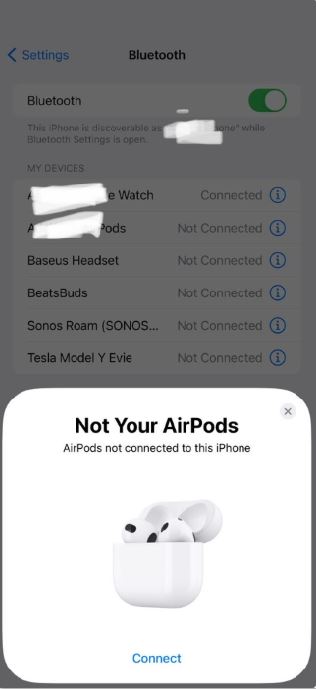
I did notice that, despite these 'refurb' AirPods connecting to the iPhone 12, there is no option for a firmware update. When I reset and re-pair them, it says 'Not your Airpods' on the pairing screen. In theory, this suggests that they might belong to someone else who needs to remove them from their 'Find My.' However, these 'refurb' AirPods can still pair with any other phone as it should ie when a friend connects their Airpod to your phone, except it would not connect the iPhone 15.


By the way, I have three of these refurbished AirPods from Kogan, and all three exhibit the same behavior. So, it's not just a random case where someone has locked them to their 'Find My.'


Can anyone else who's experiencing the same issue confirm if they see the message 'Not your Airpods' on the pairing screen? To see this message, you'll need to reset the AirPods, remove them from your other devices, and attempt to pair them again.


In any case, this situation doesn't explain why these 'refurb' or 'fake' AirPods can connect to all iPhones except the iPhone 15, while even inexpensive, no-name $10 Bluetooth earpods can pair with the iPhone 15.

Nov 29, 2023 3:29 AM in response to willh21

I had this same issue. One fix for me was resetting my network settings. You go to settings then general and go all the way down to transfer or reset IPhone. Click that and then hit reset. A few options will pop up and then hit the “reset network settings”. It will reset and then turn back on the phone and mine worked after that. Hope this helps.

Feb 9, 2024 5:59 AM in response to willh21

Hello, I managed, at least in my case, to solve the problem, namely on the 15 pro max, I left only the headphones connected via bluetooth and even the 1st generation of airpods pro and AirPods gen 1, 2 and 3 work flawlessly.

But if I also connect the watch or another device, it strictly works, that is, the headphones only work on music. I wish you success

Feb 9, 2024 12:48 PM in response to willh21

Well, after all my other replies and frustrations I called Apple Support this morning as after 5 hours of pairing and unpairing, twice connecting, then would not let me answer a call, nor make a call. After 10 minutes of having someone call me over and over again I could answer, then would not disconnect. Apple support very friendly, but after two minutes of listening I decided I am not paying 300.00 for something that may or may not work, phone was updated to the latest. Was told possibly got a set that just was made badly. I sent them back for a full refund as just got them last night. First apple product that has failed me, I did all that you guys tried, it would connect then disconnect, then the batteries went down 20% in less than 30 minutes. If you got these before 14 days you can return them. I had the AirPods Pro. Apple was super understanding. Sent me a return label and they are on their way back. No clue why not working with 15 pro max.

This thread has been closed by the system or the community team. You may vote for any posts you find helpful, or search the Community for additional answers.

airpods wont connect to iphone 15 pro

Welcome to Apple Support Community
A forum where Apple customers help each other with their products. Get started with your Apple Account.

