Use a Ringtone as Text Tone on iPhone - iOS 17

Since the iOS 17 update I have not been able to assign a ringtone as a text tone. How can I do this now?

I’ve even gone and bought new ringtones and told it to assign the tone as a text tone to a specific contact yet no luck!! Why??


[Re-Titled by Moderator]

iPhone 14, iOS 17

Posted on Sep 26, 2023 4:44 AM

Reply
Question marked as Top-ranking reply

Posted on Dec 12, 2023 1:24 PM

LifeShare-IT wrote:

Our on call staff rely on a text message with a ring tone assigned to a particular contact in order to be notified in the middle of the night. It needs to be something loud and persistent.

That is no longer an option. Text tones can't be longer than 30 seconds. You can let Apple know what you'd like to see here:


Product Feedback - Apple


Meanwhile, you might consider going to Settings>Notifications>Messages>Customize Notifications>Repeat Alerts and set it to 10 times.

110 replies

Jan 8, 2024 10:12 PM in response to PeakNewby

I don’t see how this works… Ringtones download as ringtones to the ring tone list and text tones download as text tones to the text tone list, so if you’re looking to allocate a ringtone to a text tone, the ringtone is not listed in the text tone section and therefore you can’t link it, doesn’t seem to work even even if it is 30 seconds or under. iOS 17.2.1


Jul 10, 2024 10:35 AM in response to Sadie409

Sadie409 wrote:

I’m a very unhappy customer I need my ring and text to have the same ring tone these changes is making my job hard please Fix

I suspect that if you look in the iTunes Store, you can find a tone that has versions for both text and ringtones. Or, you can make your own tones from the same sound.


Create a ringtone of your Logic Pro or GarageBand for Mac song - Apple Support


Personally, I find making my own ringtones to be very annoying but it's certainly an options.

Oct 3, 2023 11:37 AM in response to Gerbear59

Hi Gerbear59,


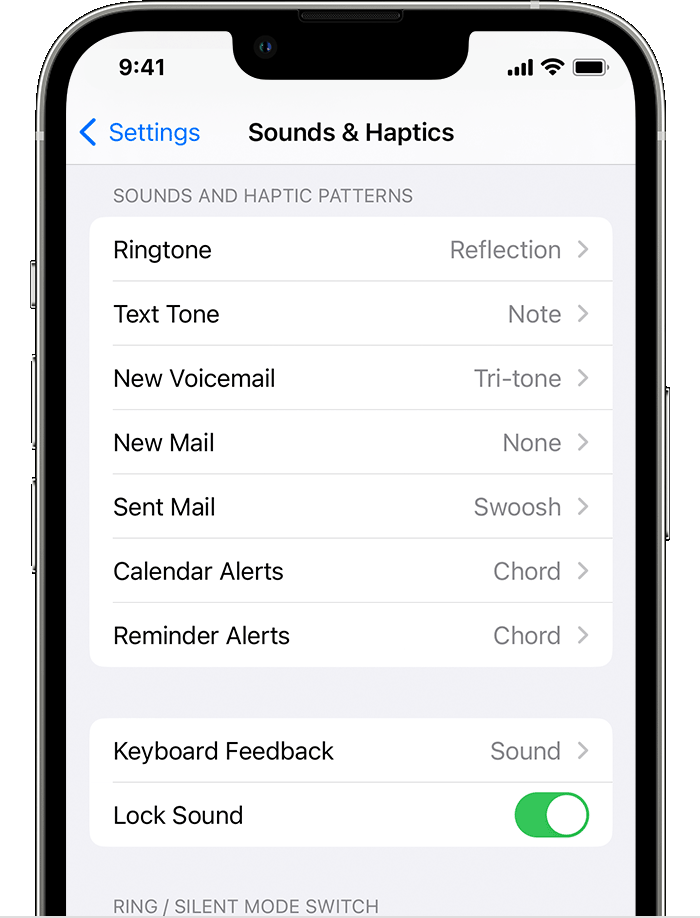
For help with tones and alerts on your iPhone, be sure your settings are correct with the steps below found in the article here: Use tones and ringtones with your iPhone or iPad - Apple Support


"Change your ringtone

  1. Go to Settings > Sounds & Haptics.
  2. Under Sounds and Haptic Patterns, tap the sound that you want to change.

3. Tap a ringtone or alert tone to hear it and set it as the new sound."


If you see the tone and aren't able to play or assign it as expected, reach out to Apple to report the issue and have them further assist.


Get connected here: Get Support


Best.

Oct 3, 2023 4:48 PM in response to OrigamiFan1

Thanks, but still doesn’t help. Ringtones and text tones used to be together before the iOS 17 update. One could assign either a ring tone or text tone as a text tone to any contact. Since the update, they are separate from each other not allowing one to assign already downloaded ring tones to a contact as a text tone!

apple needs to put downloaded ring tones and text ones back together as they were before the iOS 17 update.

Oct 23, 2023 9:25 AM in response to RonHfromSD

RonHfromSD wrote:

Really need to get this fixed soon, please, Apple! I need to be able to set a long ringtone as a specific contact text tone to wake me up at night while I’m sleeping when I get a work text alert that requires my immediate attention!

Apple doesn't read here for feedback or suggestions. You can, however, let them know your thoughts here:


Product Feedback - Apple

Nov 16, 2023 10:13 AM in response to Swansong604

Swansong604 wrote:

I’m trying to use a ringtone as a text tone and ringtones are No longer listed at the bottom. I used a ringtone for a text tone for the last 10 years and now I can’t. I need a ringtone for texts for critical texts that I receive at night when I am oncall for work. And you can no longer do that. RINGTONES ARE NO LONGER AVAILABLE FOR TEXTS !!

Was the tone you used something that was included on the phone? Or something you added? There are some built-in tones that are no longer available for text tones. However, you should be able to buy or make something to replace it.

Nov 18, 2023 10:01 AM in response to KoolsWolfey

What wasn't fixed? Are you not able to use custom text tones that you created or purchased? That should have been fixed with iOS 17.1.


However, if you mean that you don't have all the same built in options as you used to, I don't think that has changed. Apple made a lot of changes in the Apple-provided sounds and I've seen no indication that they have walked that back.

Dec 8, 2023 1:56 AM in response to nicolethefaye

Hi- there are a couple of ways to achieve this- I'm currently using both to get my attention when that important text arrives.

  1. I purchased a 30 second ringtone from the store and assigned it to the contact.
  2. I used Apple Shortcuts to turn up my volume and play music on my phone whenever I receive a text from the important source.


instructions for both methods are available in this thread or online.


Hope this helps

Dec 16, 2023 11:09 AM in response to LilQ1

LilQ1 wrote:

O.M.G i thought i was the only one with this problem because i used to have the text tone “by the seaside” before the iOS 17 update and now it’s just gone and then when i checked the ringtones section there it is, like i loved that text tone but ever since the new update i haven’t been able to do it this is *** i can’t even please apple change this back or at least at by the seaside back to text tones

Apple doesn't read here in this user-to-user forum for feedback or suggestions. You can, however, let them know your thoughts here:


Product Feedback - Apple


You might check and see if there are any text tones available in the iTunes Store that are similar. Or try making one of your own.


Meanwhile, those of us who had to listen to people who used long ringtones for text tones and never seemed to put their phones on vibrate will enjoy the comparative quite.


This thread has been closed by the system or the community team. You may vote for any posts you find helpful, or search the Community for additional answers.

Use a Ringtone as Text Tone on iPhone - iOS 17

Welcome to Apple Support Community
A forum where Apple customers help each other with their products. Get started with your Apple Account.