ios 17 airpods will not switch from iPad to phone during call

before iOS 17, I could listen to audio on iPad and switch to answer a phone call by selecting AirPods on the phone. This is no longer an option on the phone. There is only a selection for the phone speaker.

How do I answer a phone call using AirPods while listening to iPad audio ?

iPhone SE (3rd generation)

Posted on Sep 27, 2023 2:27 PM

Reply
Question marked as Top-ranking reply

Posted on Oct 9, 2023 2:51 PM

I have also found that if you select “Connect to this Phone / Automatically” in the phone settings, that it will grab the AirPods connection from the iPad and answer the phone call, but it will then remain connected to the phone and start playing music from the phone when you are finished with the phone call.

It appears that the only way to get the AirPods to go back to the iPad is to go to iPad settings and turn Bluetooth off/on and then re-connect the AirPods.

6 replies
Question marked as Top-ranking reply

Oct 9, 2023 2:51 PM in response to znedlob

I have also found that if you select “Connect to this Phone / Automatically” in the phone settings, that it will grab the AirPods connection from the iPad and answer the phone call, but it will then remain connected to the phone and start playing music from the phone when you are finished with the phone call.

It appears that the only way to get the AirPods to go back to the iPad is to go to iPad settings and turn Bluetooth off/on and then re-connect the AirPods.

Sep 30, 2023 4:23 PM in response to fdm069

Thanks for reaching out fdm069,


It sounds like you're having trouble switching between audio sources with your AirPods. We can help.


You can check out these steps to Switch your AirPods to another device:


Switch manually

If necessary, follow these steps to choose a different device to play audio or to switch the audio to different headphones or speakers.
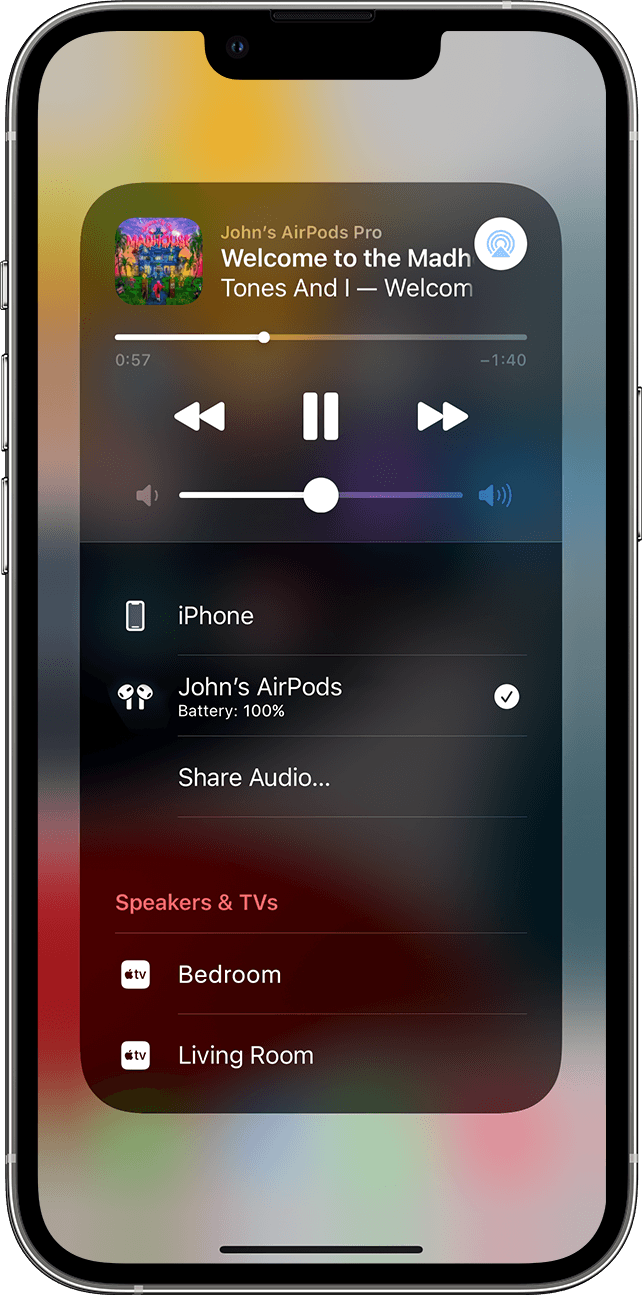
Control Center screen on your iPhone 
On your iPhone, iPad, or iPod touch
1. Open Control Center on your iPhoneiPad, or iPod touch.
2. Touch and hold the audio card in the upper-right corner of Control Center to control audio.
3. Tap , then choose the device that you want from the list.


Hope that helps.


Take care.


Nov 3, 2023 12:26 PM in response to fdm069

Same issue. I have a personal iPhone and a work iPhone. I stream through my Airpods with my personal phone and when I answer my work iPhone, the toggle to connect the Airpods that used to be in the speaker menu on the call screen is now gone. It sounds unprofessional as I'm trying to hold my phone to hear a client speak all while trying to navigate the options menu to connect to my airpods.


Does Apple plan on bringing back this feature? It is definetly a downgrade.


Also, may I add that when they do connect, the volume is only halfway when normally I set it to maximum. I have to adjust the volume every single time when in the past I didn't.

This thread has been closed by the system or the community team. You may vote for any posts you find helpful, or search the Community for additional answers.

ios 17 airpods will not switch from iPad to phone during call

Welcome to Apple Support Community
A forum where Apple customers help each other with their products. Get started with your Apple Account.