Problems with Apple Watch after updating to watchOS 10.0.1

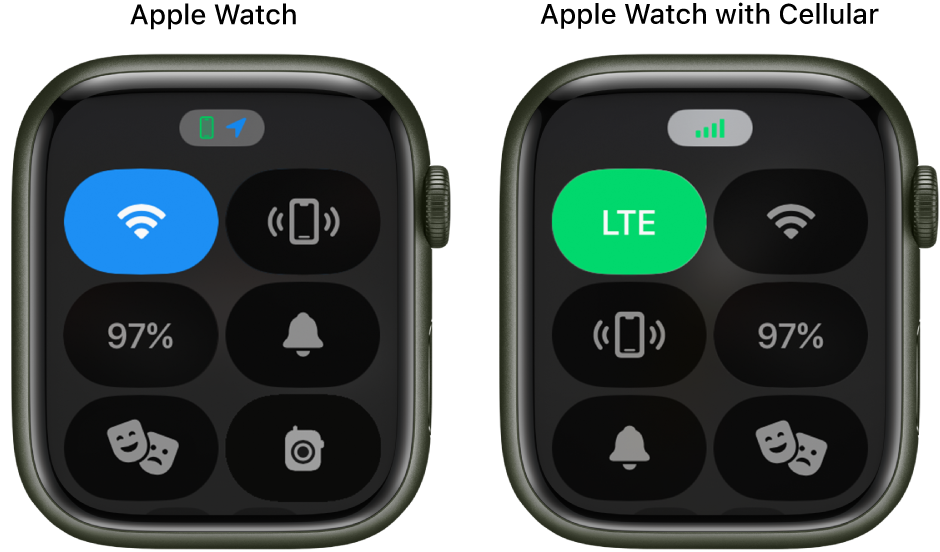
Since updating, I've lost a bundle of functions such as waterproofing, silence, 'where is my phone', wifi on/off, battery charge. I've chatted with Apple who had no answers and the chat after an hour of going in circles dropped out. I am very unhappy with this update, it has complicated my watch and I can't revert.


has anyone else had this problem? I use to be able to click on the watchface, swipe down and there they all were. Now I just get the weather (which I already get on the face, so it's not exactly a great update but an annoying duplication.)

And I can't waterproof my watch anymore.

Any solutions? Anyone?


[Re-Titled by Moderator]

Apple Watch SE, watchOS 10

Posted on Sep 28, 2023 3:37 AM

Reply
Question marked as Top-ranking reply

Posted on Sep 28, 2023 3:21 PM

Use Control Center on Apple Watch explains "Control Center gives you an easy way to check your battery, silence your watch, choose a Focus, turn your Apple Watch into a flashlight, put your Apple Watch in Airplane Mode, turn on theater mode, and more."

Open or close Control Center

  • Open Control Center: Press the side button once.
  • Close Control Center: With Control Center open, turn your wrist away from you or press the side button again.


202 replies

This thread has been closed by the system or the community team. You may vote for any posts you find helpful, or search the Community for additional answers.

Problems with Apple Watch after updating to watchOS 10.0.1

Welcome to Apple Support Community
A forum where Apple customers help each other with their products. Get started with your Apple Account.