Apple Watch

My Apple Watch has been dead for two week and I recently just lost it. I unpaired my watch from my phone then went into my settings and removed it from my iCloud. When the watch is finally charged back up will it delete all my information? As far as messages,photos and contacts

Posted on Sep 28, 2023 6:49 AM

Reply
1 reply

Oct 1, 2023 8:34 AM in response to daeira176

Greetings daeira176,


It sounds like you used the steps to erase your Apple Watch.


  1. "On your Apple Watch, tap Settings > General > Reset > Erase All Content and Settings. 
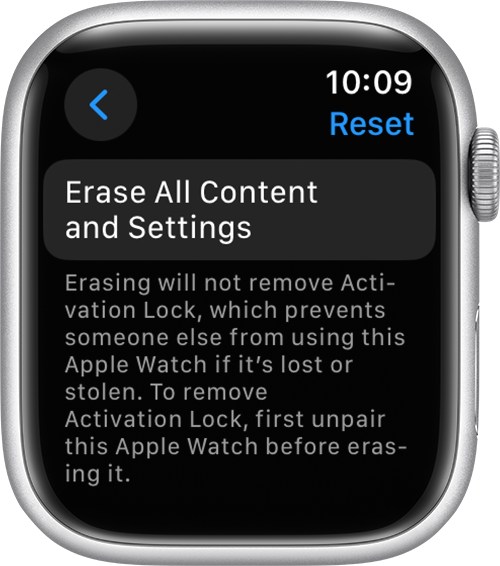
Erase All Content and Settings button in Apple Watch Settings


2. Type your password if prompted.

3. For GPS + Cellular models, choose to keep or remove your cellular plan.

    • If you want to pair your Apple Watch and iPhone again, keep your plan. 
    • If you don't want to pair your Apple Watch and iPhone again, remove your plan. If you aren't going to pair with a different watch or iPhone, you might need to contact your carrier to cancel your cellular subscription. 

4. Tap Erase All to confirm. This resets your Apple Watch to the factory settings." Unpair and erase your Apple Watch


We hope this helps!


Sincerely.


This thread has been closed by the system or the community team. You may vote for any posts you find helpful, or search the Community for additional answers.

Apple Watch

Welcome to Apple Support Community
A forum where Apple customers help each other with their products. Get started with your Apple Account.
