Many reports of this issue have been seen within the iPad Support Community.
If you are affected by this bug, check your that you do not have Full Keyboard Access enabled in iPad settings:
Settings > Accessibility > Keyboards > Full Keyboard Access > Full Keyboard Access - set to OFF
When set off, if necessary, perform a forced-restart of your iPad:
Force restart iPad (models with Face ID or with Touch ID in the top button)
If your iPad doesn’t have the Home button, do the following:
- Press and quickly release the volume button nearest to the top button.
- Press and quickly release the volume button farthest from the top button.
- Press and hold the top button.
- When the Apple logo appears, release the top button.

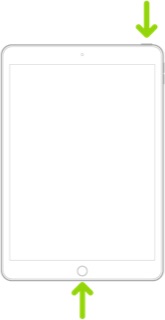
Force restart iPad (models with the Home button)
Press and hold the top button and the Home button at the same time. When the Apple logo appears, release both buttons.