
Log in not working
Every time I try and log in to my Apple Music acount it says there is another device on my account and I think it is my old phone but I don’t know how to switch it to this phone
iPhone 14 Pro
Every time I try and log in to my Apple Music acount it says there is another device on my account and I think it is my old phone but I don’t know how to switch it to this phone
iPhone 14 Pro
Hi Carsonsessingg,
For help with checking to see which devices are associated with your Apple ID, check out the steps below found in the article here: Check your Apple ID device list to find where you're signed in - Apple Support
"Use your iPhone, iPad, or Apple Watch to find where you're signed in
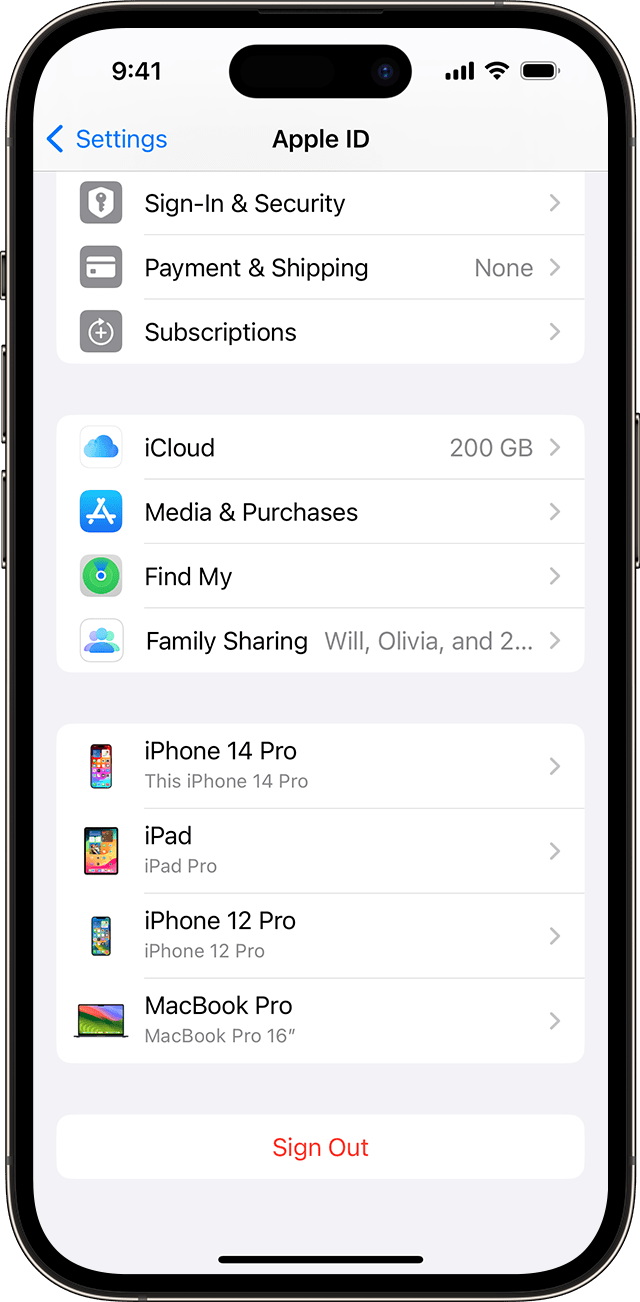 "
"
If you see your old device listed, you can remove it from the list with the steps in the section "Remove a device from the list" in the same article.
You can also find helpful information here to check other possible sources: View and remove your devices that are associated with Apple ID purchases - Apple Support
Best.
Hi Carsonsessingg,
For help with checking to see which devices are associated with your Apple ID, check out the steps below found in the article here: Check your Apple ID device list to find where you're signed in - Apple Support
"Use your iPhone, iPad, or Apple Watch to find where you're signed in
"
If you see your old device listed, you can remove it from the list with the steps in the section "Remove a device from the list" in the same article.
You can also find helpful information here to check other possible sources: View and remove your devices that are associated with Apple ID purchases - Apple Support
Best.
Log in not working

