
Send in a request for reset apple id password
My daughter has her old iPhone 12 and trying to log in to turn off her find my iphone and get old numbers out of it so she can let her sister use it since she gave a new iPhone
iPhone 12
My daughter has her old iPhone 12 and trying to log in to turn off her find my iphone and get old numbers out of it so she can let her sister use it since she gave a new iPhone
iPhone 12
Hello Queenyana,
We understand that your daughter need to turn off Find My on her iPhone 12. However, she needs access to her Apple ID password. The resource you were reviewing can walk her through the steps that she can take on her new device to regain access to her account:
"Reset your Apple ID password on your iPhone or other trusted Apple device
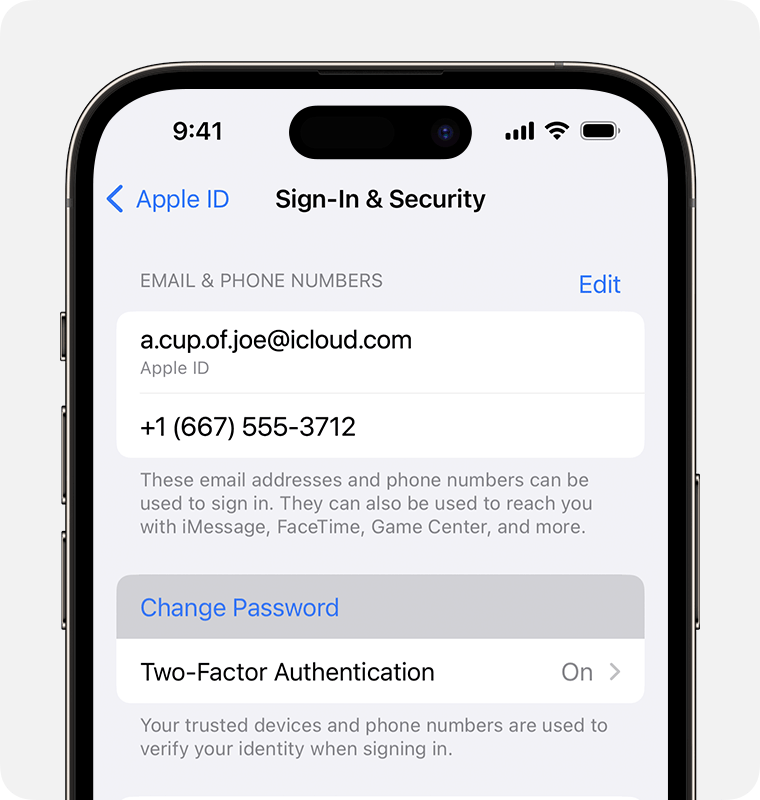
3. Follow the onscreen instructions to reset your password.
You can also follow this process on a trusted iPad or Apple Watch.
To reset your password on your trusted Mac, choose Apple menu > System Settings > your name. Then click Sign-In & Security, Change Password, and follow the onscreen instructions.
If you have a new Apple device
If you have a new Apple device or an Apple device that you aren't signed in to with your Apple ID, you can select "Forgot password or don't have an Apple ID?" wherever the option appears.
During device setup, you can find the "Forgot password or don't have an Apple ID?" option on the Apple ID sign-in screen.
After setup, you can find the "Forgot password or don't have an Apple ID?" option in Settings:
More details here: If you forgot your Apple ID password
If she is unable to reset the password using those steps, account recovery would be the next course of action to take:
How to use account recovery when you can’t reset your Apple ID password
Thanks for posting in Apple Support Communities.
All the best.
Hello Queenyana,
We understand that your daughter need to turn off Find My on her iPhone 12. However, she needs access to her Apple ID password. The resource you were reviewing can walk her through the steps that she can take on her new device to regain access to her account:
"Reset your Apple ID password on your iPhone or other trusted Apple device
3. Follow the onscreen instructions to reset your password.
You can also follow this process on a trusted iPad or Apple Watch.
To reset your password on your trusted Mac, choose Apple menu > System Settings > your name. Then click Sign-In & Security, Change Password, and follow the onscreen instructions.
If you have a new Apple device
If you have a new Apple device or an Apple device that you aren't signed in to with your Apple ID, you can select "Forgot password or don't have an Apple ID?" wherever the option appears.
During device setup, you can find the "Forgot password or don't have an Apple ID?" option on the Apple ID sign-in screen.
After setup, you can find the "Forgot password or don't have an Apple ID?" option in Settings:
More details here: If you forgot your Apple ID password
If she is unable to reset the password using those steps, account recovery would be the next course of action to take:
How to use account recovery when you can’t reset your Apple ID password
Thanks for posting in Apple Support Communities.
All the best.
Send in a request for reset apple id password

