After all the IOS17 updates I cant ping my phone using SE Watch. Why?

Used to swipe up and the ping my phone (sound & flash) were right there. The function disappeared after installing all of the IOS17 updates. Where did that easy to find function go?

iPhone 13 Pro Max, iOS 17

Posted on Oct 14, 2023 11:21 AM

Reply
Question marked as Top-ranking reply

Posted on Nov 21, 2023 9:29 AM

Momentarily press and release the flat oval button on the side.

https://support.apple.com/guide/watch/control-center-apd06bc15da1/watchos


NOT the round, rotating Digital Crown!

13 replies

Jan 14, 2024 9:13 AM in response to sherylschoolnurse

sherylschoolnurse wrote:

I agree! The easy ping function is the one I used daily multiple times. Put it back please.

Apple does not read this user-to-user technical support forum for feedback.


But you can send Apple feedback via:

Feedback - Watch - Apple


If enough users send feedback, it is more likely a decision maker will see it, and maybe take action.

The previous Control Center swipe-up has moved to a quick press and release of the flat oval side button
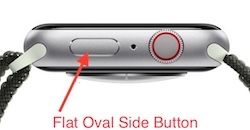
Use Control Center on Apple Watch - Apple Support


DO NOT hold the button, as that brings up Emergency services and the power off icon.


Control Center should then show you the iPhone ping icon (find my iPhone), Battery percentage, Flashlight, Water Lock, Airplane mode, Alarm silence, Theater mode, and all the other Control Center services.


An alternate way to get some of the Control Center services is:


Hey Siri, find my iPhone

“Hey Siri, Flashlight”

“Hey Siri, Battery”

“Hey Siri, Airplane mode”

Getting the press and release timing just right can be an issue. You can make it more reliable by changing:


Settings -> Accessibility -> Side Button Click Speed


“Side Button Click Speed” can adjust the press and release timing, so you get the Control Center display every time. Adjusting The “Side Button Click Speed” is also useful for Apple Pay’s double press and release. There is “Default” (sub second timing of needed), “Slow” (up to a second between press and release), and “Slowest” (up to 2 seconds between press and release). I like the “Slow” setting.


NOTE: Slow and Slowest settings do not mean you have to wait a full second or 2 seconds between press and release. It just means you do not need to be super fast.


Oct 15, 2023 12:53 PM in response to Silviafalconi

Hi Silviafalconi,


Thank you for participating in the Apple Support Communities.It looks like you came from the following support article: Update your Apple Watch - Apple Support


If you are having issues with your iPhone, here are a few steps that may be useful:


1. Restart your iPhone to see if the issue persists: Restart your iPhone - Apple Support

2. Update your iPhone to rule out the older software: Update your iPhone or iPad - Apple Support

3. Try the steps here to see if they help: Find misplaced devices with Apple Watch - Apple Support

4. If you need further support, reach out to Apple Support here: Apple Support


Have a great day.


This thread has been closed by the system or the community team. You may vote for any posts you find helpful, or search the Community for additional answers.

After all the IOS17 updates I cant ping my phone using SE Watch. Why?

Welcome to Apple Support Community
A forum where Apple customers help each other with their products. Get started with your Apple Account.
