I got a notice that said my iCloud was full. I deleted everything from my iCloud but 126 gb still ther. Then woke up to day and my account is full again with me unable to delete what’s going on

I have close all access from my 3 devices, stoped photos from syncing. I went into iCloud account and deleted all document but they don’t delete. I have 200 gigabytes of storage and was using less than 100 when the document twice filled up to 200 gigabytes

iPad Pro, iPadOS 16

Posted on Oct 14, 2023 3:35 PM

Reply
Question marked as Top-ranking reply

Posted on Oct 15, 2023 2:35 PM

Hello Dola2,


As we understand it, you've deleted a number of documents from iCloud but the storage totals have not changed. Is that right? Have you double-checked to ensure that you permanently deleted the documents using these steps? Delete files or recover deleted files in the Files app on your iPhone or iPad - Apple Support


"On your iPhone

1) Open the Files app and tap the Browse tab.

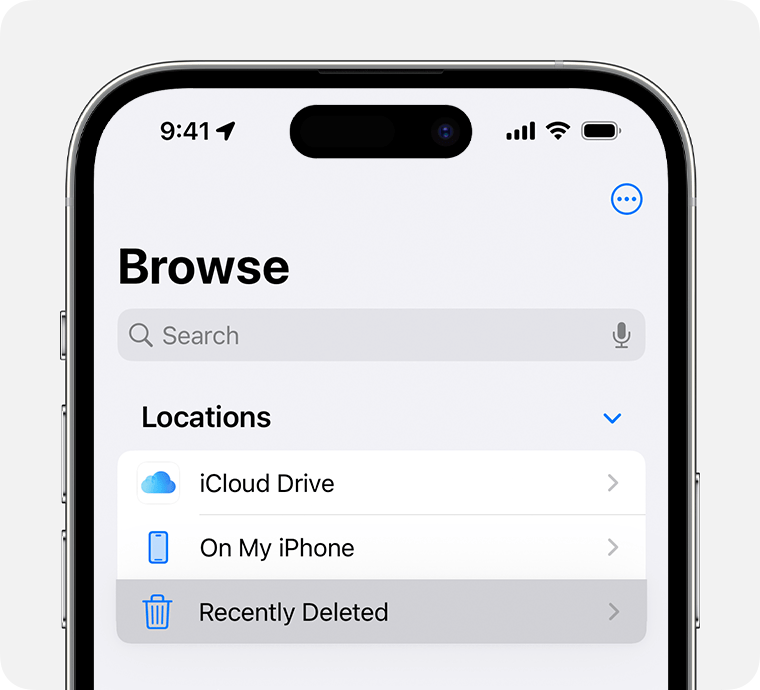
2) Under Locations, tap Recently Deleted.

An iPhone showing the Locations options in Browse, highlighting Recently Deleted.

3) Tap the More button More button, then tap Select.

4) Select the files that you want to keep, then tap Recover. To recover a single file, you can also touch and hold the file, then tap Recover."


We provided the text and screenshot above to show you how to find the Recently Deleted folder. If you want to permanently delete the files, you'd use the same steps to tap More > Select, but you'd tap Delete instead of Recover.


If that doesn't help, use this link to reach us directly: Get Support


Take care.

1 reply
Question marked as Top-ranking reply

Oct 15, 2023 2:35 PM in response to Dola2

Hello Dola2,


As we understand it, you've deleted a number of documents from iCloud but the storage totals have not changed. Is that right? Have you double-checked to ensure that you permanently deleted the documents using these steps? Delete files or recover deleted files in the Files app on your iPhone or iPad - Apple Support


"On your iPhone

1) Open the Files app and tap the Browse tab.

2) Under Locations, tap Recently Deleted.

An iPhone showing the Locations options in Browse, highlighting Recently Deleted.

3) Tap the More button More button, then tap Select.

4) Select the files that you want to keep, then tap Recover. To recover a single file, you can also touch and hold the file, then tap Recover."


We provided the text and screenshot above to show you how to find the Recently Deleted folder. If you want to permanently delete the files, you'd use the same steps to tap More > Select, but you'd tap Delete instead of Recover.


If that doesn't help, use this link to reach us directly: Get Support


Take care.

This thread has been closed by the system or the community team. You may vote for any posts you find helpful, or search the Community for additional answers.

I got a notice that said my iCloud was full. I deleted everything from my iCloud but 126 gb still ther. Then woke up to day and my account is full again with me unable to delete what’s going on

Welcome to Apple Support Community
A forum where Apple customers help each other with their products. Get started with your Apple Account.