Can't use ringtone I purchased from iTunes
Good day
Im struggling for days trying to set a ringtone I purchased from iTunes but I'm not winning
Pls assist
iPhone 12 Pro, iOS 17
Good day
Im struggling for days trying to set a ringtone I purchased from iTunes but I'm not winning
Pls assist
iPhone 12 Pro, iOS 17
Hey MEEFY,
Thanks for using Apple Support Communities. If you haven't already, redownload the ringtone to see if you're then able to set it as your ringtone: Use tones and ringtones with your iPhone or iPad - Apple Support
Redownload ringtones purchased with your Apple ID
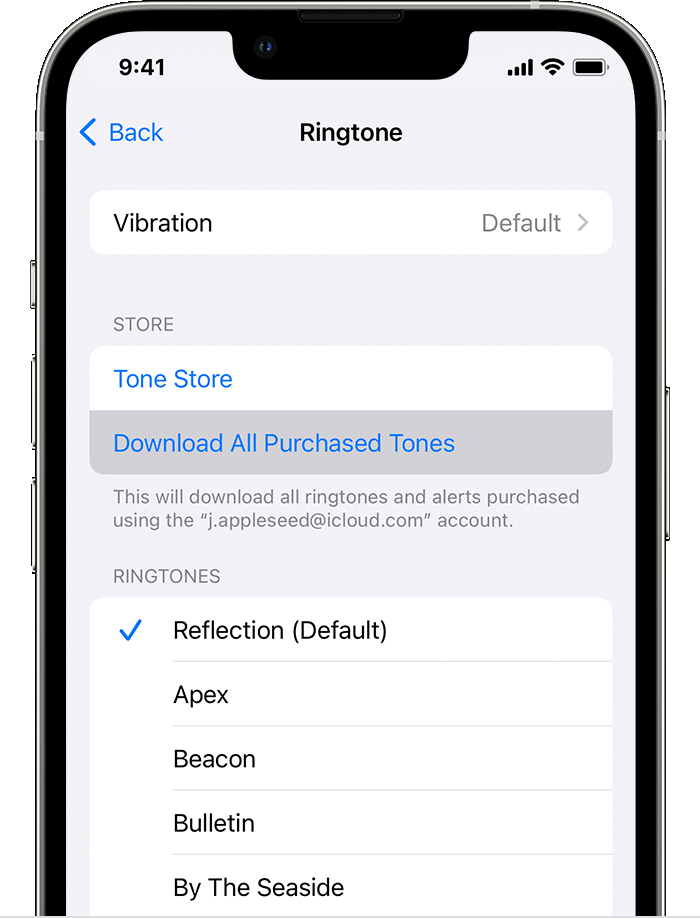
1. Go to Settings > Sounds & Haptics.
2. Under Sounds and Haptic Patterns, tap any sound.
3. Tap Download All Purchased Tones. You might not see this option if you already downloaded all the tones that you purchased or if you haven't purchased any tones.
You might not be able to redownload some previously purchased tones.
If that doesn't help, let us know more about what happens when you try to set the ringtone. Does an alert appear, and if so what does it say?
Keep us posted.
Take care!
Hey MEEFY,
Thanks for using Apple Support Communities. If you haven't already, redownload the ringtone to see if you're then able to set it as your ringtone: Use tones and ringtones with your iPhone or iPad - Apple Support
Redownload ringtones purchased with your Apple ID
1. Go to Settings > Sounds & Haptics.
2. Under Sounds and Haptic Patterns, tap any sound.
3. Tap Download All Purchased Tones. You might not see this option if you already downloaded all the tones that you purchased or if you haven't purchased any tones.
You might not be able to redownload some previously purchased tones.
If that doesn't help, let us know more about what happens when you try to set the ringtone. Does an alert appear, and if so what does it say?
Keep us posted.
Take care!
Can't use ringtone I purchased from iTunes