Can't download High Sierra full installer.

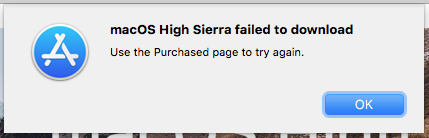
Help. I'm currently running High Sierra, but I keep getting network related errors. Apple Support wants me to reinstall High Sierra to fix the errors. When I go to app store, High Sierra page, and hit "download", I get the error:


"macOS High Sierra failed to download / Use the Purchased page to try again."


Well, High Sierra isn't on my purchased page.

How do I get around this?


Thanks


MacBook Pro 17″, macOS 10.13

Posted on Oct 17, 2023 2:17 PM

Reply
Question marked as Top-ranking reply

Posted on Oct 17, 2023 2:30 PM

That is not how you get High Sierra in 2023. Using Safari only, select High Sierra from its link in How to download and install macOS - Apple Support and that will open a panel on the Mac App Store from which you download the full High Sierra 10.13.6 installer application into your /Applications folder. Cancel if it wants to proceed with the installation.


If you have a spare 8GB USB stick, you can also make a bootable installer from the High Sierra installer app following the instructions at Create a bootable installer for macOS - Apple Support


Here is an example in the Terminal of how I created a bootable USB installer for Sierra. Just change the installer name to High Sierra with the appropriate escapes (\) for white-space.


Similar questions

34 replies

Oct 19, 2023 8:08 AM in response to Scott Bernard

Scott Bernard wrote:
I have already downloaded and successfully run Apple's High Sierra installer with no issues. The installation is fully updated to latest version.

For the curious... I did a clean install on an external drive. Then I booted off of it, and used the link repeatedly mentioned above to go to the Mac App Store, High Sierra installer download page, and I tried downloading it again, now from the clean install. It gave me the same download error as multiple other attempts, and said to go to the "...Purchased page..." and try getting it from there. It's a brand new clean installation, so there is nothing on the purchased page.

Oct 17, 2023 2:33 PM in response to VikingOSX

VikingOSX wrote:

That is not how you get High Sierra in 2023. Using Safari only, select High Sierra from its link in How to download and install macOS - Apple Support and that will open a panel on the Mac App Store from which you download the full High Sierra 10.13.6 installer application into your /Applications folder. Cancel if it wants to proceed with the installation.


That's exactly what and where I am doing that's failing. I'm hitting the only download button on the page.

Oct 17, 2023 3:26 PM in response to John Galt

John Galt wrote:

I will save you the hassle. It is no longer possible to download and install High Sierra.

Whether it will resolve the network-related problems is another story though. If you describe them perhaps a more viable solution can be suggested.


My understanding is that the High Sierra app store page "Download" either gives you a full installer download, or gives you a net installer download. I'm happy reinstalling from the net installer if that's all I can get. I have an alternate bootable drive I can run on while installing on my main hard drive. But the alternate drive gives me the same error as above when I try to download.


Here's one of my alternate problems that Apple Support also could not fix, that led to "reinstall High Sierra". Please have at it:

https://discussions.apple.com/thread/255211759

Oct 17, 2023 3:34 PM in response to Scott Bernard

Apple has not been forthcoming with the inability to download and install earlier macOS versions from Recovery. It is possible they do not even know enough to answer. The workaround will be to download the installer from the App Store as you tried, and it will require creating the "bootable USB installer" — a step you are not even able to reach.


At present, I am attempting to duplicate what you're doing and will come up with an answer either way. Unlike Apple.

Oct 18, 2023 7:04 AM in response to John Galt

That small installer just vanished between restarts.


I *did* actually start with that web page's link to the app store page. When you search the app store for "High Sierra", it won't ever find High Sierra. You have to use the web page's link to tell the app store where to find the High Sierra page.


There was no "...purchased page..." error on that alternate alternate alternate attempt, as it downloaded [the 22m] fine on the first try.


Yes, I have no explanations either for all the errors, or for the 22m installer, or it vanishing.


I already contacted support and they gave me step by step instructions for multiple methods, that all failed. And you'll love this... the screen sharing wouldn't work either. It showed good on my end, but not on support's end. We tried multiple times. I finally had to screen share my iPhone instead, put it in camera mode, and hold that up towards the laptop screen for the agent to see while I followed instructions. No idea why screen sharing failed, but it worked perfectly fine 3 weeks ago on a different Apple support call.


I tried Safe Mode already multiple times and had the usual errors. I tried it one more time just now, on normal account, and also with the alternate alternate alternate method that got me the small installer. Both accounts are now giving the "...Purchased Page..." error.

Oct 18, 2023 6:18 PM in response to John Galt

John Galt wrote:

I can only surmise something is amiss with the MAS's content distribution network. What else could explain the fact it works "here" and not "there"?

I'm still suspicious of my various network gremlins. And I really don't like the inconsistency of the failures. Sometimes it's the "go to Purchased page" error, sometimes it downloads the 22m installer (which errors out when run), and I swear there were a few times when hitting the download button didn't do anything bat all. And one of those times, I don't know which, actually stared the download (which failed to complete), but never showed me it was downloading. For all I know, it would have downloaded fine, but my shutdowns and restarts to try other methods probably cut off that download.

Nov 9, 2023 9:06 PM in response to Scott Bernard

Scott Bernard wrote:

I'm still suspicious of my various network gremlins.


As it turns out, I really DID have network gremlins, accounting for quite a few forum threads I started recently. I'm not sure how many of the attempts in this thread would have worked if not for said gremlins.


The eventual answer was a new installation of High Sierra (ironic in this thread at least) and that killed them all. However, not all new installs are good. Some brand new High Sierra installations came with the same errors. Some (very few) did not. You have to test each HS installation


The easiest, but still painful way to explain all this, is to check out the other forum thread:

https://forums.macrumors.com/threads/nasty-mystery-high-sierra-connection-problem.2409308/


P.S. thanks again for all the help here.

This thread has been closed by the system or the community team. You may vote for any posts you find helpful, or search the Community for additional answers.

Can't download High Sierra full installer.

Welcome to Apple Support Community
A forum where Apple customers help each other with their products. Get started with your Apple Account.


