Hi gwen210,
Resetting your Beats could help if you're noticing audio issues. This resource covers how to do that: Reset your Beats Studio Buds or your Beats Studio Buds +
1. Place both earbuds in the charging case, and keep the case open.
2. Press and hold the system button on the case for 15 seconds or until the LED indicator light flashes red and white.
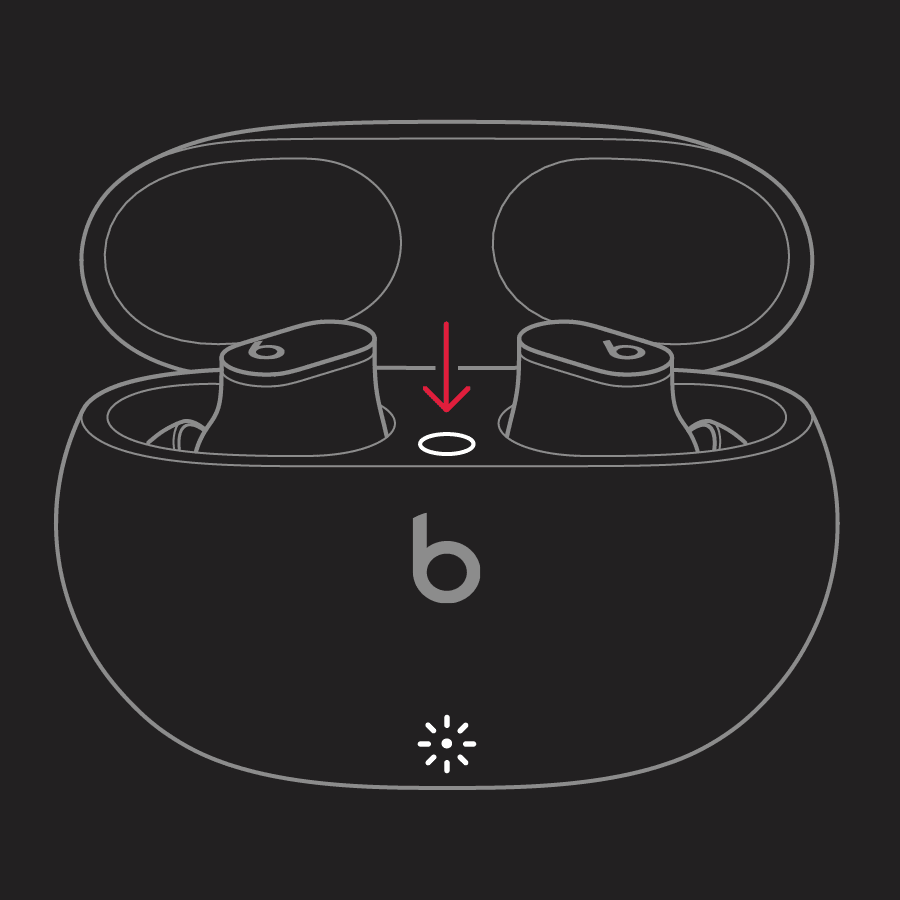
3. Release the system button.
If the issue continues and you have another device available, test your Beats with that device to see if you notice any difference. If the issue only occurs on one device, restart it and make sure the software is up-to-date. Both of those steps can help resolve unexpected behavior.
If none of these steps help, you may want to reach out to the retailer where they were purchased from for additional guidance. If they were purchased from Apple, here's how to contact Apple Support:
They can be contacted here: Get Support or by calling the most applicable phone number from this list: Contact Apple for support and service.
Regards.