I can't unlock my macbook after software update

for three days, my macbook was not working. It kept saying I had to do a recovery for the system and I kept trying to do the monetary update but it always ended up with my macbook hanging. Today, somehow I was able to create a new account but I noticed that the touch bar was not working so I looked it up in the internet and saw that it might be because my software was not up to date. So, I updated it. After updating to the new one (I do not know the name im sorry), I can't get in even after typing the correct password. It just keeps loading then restarts by itself. Then I'm back to the lock screen. This has been going on for 3 hours... please someone help me. I have an important online lesson tomorrow :(😭

Posted on Oct 24, 2023 3:39 AM

Reply
Question marked as Top-ranking reply

Posted on Oct 25, 2023 6:36 AM

Hello Annieees,


Thank you for reaching out to Apple Support Communities.


Let's attempt to erase and reinstall macOS. Keep in mind this will erase all of the data on the Mac:


Reinstall macOS from macOS Recovery

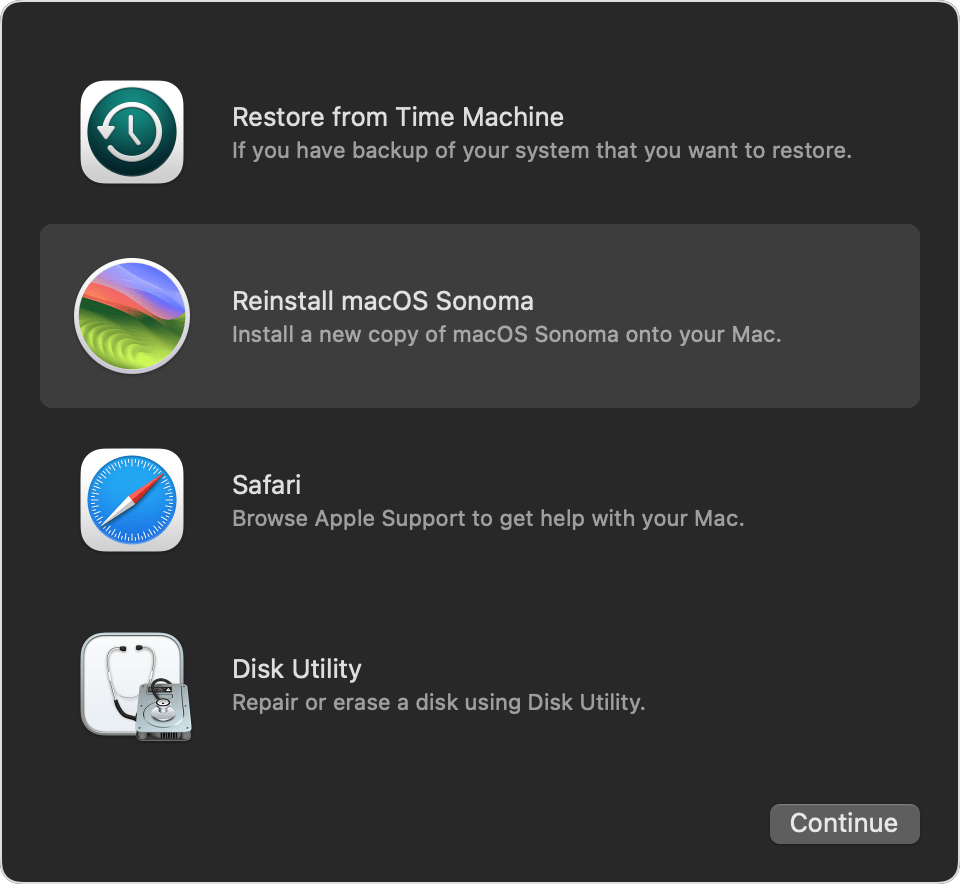
When you see a window with the option to reinstall macOS, your Mac has started up from Recovery.

  1. Select the option to reinstall macOS.*macOS Recovery window
  2. Click Continue, then follow the onscreen instructions.
    • If the installer asks to unlock your disk, enter the password that you use to log in to your Mac.
    • If the installer offers the choice between installing on Macintosh HD or Macintosh HD - Data, choose Macintosh HD.
    • If the installer doesn't see your disk, or it says that it can't install on your computer or volume, you might need to erase your disk first.

3.Allow installation to complete without putting your Mac to sleep or closing its lid. Your Mac might restart and show a progress bar several times, and the screen might be empty for minutes at a time. 

4.When installation is complete, your Mac might start up to a setup assistant. Follow the steps in the setup assistant.

If you're selling, trading in, or giving away your Mac, quit the setup assistant without completing setup, then click Shut Down. When the new owner starts up the Mac, they can use their own information to complete setup."


Additional details can be found here: How to reinstall macOS


If the issue persists, can you provide a few more details? Were you able to erase your Mac successfully? What happens when you attempt to reinstall macOS?


Cheers!

1 reply
Question marked as Top-ranking reply

Oct 25, 2023 6:36 AM in response to Annieees

Hello Annieees,


Thank you for reaching out to Apple Support Communities.


Let's attempt to erase and reinstall macOS. Keep in mind this will erase all of the data on the Mac:


Reinstall macOS from macOS Recovery

When you see a window with the option to reinstall macOS, your Mac has started up from Recovery.

  1. Select the option to reinstall macOS.*macOS Recovery window
  2. Click Continue, then follow the onscreen instructions.
    • If the installer asks to unlock your disk, enter the password that you use to log in to your Mac.
    • If the installer offers the choice between installing on Macintosh HD or Macintosh HD - Data, choose Macintosh HD.
    • If the installer doesn't see your disk, or it says that it can't install on your computer or volume, you might need to erase your disk first.

3.Allow installation to complete without putting your Mac to sleep or closing its lid. Your Mac might restart and show a progress bar several times, and the screen might be empty for minutes at a time. 

4.When installation is complete, your Mac might start up to a setup assistant. Follow the steps in the setup assistant.

If you're selling, trading in, or giving away your Mac, quit the setup assistant without completing setup, then click Shut Down. When the new owner starts up the Mac, they can use their own information to complete setup."


Additional details can be found here: How to reinstall macOS


If the issue persists, can you provide a few more details? Were you able to erase your Mac successfully? What happens when you attempt to reinstall macOS?


Cheers!

This thread has been closed by the system or the community team. You may vote for any posts you find helpful, or search the Community for additional answers.

I can't unlock my macbook after software update

Welcome to Apple Support Community
A forum where Apple customers help each other with their products. Get started with your Apple Account.