17.1.1 issues with air print

I recently updated to iOS 17.1.1 and I can longer print to my air printer from my iPad or iPhone. Both were updated. It is there to select, but says the printer has an error. My husband did not update yet and he can still print to air printer. Help!

Posted on Nov 21, 2023 10:01 AM

Reply
Question marked as Top-ranking reply

Posted on Nov 21, 2023 10:03 AM

If your printer supports AirPrint - is set-up correctly and was working as expected prior to the iPadOS17 update - you may find that restart of your network components will resolve the problem. You’ll need to restart your network devices in the correct order. Assuming that you WiFi Router provides DNS services for your network, restart devices in this order - allowing time for devices to fully boot/restart prior to restarting other devices:


  • WiFi Router
  • Upstream wired Network Switch(es) (if any)
  • WiFi Access Points / Network Extenders
  • Other fixed infrastructure devices - such as Printers
  • Client devices (your iPad)


Restarting your iPad, after restarting other devices in the correct sequence, is most simply achieved by a forced-restart of the iPad:


  • On an iPad with a Home button: Press and hold the top button and the Home button at the same time. When the Apple logo appears, release both buttons.



  • On an iPad with Face ID: Press and quickly release the volume up button, press and quickly release the volume down button, then press and hold the top button. When the Apple logo appears, release the button.
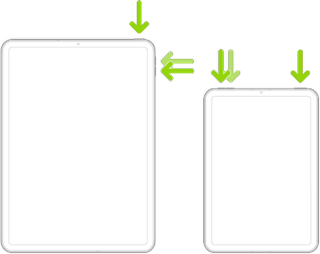


If you continue to have difficulties, check to see if your iPad is using the new WiFi Private Address feature. This feature is intended to provide additional privacy and security when using “public” (untrusted) WiFi networks.

Settings > WiFi > [Your WiFi Network / SSID] - tap the “i” icon - Private Address


The Private Address feature is largely unnecessary for your home WiFi network; if enabled, Private Addressing can interfere with anticipated operation of other devices, such as AirPrint/Airplay. In such circumstances, you may need to disable this feature - and can be enabled or disabled for each individual network.


Use private Wi-Fi addresses in iOS 14, iPadOS 14, and watchOS 7 - Apple Support

26 replies
Question marked as Top-ranking reply

Nov 21, 2023 10:03 AM in response to Pat1024q

If your printer supports AirPrint - is set-up correctly and was working as expected prior to the iPadOS17 update - you may find that restart of your network components will resolve the problem. You’ll need to restart your network devices in the correct order. Assuming that you WiFi Router provides DNS services for your network, restart devices in this order - allowing time for devices to fully boot/restart prior to restarting other devices:


  • WiFi Router
  • Upstream wired Network Switch(es) (if any)
  • WiFi Access Points / Network Extenders
  • Other fixed infrastructure devices - such as Printers
  • Client devices (your iPad)


Restarting your iPad, after restarting other devices in the correct sequence, is most simply achieved by a forced-restart of the iPad:


  • On an iPad with a Home button: Press and hold the top button and the Home button at the same time. When the Apple logo appears, release both buttons.


  • On an iPad with Face ID: Press and quickly release the volume up button, press and quickly release the volume down button, then press and hold the top button. When the Apple logo appears, release the button.


If you continue to have difficulties, check to see if your iPad is using the new WiFi Private Address feature. This feature is intended to provide additional privacy and security when using “public” (untrusted) WiFi networks.

Settings > WiFi > [Your WiFi Network / SSID] - tap the “i” icon - Private Address


The Private Address feature is largely unnecessary for your home WiFi network; if enabled, Private Addressing can interfere with anticipated operation of other devices, such as AirPrint/Airplay. In such circumstances, you may need to disable this feature - and can be enabled or disabled for each individual network.


Use private Wi-Fi addresses in iOS 14, iPadOS 14, and watchOS 7 - Apple Support

Nov 27, 2023 12:43 PM in response to LotusPilot

I have talked to Apple Support twice today and they were not able to fix the issue for me and admitted they have received similar complaints and are working on the issue. None of the “resets” or “reboots” suggestions here or elsewhere online have worked for me. Thanks fully we can still print from our computers but we are likely going to have to wait for another iOS update until we can print from our phones again. :-(

Dec 14, 2023 1:06 PM in response to BriceMB96

I have iPad with iPadOS 17.2 and can no longer print to my Samsung Xpress M2835DW as it’s no longer found following the update to 17.1.2 but I can still print to my Canon MG5750 with AirPrint on the same local network. Both these printers are AirPrint enabled. I have tried all the suggested remedies over a number of hours of my time without any positive result. My wife has not updated to ipados17 and she can still use AirPrint to to print to both the Canon and Samsung. This is obviously a terrible glitch produced by Apple’s update and a solution is in their hands and not wasting their customers time and money. So let’s hear it from whoever at Apple thought os17 update was a good job done.

Nov 24, 2023 4:35 PM in response to LotusPilot

This did not resolve my issue. Before you ask, iPad does not have VPN, security, or anything like that installed. Printer appears as an option, but clicking it does nothing. Power cycled printer, router, modem, force restarted iPad, toggled airplane mode, wi-fi switch, deleted and re-added wifi. As a last resort, I even resetted all network settings.The only thing I haven't done is wipe the iPad - which is silly. Apple, come up with an update patch to fix this!

Nov 26, 2023 3:07 PM in response to LotusPilot

i did all the things on that list before seeing this post except I did not reboot my router first. However, we did need to replace the toner cartridge which I thought was the problem. After that, I was able to print from my MacBook but not our iPhones which just got the 17.1.1 update. Which just occurred to me that my MacBook doesn’t get the new iOS update. Frustrating when updates make things break or not work.

Nov 29, 2023 3:50 PM in response to Katana-San

Thanks. I’ve tried almost everything he mentions except trying to update my printer’s firmware. I tried looking on the control panel for my printer to do an update but I couldn’t find how to do it. I may try turning it off for an hour or so and then powering back up to see if it does anything. Since we can still print from all devices that didn’t update to iOS 17.1.1, I was pretty sure the issue wouldn’t get resolved until they Apple engineers did another update and fixed it.

Dec 6, 2023 2:06 PM in response to Pat1024q

I have 17.1.2 and and iPhone 14 and Canon MF244dw.

I have done all of the above. I am able to print with wifi from my laptop MacBook air - no problem.

I cannot print from my iPhone. When I choose print - i can see my hp printer, but my Canon MF244dw will not allow me to choose it, If I go to other printers and choose canon MF240 it says No Printer Selected.

HELP!!! This is the printer in my office - I need to be able to print!!

This thread has been closed by the system or the community team. You may vote for any posts you find helpful, or search the Community for additional answers.

17.1.1 issues with air print

Welcome to Apple Support Community
A forum where Apple customers help each other with their products. Get started with your Apple Account.
