My iPad is set up with my applied but every time I go to the App Store or try to update an app, it provides my wife’s applied and asks for her password. How can I change it to mine? Nowhere in my settings is her info so I’m baffled.

Can’t find anything in my settings that would pull my wife’s applied instead of mine. She has iPhones but never uses my iPad.

iPad (6th generation)

Posted on Nov 21, 2023 4:31 PM

Reply
Question marked as Top-ranking reply

Posted on Nov 23, 2023 6:41 AM

Begin with signing-out from the App Store:

Settings > [Your Name / AppleID] > Media & Purchases > Sign Out


Next, force-restart your iPad:


Force restart iPad (models with Face ID or with Touch ID in the top button)

If your iPad doesn’t have the Home button, do the following:

  1. Press and quickly release the volume button nearest to the top button.
  2. Press and quickly release the volume button farthest from the top button.
  3. Press and hold the top button.
  4. When the Apple logo appears, release the top button.



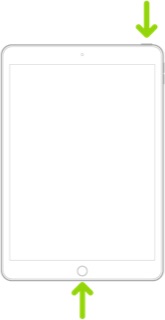
Force restart iPad (models with the Home button)

Press and hold the top button and the Home button at the same time. When the Apple logo appears, release both buttons.


After restarting your iPad, sign-in to the App Store using your own AppleID account credentials:

Settings > [Your Name / AppleID] > Media & Purchases

4 replies
Question marked as Top-ranking reply

Nov 23, 2023 6:41 AM in response to Golfkrazee

Begin with signing-out from the App Store:

Settings > [Your Name / AppleID] > Media & Purchases > Sign Out


Next, force-restart your iPad:


Force restart iPad (models with Face ID or with Touch ID in the top button)

If your iPad doesn’t have the Home button, do the following:

  1. Press and quickly release the volume button nearest to the top button.
  2. Press and quickly release the volume button farthest from the top button.
  3. Press and hold the top button.
  4. When the Apple logo appears, release the top button.


Force restart iPad (models with the Home button)

Press and hold the top button and the Home button at the same time. When the Apple logo appears, release both buttons.


After restarting your iPad, sign-in to the App Store using your own AppleID account credentials:

Settings > [Your Name / AppleID] > Media & Purchases

Nov 22, 2023 3:49 PM in response to Lyssa

Thanks Lyssa but that’s the problem. Sure I can delete an app but when I try to re-add it, it will provide my wife’s Apple ID & ask for her password. I haven’t found a way to change it to mine, there’s no option anywhere to change it. In My Settings, it’s my info., my Apple ID. And no, my wife only got her first iPhone this year and I’ve had my iPad for years so there’s no backup to her phone. I have no idea why or how her Apple ID got tangled in on my device, she never uses it. So frustrating!!🤪

This thread has been closed by the system or the community team. You may vote for any posts you find helpful, or search the Community for additional answers.

My iPad is set up with my applied but every time I go to the App Store or try to update an app, it provides my wife’s applied and asks for her password. How can I change it to mine? Nowhere in my settings is her info so I’m baffled.

Welcome to Apple Support Community
A forum where Apple customers help each other with their products. Get started with your Apple Account.
