
Cursor STILL jumps around ios 17 & 17.01 upgrades

This is wildly frustrating. And absolutely ridiculous considering how Apple considers itself so highly technical. But on a text message, the cursor does not allow me to go back and edit. Completely jumps around, it brings up the keyboard, it will not let me go to the top of the text message, I have tried everything from pressing on the screen to move the cursor and though it looks like it moves, when I let go to Edit, the cursor is back down at the bottom and the keyboard is popped up. Please Apple please fix this. I’ve upgraded to the latest software update, and yes, I’ve turned my phone off and I’ve turned it back on.

Posted on Dec 4, 2023 5:01 AM

Reply
Question marked as Top-ranking reply

Posted on Dec 28, 2023 11:17 AM

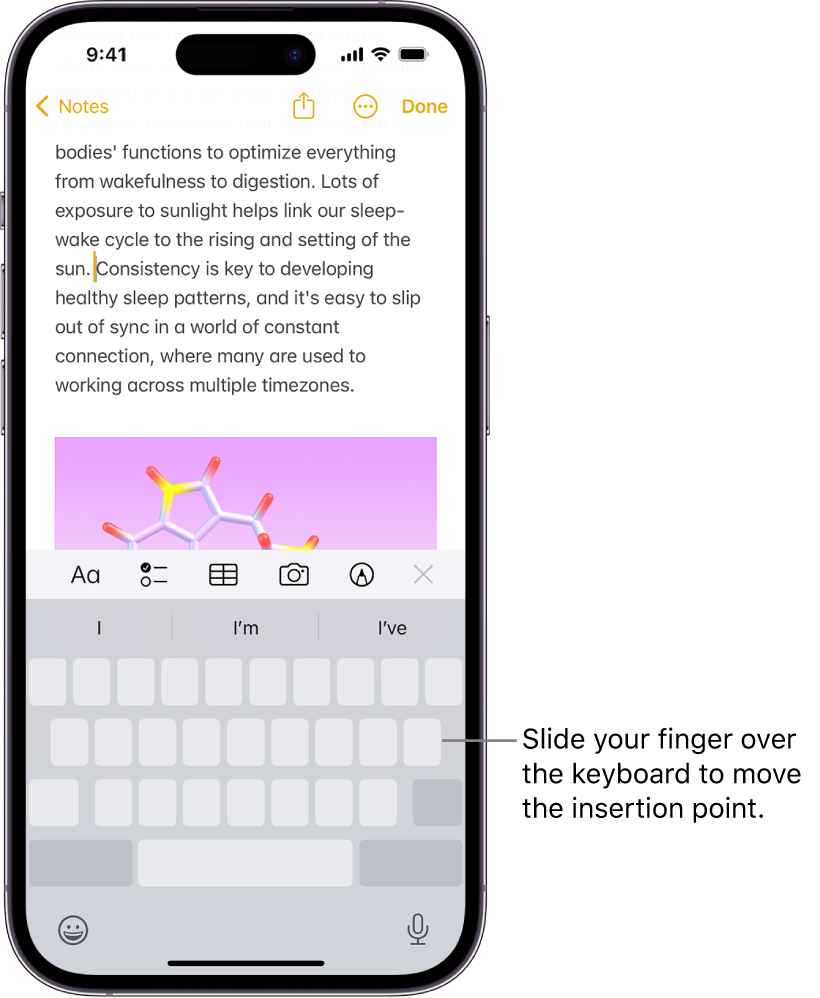
Turn the onscreen keyboard into a trackpad

You can turn the onscreen keyboard into a trackpad to easily move and place the insertion point.

  1. Touch and hold the Space bar with one finger until the keyboard turns light gray.
  2. To move the insertion point, slide your finger around the keyboard.
  3. To select text, touch and hold the keyboard with a second finger, then adjust the selection by moving the first finger around the keyboard.


Similar questions

3 replies
Question marked as Top-ranking reply

Dec 28, 2023 11:17 AM in response to ddistasi

Turn the onscreen keyboard into a trackpad

You can turn the onscreen keyboard into a trackpad to easily move and place the insertion point.

  1. Touch and hold the Space bar with one finger until the keyboard turns light gray.
  2. To move the insertion point, slide your finger around the keyboard.
  3. To select text, touch and hold the keyboard with a second finger, then adjust the selection by moving the first finger around the keyboard.


Dec 28, 2023 11:03 AM in response to Ahab the Eskimo

I am on this board to see if there’s a way to fix or turn off this feature. It takes me so much longer now to type anything because as soon as I try to reposition the cursor to make a correction or an addition, the closest whole word is highlighted and it takes forever to undo and get back to where I want to be in the process. It just happened while typing this reply! I end up just cutting the highlighted word and retyping it along with the correction or addition. The only time this doesn’t happen is when I am able to put my finger precisely where it needs to go. But if I am slightly off, forget it; we’re in highlighted land and we can’t escape. This is a feature, not a bug?

This thread has been closed by the system or the community team. You may vote for any posts you find helpful, or search the Community for additional answers.

Cursor STILL jumps around ios 17 & 17.01 upgrades

Welcome to Apple Support Community
A forum where Apple customers help each other with their products. Get started with your Apple Account.