Email switching names

Hi all,


Thanks for reading this.


Basically my email address name from one of my accounts keeps changing names to another one I use almost immediately whenever I change it in settings and I cannot change it back. I’ve also tried deleting the account and re-adding it but for some reason the address name immediately switches to another one of my email addresses. This then means I cannot send emails on my mail app from the desired email address because it’s been switched.


Has anybody else experienced this before? Any ideas how to make it stop?


many thanks


Jake

iPhone XS Max, iOS 15

Posted on Dec 14, 2023 2:26 AM

Reply
Question marked as Top-ranking reply

Posted on Dec 14, 2023 5:14 AM

Remove your email account and set it up again

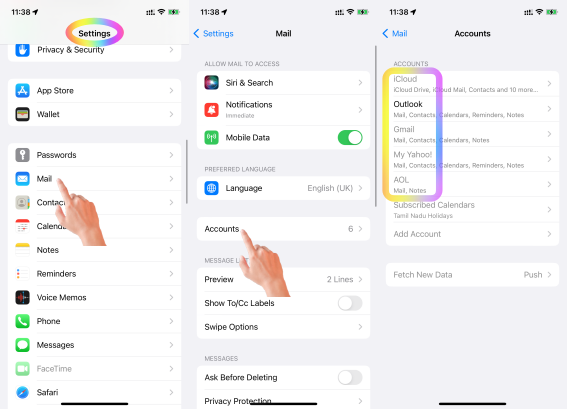
Make sure that all of your emails are there or make sure that your email is saved somewhere other than your device. On your device, go to Settings > Mail, then tap Accounts. Tap the email account that you want to remove. Tap Delete Account.


If you can't receive email on your iPhone, iPad, or iPod touch ...



If you can't send an email on your iPhone, iPad or iPod touch

  1. When you make an iOS or iPadOS backup in iCloud or iTunes, it backs up your mail settings, but not your email. ... 
  2. Make sure your device is connected to the Internet.
  3. Check with your email service provider to find out if there's a service outage.

More items...


If you can't send an email on your iPhone, iPad or iPod touch ...


Which email account are you referring to? Google, iCloud, AOL, Exchange, Outlook, Yahoo or any Other (Refer to the pic )below


  1. Is this your corporate iPhone? Then please contact the system administrator of your corporate
  2. If it is your personal device, in that case, do you have any profile installed by your corporate/organisation/enterprise/School Management?
    1. Erase the profile added by you If you have installed a profile on your own --> Install or remove configuration profiles on iPhone - Apple ...
    2. Or please contact the system administrator of the organisation who provided the profile to you


1 reply
Question marked as Top-ranking reply

Dec 14, 2023 5:14 AM in response to Jake0509

Remove your email account and set it up again

Make sure that all of your emails are there or make sure that your email is saved somewhere other than your device. On your device, go to Settings > Mail, then tap Accounts. Tap the email account that you want to remove. Tap Delete Account.


If you can't receive email on your iPhone, iPad, or iPod touch ...


If you can't send an email on your iPhone, iPad or iPod touch

  1. When you make an iOS or iPadOS backup in iCloud or iTunes, it backs up your mail settings, but not your email. ... 
  2. Make sure your device is connected to the Internet.
  3. Check with your email service provider to find out if there's a service outage.

More items...


If you can't send an email on your iPhone, iPad or iPod touch ...


Which email account are you referring to? Google, iCloud, AOL, Exchange, Outlook, Yahoo or any Other (Refer to the pic )below


  1. Is this your corporate iPhone? Then please contact the system administrator of your corporate
  2. If it is your personal device, in that case, do you have any profile installed by your corporate/organisation/enterprise/School Management?
    1. Erase the profile added by you If you have installed a profile on your own --> Install or remove configuration profiles on iPhone - Apple ...
    2. Or please contact the system administrator of the organisation who provided the profile to you



This thread has been closed by the system or the community team. You may vote for any posts you find helpful, or search the Community for additional answers.

Email switching names

Welcome to Apple Support Community
A forum where Apple customers help each other with their products. Get started with your Apple Account.