Hi sharp,
Try this with a copy of your Numbers document.
Select all the Body cells in column B and Format Panel > Cell Data Format > Date & Time.
Choose Time None.
Numbers will convert anything that resembles a Date to Date & Time format.
Numbers will leave anything that does not resemble a Date in its original format.
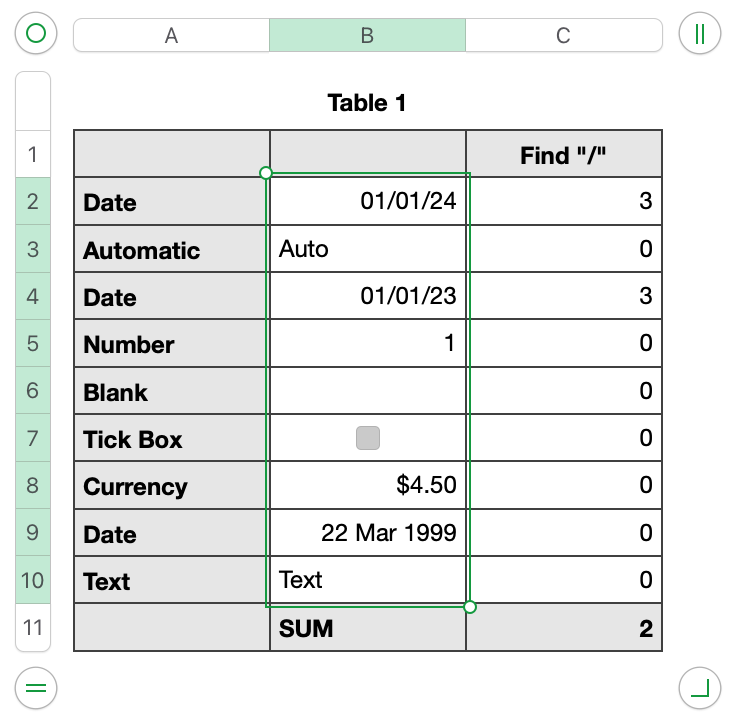
Now use the FIND function to find something that is unique in a Date. I used slash.
Formula in C2 and fill down is IFERROR(FIND("/",B2),0)
Formula in Footer cell C11 is COUNTIF(C,">0")
Note that B9 does not contain a slash, so it is not counted.
No problem. Select all the Body cells in column B and Format Panel > Cell Data Format > Date & Time > choose a Date format that displays a slash. Numbers will not mess with the cells that are not a Date.
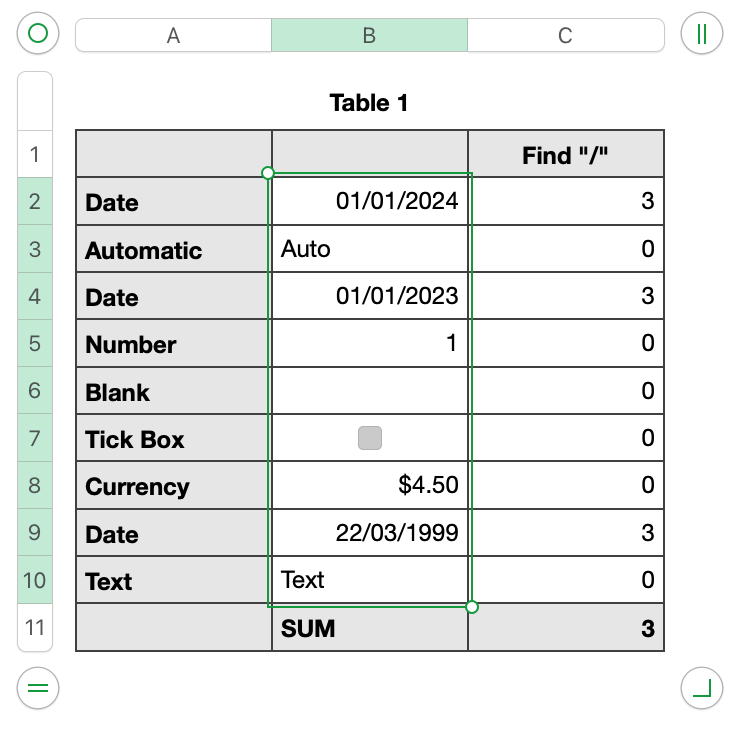
B9 is now counted. There are 3 dates in B.
The charm of Numbers!
Regards,
Ian.
Edit: sorry the footer cell does not SUM (my screen shots). It uses COUNTIF
Ian.



