iPhone 15 Pro Max blurry photo thumbnails

In December 2023 I purchased an iPhone15 Pro Max. Periodically the photos in my library become blurred. I have to re-start the phone to access clear quality photos in my library. My phone provider thought it might be settings and made a small change however the problem continues. Is this a settings, software or hardware problem?

iPhone 15 Pro Max, iOS 17

Posted on Mar 15, 2024 8:03 PM

Reply
Question marked as Top-ranking reply

Posted on Mar 16, 2024 2:30 AM

If your Photos and Videos are stored in iCloud and you share it before downloading the original then it may appear blurry but it is not.


Your photos and videos are stored on your device in their original, high-resolution version. This means that they use a lot of space on your iPhone, iPad, and iPod touch. With iCloud Photos, you can make more space available on your device and have your entire collection, everywhere you go.

Get started with iCloud Photos:

  1. Tap Settings > [your name] > iCloud > Photos.
  2. Turn on iCloud Photos.
  3. Select Optimize iPhone Storage to save space on your device.
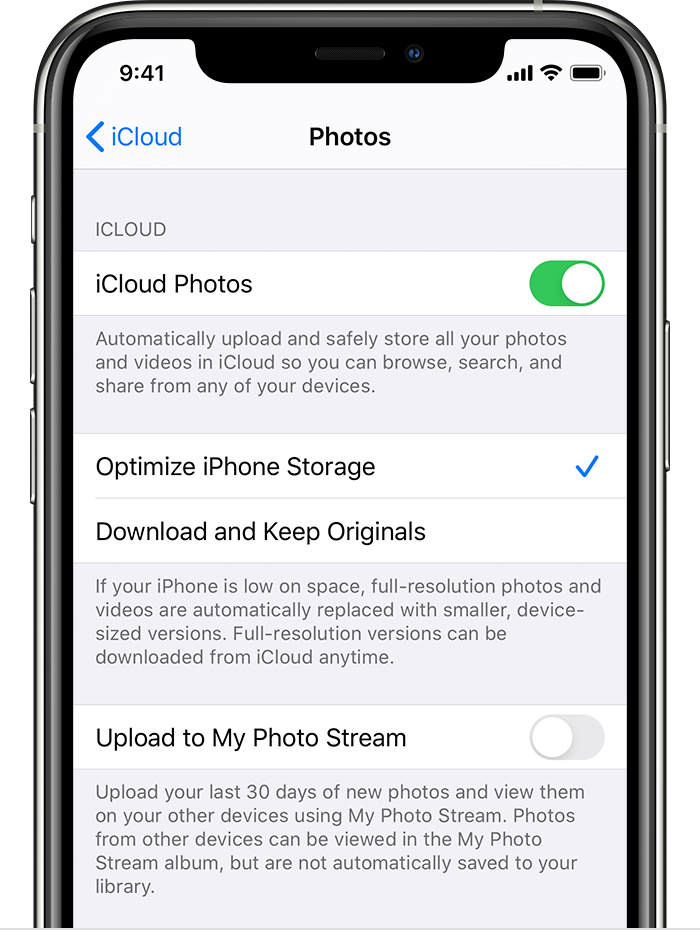
With Optimize Storage, smaller, space-saving photos and videos are kept on your device while all of your original, full-resolution versions are stored in iCloud. And as long as you have enough space in iCloud, you can store as many photos and videos as you want.


1 reply
Question marked as Top-ranking reply

Mar 16, 2024 2:30 AM in response to ManawaRahi

If your Photos and Videos are stored in iCloud and you share it before downloading the original then it may appear blurry but it is not.


Your photos and videos are stored on your device in their original, high-resolution version. This means that they use a lot of space on your iPhone, iPad, and iPod touch. With iCloud Photos, you can make more space available on your device and have your entire collection, everywhere you go.

Get started with iCloud Photos:

  1. Tap Settings > [your name] > iCloud > Photos.
  2. Turn on iCloud Photos.
  3. Select Optimize iPhone Storage to save space on your device.

With Optimize Storage, smaller, space-saving photos and videos are kept on your device while all of your original, full-resolution versions are stored in iCloud. And as long as you have enough space in iCloud, you can store as many photos and videos as you want.

This thread has been closed by the system or the community team. You may vote for any posts you find helpful, or search the Community for additional answers.

iPhone 15 Pro Max blurry photo thumbnails

Welcome to Apple Support Community
A forum where Apple customers help each other with their products. Get started with your Apple Account.