Why my iPhone 14 keeps changing the wallpaper every time I open it ?

My iPhone 14 keeps changing the wall paper every time I open It. Why


[Re-Titled by Moderator]

iPhone 14, iOS 17

Posted on May 11, 2024 8:32 PM

Reply
Question marked as Top-ranking reply

Posted on May 11, 2024 9:23 PM

Perhaps this could be why:


Rotate multiple photos as your Lock Screen wallpaper
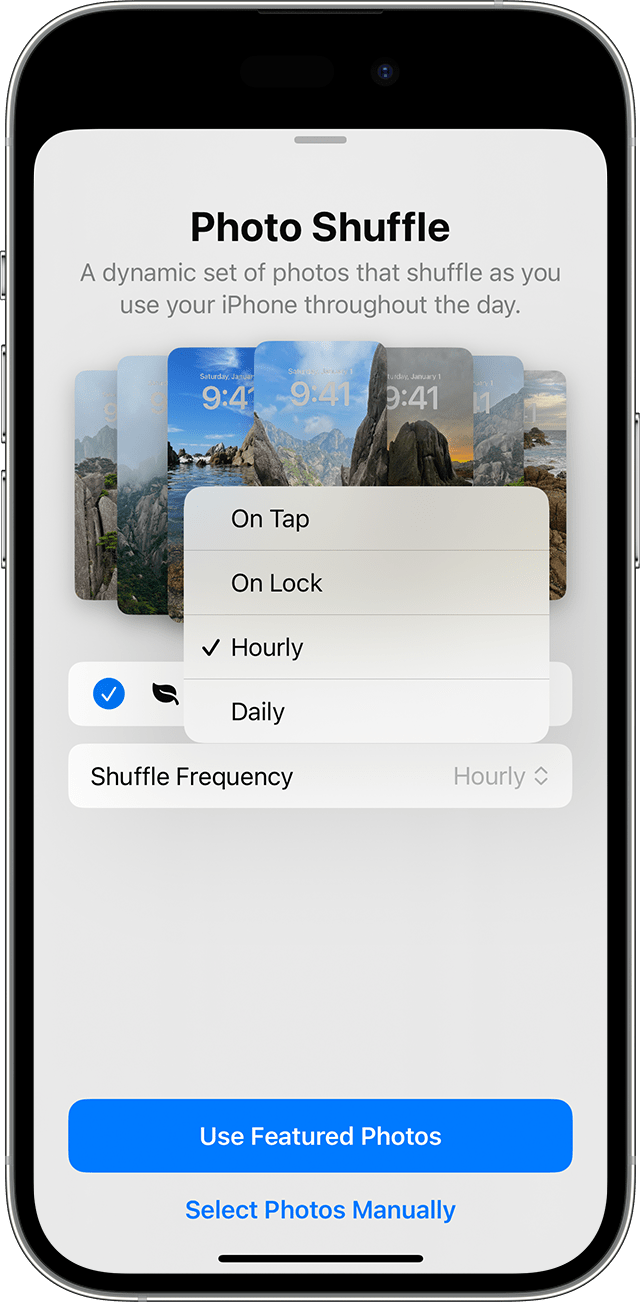
  1. In the Settings app, tap Wallpaper.
  2. Tap Add New Wallpaper.
  3. Select Photo Shuffle from the top row of options.
  4. On the Photo Shuffle screen, set a frequency (On Tap, On Lock, Hourly, or Daily). Then choose a set of photos that will shuffle as you use your iPhone throughout the day.


  1. Tap Done.


1 reply
Question marked as Top-ranking reply

May 11, 2024 9:23 PM in response to Mrmikeb65

Perhaps this could be why:


Rotate multiple photos as your Lock Screen wallpaper

  1. In the Settings app, tap Wallpaper.
  2. Tap Add New Wallpaper.
  3. Select Photo Shuffle from the top row of options.
  4. On the Photo Shuffle screen, set a frequency (On Tap, On Lock, Hourly, or Daily). Then choose a set of photos that will shuffle as you use your iPhone throughout the day.


  1. Tap Done.


This thread has been closed by the system or the community team. You may vote for any posts you find helpful, or search the Community for additional answers.

Why my iPhone 14 keeps changing the wallpaper every time I open it ?

Welcome to Apple Support Community
A forum where Apple customers help each other with their products. Get started with your Apple Account.