Mirror iPhone to Fire TV using AirPlay

Hi everyone! I wanted to view my vacation photos on a big screen, so I tried to mirror my iPhone to my Fire TV with AirPlay. For some reason, it didn't work, even though both devices are connected to the same Wi-Fi network. Any suggestions?

iPhone 15

Posted on Jul 1, 2024 2:44 AM

Reply
Question marked as Top-ranking reply

Posted on Aug 13, 2024 4:53 AM

Your Fire TV likely doesn't support AirPlay, which is why it isn't showing up in your list of devices. You can connect using an HDMI or VGA cable, depending on your iPhone model.

Read here - https://support.apple.com/en-gb/guide/iphone/iph93af723b9/ios


If you prefer a wireless connection, you can download special mirroring apps for Fire TV, for example https://apps.apple.com/us/app/screen-mirror-smart-tv-docast/id6446948344

Simply install the app on your phone, connect to the TV via Wi-Fi, and start mirroring.


2 replies
Question marked as Top-ranking reply

Aug 13, 2024 4:53 AM in response to lavanda67

Your Fire TV likely doesn't support AirPlay, which is why it isn't showing up in your list of devices. You can connect using an HDMI or VGA cable, depending on your iPhone model.

Read here - https://support.apple.com/en-gb/guide/iphone/iph93af723b9/ios


If you prefer a wireless connection, you can download special mirroring apps for Fire TV, for example https://apps.apple.com/us/app/screen-mirror-smart-tv-docast/id6446948344

Simply install the app on your phone, connect to the TV via Wi-Fi, and start mirroring.


Jul 1, 2024 2:47 AM in response to lavanda67

See the pic below (Airplay on Samsung 4 Series)
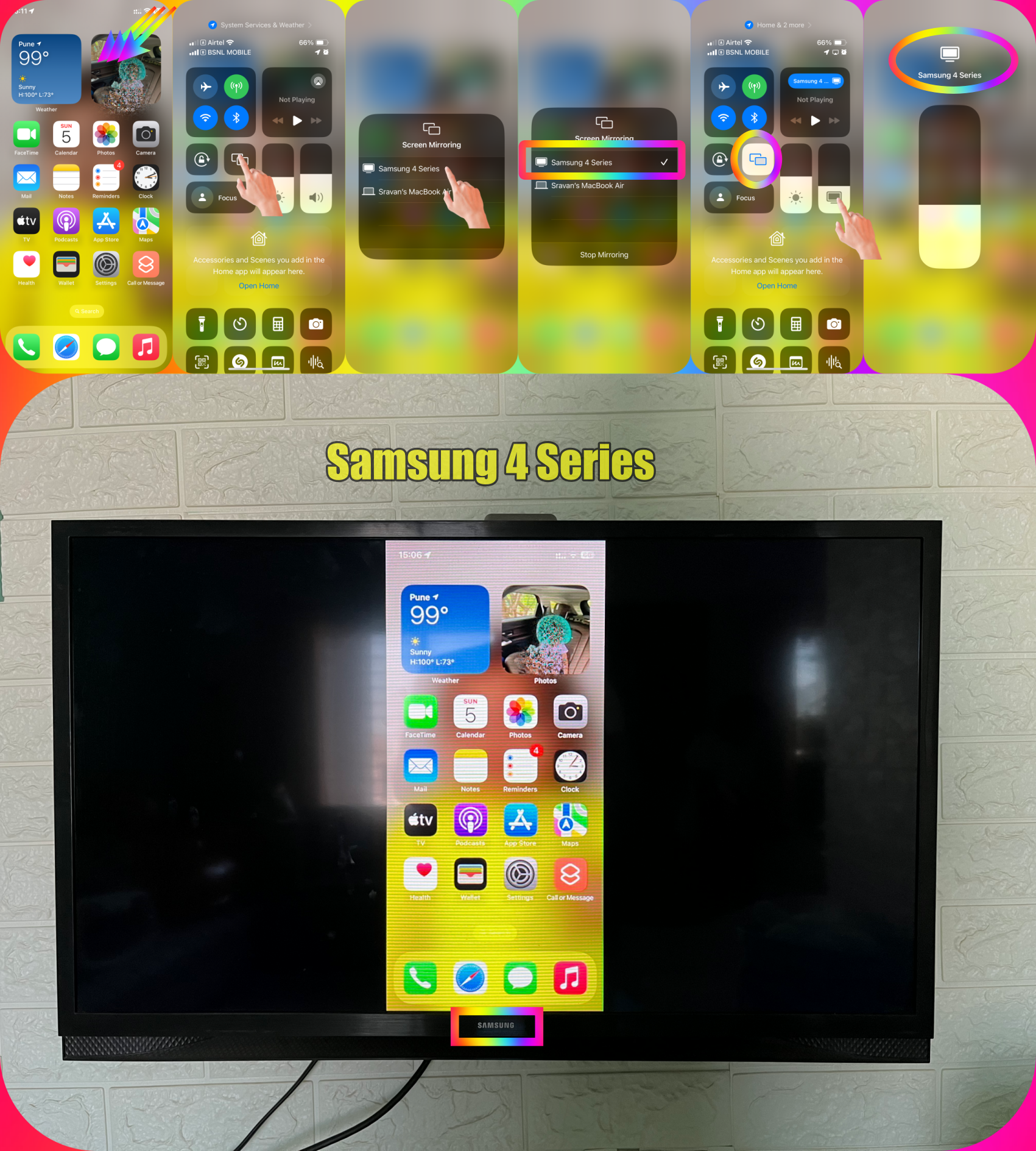



AirPlay 2–compatible TVs and other Products --> See all AirPlay 2–enabled smart TVs


If you find your device in the link provided above then --> Use AirPlay to stream video or mirror the screen of your ...


Else Plug a Lightning Digital AV Adapter or Lightning to VGA Adapter into the charging port on the bottom of iPhone. Connect an HDMI or VGA cable to the adapter. Connect the other end of the HDMI or VGA cable to the monitor, TV, or projector. If necessary, switch to the correct video source on the monitor, TV, or projector.


Connect iPhone to a display with a cable - Apple Support (IN)


This thread has been closed by the system or the community team. You may vote for any posts you find helpful, or search the Community for additional answers.

Mirror iPhone to Fire TV using AirPlay

Welcome to Apple Support Community
A forum where Apple customers help each other with their products. Get started with your Apple Account.
