I have a MacBook Pro 2013 running Big Sur 11.7.10. WiFi issue

I have a MacBook Pro 2013 running big sir 11.7.10. It connects to Wi-Fi. It will frequently drop and have to be reconnected. Is this repairable as a software issue or is this worn out hardware

Earlier Mac models

Posted on Jul 21, 2024 8:38 AM

Reply
Question marked as Top-ranking reply

Posted on Jul 21, 2024 9:59 AM

Incorrectly-configured Wi-Fi can cause connectivity issues, as can buggy or failing Wi-Fi routers or Wi-Fi clients, as can interference.


Check for and apply available Wi-Fi router firmware updates, too.


If there’s more than one Wi-Fi router present (and configured as routers, and not as access points), that can play havoc with connectivity when subnets are not configured.


How many IP network routers are present? Just one?


Or is there another Wi-Fi router, or maybe an ISP IP router/firewall/gateway box involved, or maybe a still-powered AirPort somewhere?


Does the MacBook Pro Wi-Fi network run more stably or faster when connected to other Wi-Fi networks elsewhere? Is this performance issue specific to this Wi-Fi network?


Wi-Fi interference can also be a potential issue. The built-in Wi-Fi troubleshooting tools are adequate and have the benefit of being trivial, while tools such as WiFi Explorer app can make troubleshooting shooting easier.


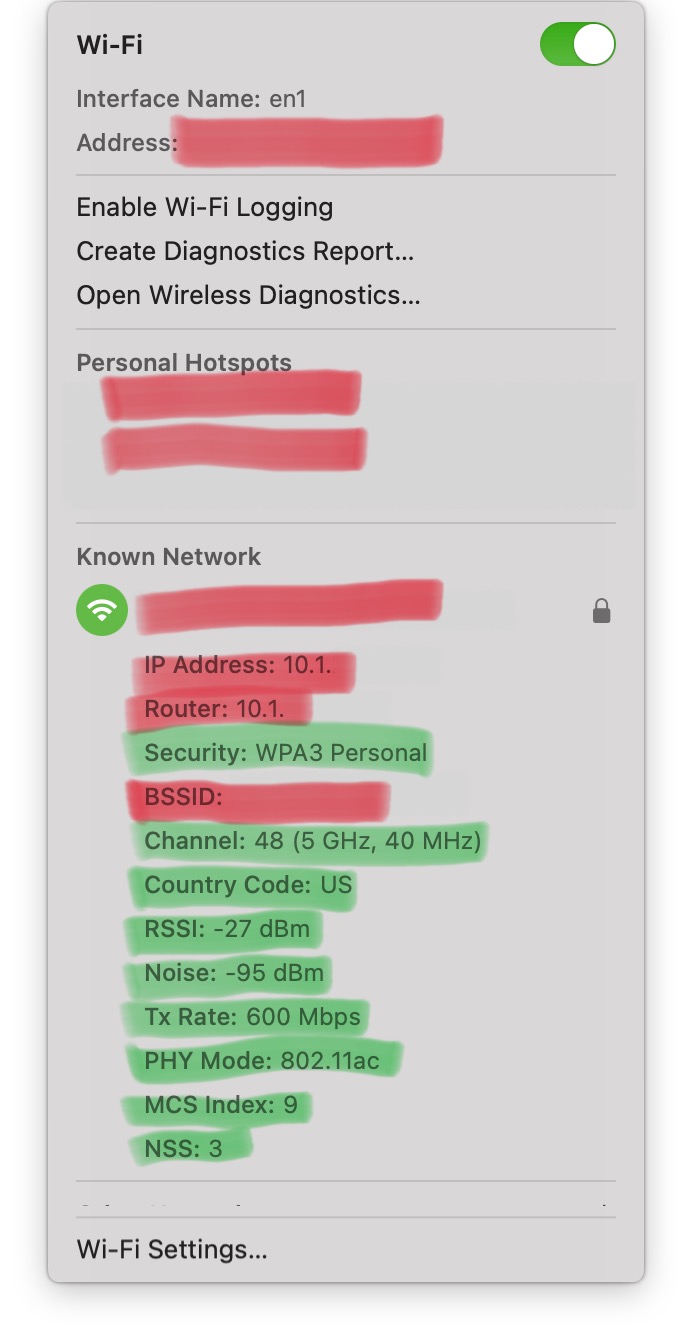
To view the basic Wi-Fi environment characteristics, Option-Click on the Wi-Fi logo 🛜 in the menu bar, and capture some Wi-Fi network data.


Please post the items shown in the following image including the Security mode and from Channel to NSS inclusive (Security, Channel, Country, RSSI, Noise, Tx Rate, PHY mode, MCS, NSS, green highlight) (without posting the Wi-Fi address, any local HotSpots that might be present, the network name, or the BSSID, all of which are expurgated from the image shown below, red highlight), and we can take a look at the basic network environment.


Add-on tools such as WiFi explorer can make some issues much clearer, if you have the budget for that.

Similar questions

1 reply
Question marked as Top-ranking reply

Jul 21, 2024 9:59 AM in response to russellfrompowell

Incorrectly-configured Wi-Fi can cause connectivity issues, as can buggy or failing Wi-Fi routers or Wi-Fi clients, as can interference.


Check for and apply available Wi-Fi router firmware updates, too.


If there’s more than one Wi-Fi router present (and configured as routers, and not as access points), that can play havoc with connectivity when subnets are not configured.


How many IP network routers are present? Just one?


Or is there another Wi-Fi router, or maybe an ISP IP router/firewall/gateway box involved, or maybe a still-powered AirPort somewhere?


Does the MacBook Pro Wi-Fi network run more stably or faster when connected to other Wi-Fi networks elsewhere? Is this performance issue specific to this Wi-Fi network?


Wi-Fi interference can also be a potential issue. The built-in Wi-Fi troubleshooting tools are adequate and have the benefit of being trivial, while tools such as WiFi Explorer app can make troubleshooting shooting easier.


To view the basic Wi-Fi environment characteristics, Option-Click on the Wi-Fi logo 🛜 in the menu bar, and capture some Wi-Fi network data.


Please post the items shown in the following image including the Security mode and from Channel to NSS inclusive (Security, Channel, Country, RSSI, Noise, Tx Rate, PHY mode, MCS, NSS, green highlight) (without posting the Wi-Fi address, any local HotSpots that might be present, the network name, or the BSSID, all of which are expurgated from the image shown below, red highlight), and we can take a look at the basic network environment.


Add-on tools such as WiFi explorer can make some issues much clearer, if you have the budget for that.

This thread has been closed by the system or the community team. You may vote for any posts you find helpful, or search the Community for additional answers.

I have a MacBook Pro 2013 running Big Sur 11.7.10. WiFi issue

Welcome to Apple Support Community
A forum where Apple customers help each other with their products. Get started with your Apple Account.