iOS 18 Update: English and Swedish Keyboards Merged!!!

I noticed that after updating to iOS 18, my two keyboard languages, English and Swedish, have merged into one, and it's only displaying the English keyboard, which makes it impossible to type in Swedish. Am I missing something, or am I supposed to use the English keyboard for both languages?

iPhone 13 Pro

Posted on Sep 18, 2024 2:16 AM

Reply
Question marked as Top-ranking reply

Posted on Sep 23, 2024 5:46 AM

Support for Swedish in "multilingual typing" was added in iOS 18. :)


So this is where the layout one wants to use for the multilingual keyboard is set:


Settings -> General -> Keyboard -> Keyboards and tap on the multi lingual keyboard which layout you want to change and then choose the keyboard layout at the section at the bottom:
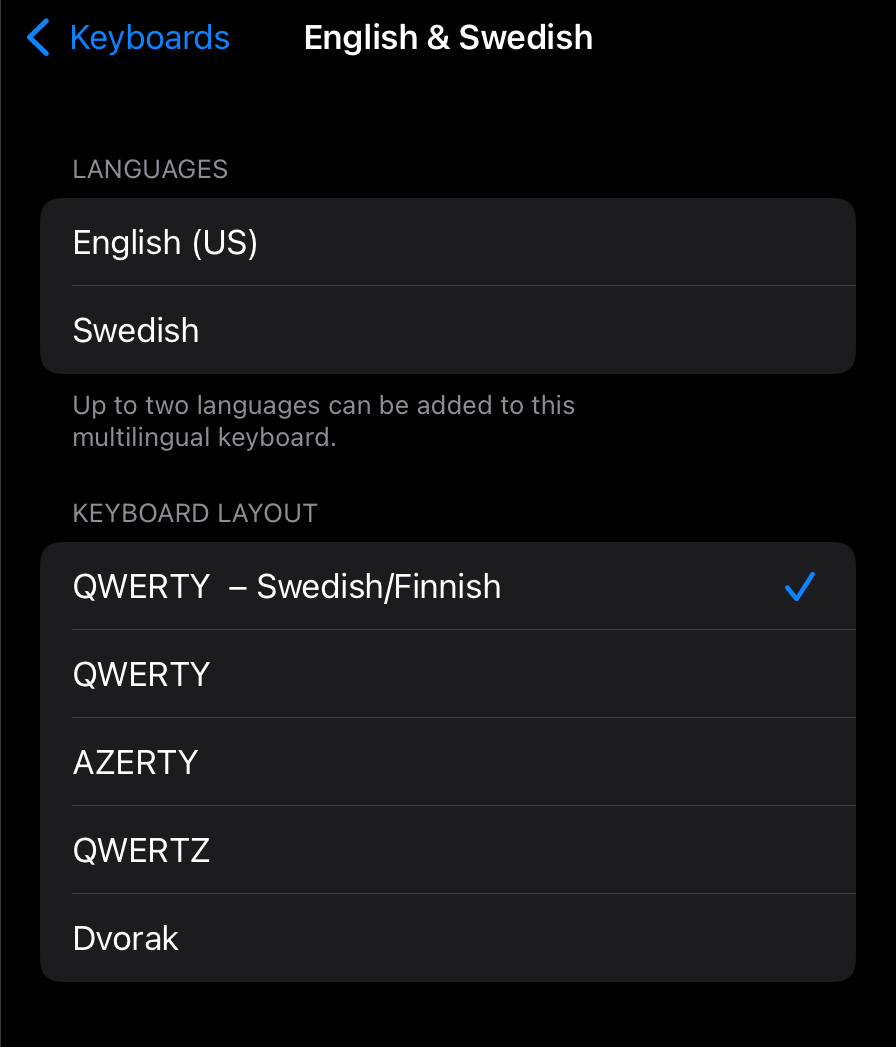


The layout set in the screenshot above will have the åäö characters visible directly. Setting it to ”QWERTY” will not.


If you do type a lot in both Swedish and English I actually recommend to only have the multi language keyboard listed in the settings and remove any separate ”Swedish only” one you might have. This takes away the need for having to switch between keyboards as the multi lingual one covers both and will suggest words etc. for both languages.


Now, if you need to type in a third language that is a another story, but maybe then add one more multi lingual multilingual keyboard with that language (if there is support for it) and English to minimize the need for switching between several separate language keyboards.


Similar questions

36 replies
Question marked as Top-ranking reply

Sep 23, 2024 5:46 AM in response to Tom Gewecke

Support for Swedish in "multilingual typing" was added in iOS 18. :)


So this is where the layout one wants to use for the multilingual keyboard is set:


Settings -> General -> Keyboard -> Keyboards and tap on the multi lingual keyboard which layout you want to change and then choose the keyboard layout at the section at the bottom:


The layout set in the screenshot above will have the åäö characters visible directly. Setting it to ”QWERTY” will not.


If you do type a lot in both Swedish and English I actually recommend to only have the multi language keyboard listed in the settings and remove any separate ”Swedish only” one you might have. This takes away the need for having to switch between keyboards as the multi lingual one covers both and will suggest words etc. for both languages.


Now, if you need to type in a third language that is a another story, but maybe then add one more multi lingual multilingual keyboard with that language (if there is support for it) and English to minimize the need for switching between several separate language keyboards.

Nov 5, 2024 5:31 AM in response to Henrik Carlsson

Same issue, Norwegian, but I found the solution. I removed the keyboard. Added my Norwegian Keyboard, then added my English keyboard to my Norwegian one. That means the Norwegian keyboard layout is standard, and I can type English on it no problem. So if only one of your languages have special letters, make that the main keyboard.


Step by step.

  1. Settings > General > Keyboard > Keyboards
  2. Add a Language keyboard, just so you have a keyboard, because it won’t let you delete all your keyboards and just have emojis left.
  3. Add the keyboard with the special letters, for me, it would be Norwegian.
  4. Then add English and choose, add to Norwegian (or whatever language you need).
  5. Delete the unnecessary keyboard you added.


You should have the Norwegian keyboard layout, but with English support. The space bare will have the NB EN on it. Here’s pictures showing the difference.


Hope this helps!

Dec 9, 2024 12:08 AM in response to Henrik Carlsson

I have the same issue. Initially, I thought it was a good idea since I wouldn’t need to switch between keyboards, but then I realized that the dictation does not work properly anymore and I use dictation a lot. So for the moment I uninstalled the bilingual keyboards and reinstalled them in individually. If Apple sorts out the dictation problem, I will reinstall them.

Sep 18, 2024 2:32 PM in response to Henrik Carlsson

Henrik Carlsson wrote:

Am I missing something, or am I supposed to use the English keyboard for both languages?

You should be able to set the Swedish keyboard as the default by going to settings > general > keyboard > keyboards and tapping on the bilingual item. Also you should be able to go back to having monolingual keyboards by adding a new English keyboard and adding a new Swedish keyboard and removing the bilingual version.

Dec 1, 2024 6:52 AM in response to Jan3181

Jan3181 wrote:

After the 18.11 update, I no longer have access to the international keyboard. This allows you to type the ‘ (apostrophe) on the magic keyboard before a letter, thus accenting the letter. Very useful for Spanish. The keyboard is not on the list of additional keyboards.

To find and activate the "US International PC" mapping, you have to go to settings > general > keyboard > hardware keyboard and tap on english or spanish so you can see the long list of keyboards and make sure this one is checked. Is it really not there for you?

This thread has been closed by the system or the community team. You may vote for any posts you find helpful, or search the Community for additional answers.

iOS 18 Update: English and Swedish Keyboards Merged!!!

Welcome to Apple Support Community
A forum where Apple customers help each other with their products. Get started with your Apple Account.
