Support for Swedish in "multilingual typing" was added in iOS 18. :)
So this is where the layout one wants to use for the multilingual keyboard is set:
Settings -> General -> Keyboard -> Keyboards and tap on the multi lingual keyboard which layout you want to change and then choose the keyboard layout at the section at the bottom:
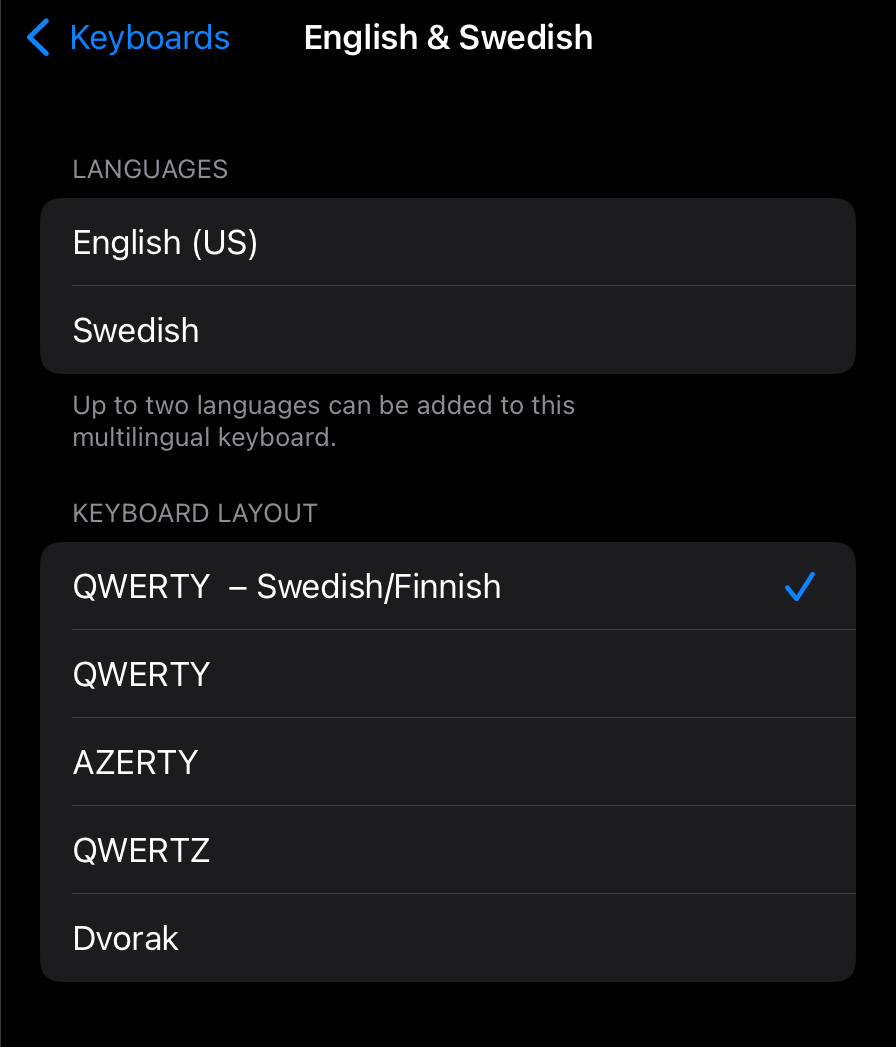
The layout set in the screenshot above will have the åäö characters visible directly. Setting it to ”QWERTY” will not.
If you do type a lot in both Swedish and English I actually recommend to only have the multi language keyboard listed in the settings and remove any separate ”Swedish only” one you might have. This takes away the need for having to switch between keyboards as the multi lingual one covers both and will suggest words etc. for both languages.
Now, if you need to type in a third language that is a another story, but maybe then add one more multi lingual multilingual keyboard with that language (if there is support for it) and English to minimize the need for switching between several separate language keyboards.