AirPods Conversational Awareness gesture

Hello everyone, I have a pair of AirPods Pro (2nd generation) and I wanted to ask a question about the Conversational Awareness feature.


An Apple article on this feature states that once a noise control setting has been changed from Noise Cancellation to Transparency due to a conversation, you can manually go back to the noise control settings, in this case Noise Cancellation by swiping up on the stem which does work, but that also increases the volume too.


Is that a design feature fault? It also says I can long press the steam which does change back to the original noise control setting without changing the volume, but I just wanted to get some guidance.


Thank you.


Guide: Use Adaptive Audio with your AirPods Pro (2nd generation) – Apple Support (UK)


AirPods Pro (2nd generation)

Posted on Sep 22, 2024 11:07 AM

Reply

Similar questions

2 replies

Sep 22, 2024 11:37 AM in response to AeroFlightFan

Touch gestures are only available on regular AirPods.

Airpods Pro you squeeze the force sensor.


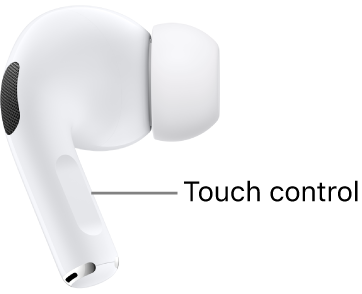
AirPods Pro 2 controls and gestures

With the Touch control on the stem of both AirPods Pro 2, you can do any of the following:

  • Play and pause audio: Press the stem. To resume playback, press it again.
  • Play the next track: Double-press the stem.
  • Play the previous track: Triple-press the stem.
  • Answer a call: When you receive a call, press the stem.
  • Adjust volume: Lightly swipe up or down on the stem.
  • You can also turn on Personalized Volume to automatically adjust the volume based on listening preferences and your environment. See Use Conversation Awareness, Personalized Volume, and Loud Sound Reduction.
  • Switch between Noise Cancellation, Transparency, and Adaptive Audio noise control modes: You can set either of your AirPods to perform this action when you press and hold the stem. See Change what the force sensor or Touch control does.
  • Activate Siri: You can set either of your AirPods to perform this action when you press and hold the stem. See Use Siri with AirPods.


This thread has been closed by the system or the community team. You may vote for any posts you find helpful, or search the Community for additional answers.

AirPods Conversational Awareness gesture

Welcome to Apple Support Community
A forum where Apple customers help each other with their products. Get started with your Apple Account.