Camera app crashing on my iPhone 16 Pro Max

Having issue on my iPhone 16 pro max 512 gb when launching camera control from Lock Screen it’s crashing the camera app. Screen turns black and crashing. Also phone seems to be getting abnormally hot when playing games or recoding video for a short period of time. Anyone else experiencing these issues and wondering if it’s a software or hardware issue.


[Re-Titled by Moderator]

iPhone 16 Pro Max, iOS 18

Posted on Sep 26, 2024 11:33 AM

Reply
Question marked as Top-ranking reply

Posted on Oct 8, 2024 5:21 PM

Worked with Apple Support. We tried reapplying the latest upgrade via my Mac and the phone in restore mode. Problem persisted a couple days later. I was advised the next step was to completely wipe the phone and reinstall everything from scratch, not from backup, as the culprit is likely somewhere in my backup. I did that over the weekend, took about 8 hours. It's been two days without the issue returning. I will continue to monitor.

401 replies
Question marked as Top-ranking reply

Oct 8, 2024 5:21 PM in response to RyTheITGuy

Worked with Apple Support. We tried reapplying the latest upgrade via my Mac and the phone in restore mode. Problem persisted a couple days later. I was advised the next step was to completely wipe the phone and reinstall everything from scratch, not from backup, as the culprit is likely somewhere in my backup. I did that over the weekend, took about 8 hours. It's been two days without the issue returning. I will continue to monitor.

Oct 8, 2024 5:26 PM in response to KaeBFly

I restarted the phone 6 days prior. That resolved the issue for 6 days. After 6 days the issue returned. That's when I contacted Apple support. They had me connect it to my Mac and then start the phone in recovery mode. We reinstalled the latest update (18.0 on that day) over top of what was there (this made it so I did not lose anything). This method helped for a day and then the issue returned. I upgraded to iOS 18.0.1, but that did not help, either. Apple Support told me all hardware sensors were fine when we ran diagnostics, so the issue must lie somewhere with something in my backup that I restored to the phone. My only recourse after that was to wipe the phone, reinstall iOS from scratch, and NOT restore a backup, but rather restore every app individually. It took around 8 hours to do, but I finished that 3 days ago. I have not had an issue since doing that, but then again, my phone went 6 days in between restarts without an issue, so who knows. BUT, the Apple Tech said since the diagnostics all passed it was NOT a hardware issue.

Oct 8, 2024 7:52 PM in response to torrey145

Friends ... issue resolved ...


  1. As per my last update here as guided by Apple Support ... I had placed my 16 pro max in recovery mode ... done a clean install of iOS 18.0.1 and restored my phone from backup made on Mac. Camera crashing issue reappeared after one day.
  2. Did a complete erase of contents and settings on the iPhone on version iOS 18.0.1 the next day and DID NOT RESTORE FROM BACKUP ... set it up as new iPhone ... was cumbersome to download everything again but camera app is not crashing since. It's been more than 36 hours and I've used the camera app several times without issue. ISSUE RESOLVED SO FAR.


Summary - As per Apple Support ... Do a clean install from recovery mode of iOS 18.0.1 from your Mac or PC and set it up as new iPhone. DO NOT RESTORE FROM BACKUP.

Oct 12, 2024 5:08 AM in response to torrey145

My iPhone 16 Pro was behaving the same way and I made an appointment at my local Apple Store. The tech scanned my phone for any hardware issues and found none. He then suggested that when I setup my new phone from my old iPhone 12 Pro backup, the system files from that phone weren’t playing nicely with the new phone. He suggested that we restore the phone to the factory settings and then install all of my apps manually and setup the phone from scratch. Sounds like a pain but everything saved to iCloud (Photos, Passwords, Mail, etc.)transferred flawlessly. I can happily say that it worked and now the camera works perfectly! I hope that this helps!

Oct 14, 2024 8:02 AM in response to torrey145

I have been experiencing this problem many times a day, rebooting my 16 pro for it to work only for a

very short time. Camera crashes, heating, you name it. It took me a long time to

have everything working after the change from my old phone, even recovering a copy

so I was not willing to start from a fresh OS and download and configure

everything, specially when I read that this does not seem to work. But I read

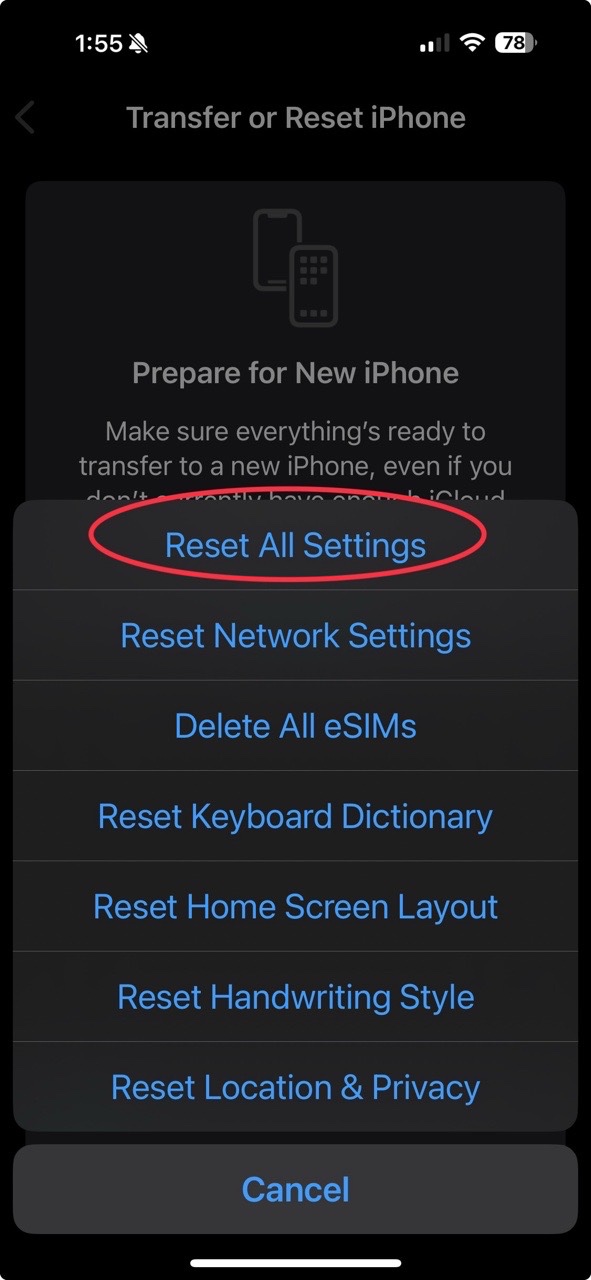
that someone tried “resetting all settings” under settings- General - transfer

or reset iPhone - reset. I tried that yesterday and it seems to have worked! No

issues since! I can open my camera and take pictures now when before it would

crash immediately. True I had to install all my cards again in wallet,

configure my alarms, notifications, WiFi passwords etc but my watch was still

connected, my apps mostly configured… not too bad.

Oct 18, 2024 11:02 AM in response to BAGBOY1

Ok, I wanted to wait a week before posting my results because some fixed listed will still have the issue 3 or 4 days later return. Now thats it’s been 9 days I feel comfortable confirming that doing a full reset will fix the issue without loosing all your apps. I did not have to install a fresh iOS for this fix. I would recommend updating to iOS 18.0.1 or newer first.


To be clear. I am glad the camera is working. But not happy to have to do this just to fix something apple wont admit to being a software screw up on their part. It probably the same settings they changed that bricked some of the new iPad Pro M45 models.


CAUTION: You do not have to do erase all. Just do RESET ALL SETTINGS.

Under SETTINGS app

GENERAL

At the bottom TRANSFER or RESET iPhone

RESET

Then choose RESET ALL SETTINGS


Although reset all setting can be annoying it’s not as bad as loosing all your apps and app arrangements on the phone.


In short it’s like setting up a new phone without having to enter your iCloud password, email account passwords, pairing bluetooth devices or waiting for all the apps to download again. But this has fixed the camera issues, and an issue I had with a 3rd party wireless charger only charging to 65% now works. This is still annoying and takes some time if you have a lot of custom settings and apps installed like I do, but its faster then a full clean install and setting everything up again without a backup.


Once you do this, you will want to run a backup so the corrupted version gets over written in the cloud. And again run a backup once you have set everything up. NOTE: I had backup photos turned off so It wouldn’t use all my iCloud space. The reset turned photos back on causing my backup fail. So just turn off what you had off before and the backup should work again.


Home Automation NOTE: By doing a reset all settings this did not affect my HomeKit setup with 60 automations or my shortcut app with 117 shortcuts. NOTE: Some automations may fail because you might have to give location services permissions again to the Home app.


Resting all settings will require you to do the following so make sure you know your app logins and WiFi passwords. Or I would recommend changing your app login if you forgot it before doing a reset all.

Set up zoom and text sizes and any accessibility settings.

Set up WiFi passwords.

Set up Apple Pay

Apple Cash

Log into all the apps again

Setup Face ID and phone password again

Set up Mission Control preferences if you changed them previously

Set up photos app preferences and order if you had changed them

Reset backup settings

Connect car play again

And maybe some other little things I might be missing.

Oct 30, 2024 3:56 PM in response to NomadMon

NomadMon wrote:

My new iPhone 16 pro 512 also has the same problem. Today, I went to the shop, and he asked me to back up, reset the phone, and try it without the data, and if it works, then I can restore it. He also suspects the bug is in the back-up rather than a hardware problem.

Seeing all the comments here, I think this is a serious software issue!

Lot's of people who have updated to iOS 18.1, which was released on Monday have come here to say their camera issues are completely resolved. Have you updated your phone to 18.1? If no, you should do that as soon as you can.

Sep 28, 2024 1:08 AM in response to torrey145

I think there’s an issue with setting up the new phone from an old profile. I used one of ChatGPT’s suggestions and it worked on my 16 Pro: Reset All Settings


• Go to Settings > General > Reset > Reset All Settings. This won't erase your data but will reset system settings.


I did one more backup before this:


iCloud Keychain


If you were using iCloud Keychain to store your passwords, they should automatically sync back to your device after the reset. Make sure iCloud Keychain is turned on:


  • Go to Settings > [Your Name] > iCloud > Keychain.


  • Make sure iCloud Keychain is toggled

ON.


This will restore your saved Wi-Fi passwords, website logins, and other credentials.


Good luck. This helped me avoid a replacement, but I had to restore a lot of settings to apps not backed up to iCloud even my Apple Wallet.

Oct 17, 2024 7:47 PM in response to torrey145

Figured out an (apparent) fix for this problem:


  1. Wipe the device and restore from an iCloud backup of whatever phone you used before the 16. Alternatively, use QuickStart and set up your wiped 16 using the older device directly (if you still have it.) Frustrating I know, but bear with me.
  2. Once restoration is complete, the most important step you need to follow is DO NOT open the camera app. I cannot emphasise this enough. Your first instinct will be to open the app and check that all is well. DO NOT DO THIS. Doing so will put you right back to square one, and you’ll have to restart the entire process all over again.
  3. Instead, head directly to settings > camera > (scroll down) > macro control and turn it OFF. You MUST do this before opening the camera app for the first time.


For whatever reason, entering the camera app with the macro control toggle enabled even once seems to be akin to opening a Pandora’s box of errors and crashes. From there, turning the option off after the fact does absolutely nothing to stop the issue.


I did this last week and haven’t had any problems since, though I will update if the issue rears its head again. I only figured this fix out after telling my dad to disable the macro mode toggle shortly after he’d set up his new 16 for the first time, in light of all the issues people (including myself) were dealing with. He went on to not experience any of the camera issues I had, at which point it occurred to me that he had never opened the camera app in the first place before disabling the macro toggle.


Really hope this turns out to be a reliable fix.


Oct 22, 2024 5:48 PM in response to torrey145

I’ve been experiencing a frustrating issue with my iPhone 16 Pro Max, which I pre-ordered and was among the first to receive. After setting it up with an iCloud restore from my iPhone 15 Pro Max—which had worked perfectly for a year—I encountered problems just a day or two into using the new phone. The camera began crashing, and the only solution was to restart the device.

Despite speaking with multiple Apple Support technicians and supervisors, collecting logs, and allowing them to remotely access my phone, no solution was found. They recommended waiting for the next iOS update. Unfortunately, when iOS 18.01 was released, the issue worsened. Frustrated, I requested a replacement phone within my 30-day return window. However, the new device exhibited the same problem after just one day of use.

After researching online, I discovered a recommended solution: resetting all settings. This option does not result in data loss, although it does remove Apple Pay cards from your Wallet, as well as location settings for all apps and some preferences. As of now, about 36 hours later, it seems to be working.

Oct 25, 2024 6:22 PM in response to torrey145

Ended up going to the Apple store, and they tech mentioned to me that so far the only solution that he knows would work was to reset the phone, and start from scratch. That was 5 days ago and so far the issue hasn't reappear. if you are planning to reset your phone and start from scratch, make sure you have a backup of your photos and text messages. I had issues with restoring text messages, thankfully I still had my old iPhone, sync up the Messages and downloaded them to the new phone. I hope this helps someone out there. Good luck.

Oct 31, 2024 6:10 PM in response to HugeElvis1

HugeElvis1 wrote:

Same issue on my 16 Pro. Reset works temporarily then it crashes again in an inopportune time. I found a temporary BS fix until Apple figures out what is going on.

I bought the app ProCamera for better options with the camera. The camera crashed repeatedly tonight and I tried ProCamera out of frustration. It worked flawlessly.

Maybe that will point apple techs in the right direction to repair the faulty phone.

I also have occasional overheating issues on my phone.

Im pretty disappointed in IPhone quality if multiple phones have this camera AND overheat problem. A rare “oops” with a quick fix is more Apple’s style, than this current mess.

Since you replied to the first post, can we assume you didn't read any of the later posts, where many reported that updating to the newest iOS 18.1, which was released on Monday, solved their problems, most prominently, the camera issues? Update your iPhone to iOS 18.1

Sep 26, 2024 11:42 AM in response to torrey145

It's normal for the phone get warm when recording video or playing games. Plus if you just got the phone in the last few days, it's working behind the scenes to index millions of bytes of data.


For the camera issue, I've not experienced such an issue on either our 16 Pro or 16 Pro Max. I'd recommend doing a Forced Restart and see if that helps with the camera issue:


  1. Press and quickly release the volume up button
  2. Then immediately press and release the volume down button
  3. Then immediately and KEEP HOLDING the side power button. KEEP HOLDING past the swipe to power off and KEEP HOLDING until you see the Apple Logo, then let go
  4. Once your phone restarts, enter your passcode and try the camera capture button

Oct 10, 2024 6:16 PM in response to torrey145

after speaking to apple support I performed the restore via PC as it apparenlty instealls fresh rather than updating. It took several hours and ~7 attempts before I actually got it to restore and not fail without various unkown or DFU errors.

I tried from a windows 11 device with Apple Devices and a Windows 10 device with iTunes and experienced failures both ways before eventually getting through on attempt 3 on the windows 10 device.

Required a force restart (volume up, volume down, hold side button) between each attempt.


Good news:

I had been running for 36 hours with it set up as a new device no issues with the Camera.


Bad news:

After 36 hours on the fresh setup I decided to restore my backup to have all my app data back and ~19.5 hours later we are back to the same crashing camera issue when a captures if taken.

This thread has been closed by the system or the community team. You may vote for any posts you find helpful, or search the Community for additional answers.

Camera app crashing on my iPhone 16 Pro Max

Welcome to Apple Support Community
A forum where Apple customers help each other with their products. Get started with your Apple Account.

