How can I fix Wi-Fi issues on my new iPhone 15?

I upgraded my service and have a new iPhone 15. I transferred all data today from old phone to new one, however, no matter what I do I cannot get the new phone to access my household wifi. It indicates that it is connected but there are no signal bars. I tried to hot spot as well but to no avail. This is annoying! Can this be fixed?


[Re-Titled by Moderator]


iPhone 15, iOS 18

Posted on Dec 3, 2024 10:26 AM

Reply
Question marked as Top-ranking reply

Posted on Dec 3, 2024 11:46 PM

Sometimes, a simple restart can resolve temporary software glitches. Turn off your iPhone, wait for a few seconds, and then turn it back on.

  1. Restart the device. That's it.
  2. Still not solved --> Force restart iPhone - Apple Support


Settings > General > Transfer or Reset iPhone > Reset > Reset Network Settings: Only network settings are removed.


  • When you reset network settings, previously used networks and VPN settings that weren’t installed by a configuration profile or mobile device management (MDM) are removed. Wi-Fi is turned off and then back on, disconnecting you from any network you’re on. The Wi-Fi and Ask to Join Networks settings remain turned on.
  • To remove VPN settings installed by a configuration profile, go to Settings > General > Profiles & Device Management, select the configuration profile, then tap Remove Profile. This also removes other settings and accounts provided by the profile. See Install or remove configuration profiles on iPhone in this guide.
  • To remove network settings installed by MDM, go to Settings > General > Profiles & Device Management, select the management, then tap Remove Management. This also removes other settings and certificates provided by MDM. See “Mobile device management (MDM)” in the iOS Deployment Reference.
  • Reset your Network Settings. Tap Settings > General > Reset > Reset Network Settings. This also resets Wi-Fi networks and passwords, cellular settings, and VPN and APN settings that you've used before.

If the above fails...


Settings > General > Transfer or Reset iPhone > Reset > Reset All Settings: All settings—including network settings, the keyboard dictionary, the Home screen layout, location settings, privacy settings, and Apple Pay cards—are removed or reset to their defaults. No data or media are deleted.


  1. Reset All Settings: Return iPhone settings to their defaults - Apple Support:- Return iPhone settings to their defaults
  2. You can return settings to their defaults without erasing your content.
  3. If you want to save your settings, back up your iPhone before returning them to their defaults. For example, if you’re trying to solve a problem but returning settings to their defaults doesn’t help, you might want to restore your previous settings from a backup.


Make sure you have the latest updates installed.

  1. Update Over-the-Air (OTA) —> Update your iPhone or iPad - Apple Support (IN)
  2. Update using iTunes/Finder —> Update your iPhone, iPad, or iPod touch - Apple Support (IN)


5 replies
Question marked as Top-ranking reply

Dec 3, 2024 11:46 PM in response to C_Bra_co

Sometimes, a simple restart can resolve temporary software glitches. Turn off your iPhone, wait for a few seconds, and then turn it back on.

  1. Restart the device. That's it.
  2. Still not solved --> Force restart iPhone - Apple Support



Settings > General > Transfer or Reset iPhone > Reset > Reset Network Settings: Only network settings are removed.


  • When you reset network settings, previously used networks and VPN settings that weren’t installed by a configuration profile or mobile device management (MDM) are removed. Wi-Fi is turned off and then back on, disconnecting you from any network you’re on. The Wi-Fi and Ask to Join Networks settings remain turned on.
  • To remove VPN settings installed by a configuration profile, go to Settings > General > Profiles & Device Management, select the configuration profile, then tap Remove Profile. This also removes other settings and accounts provided by the profile. See Install or remove configuration profiles on iPhone in this guide.
  • To remove network settings installed by MDM, go to Settings > General > Profiles & Device Management, select the management, then tap Remove Management. This also removes other settings and certificates provided by MDM. See “Mobile device management (MDM)” in the iOS Deployment Reference.
  • Reset your Network Settings. Tap Settings > General > Reset > Reset Network Settings. This also resets Wi-Fi networks and passwords, cellular settings, and VPN and APN settings that you've used before.
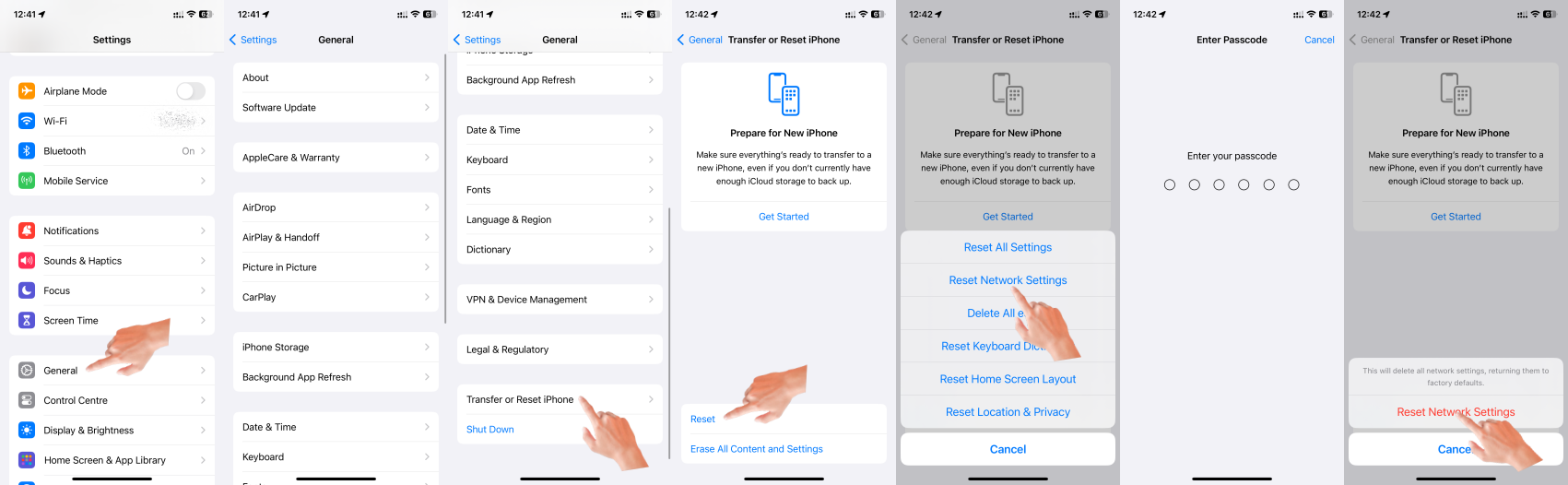
If the above fails...


Settings > General > Transfer or Reset iPhone > Reset > Reset All Settings: All settings—including network settings, the keyboard dictionary, the Home screen layout, location settings, privacy settings, and Apple Pay cards—are removed or reset to their defaults. No data or media are deleted.


  1. Reset All Settings: Return iPhone settings to their defaults - Apple Support:- Return iPhone settings to their defaults
  2. You can return settings to their defaults without erasing your content.
  3. If you want to save your settings, back up your iPhone before returning them to their defaults. For example, if you’re trying to solve a problem but returning settings to their defaults doesn’t help, you might want to restore your previous settings from a backup.
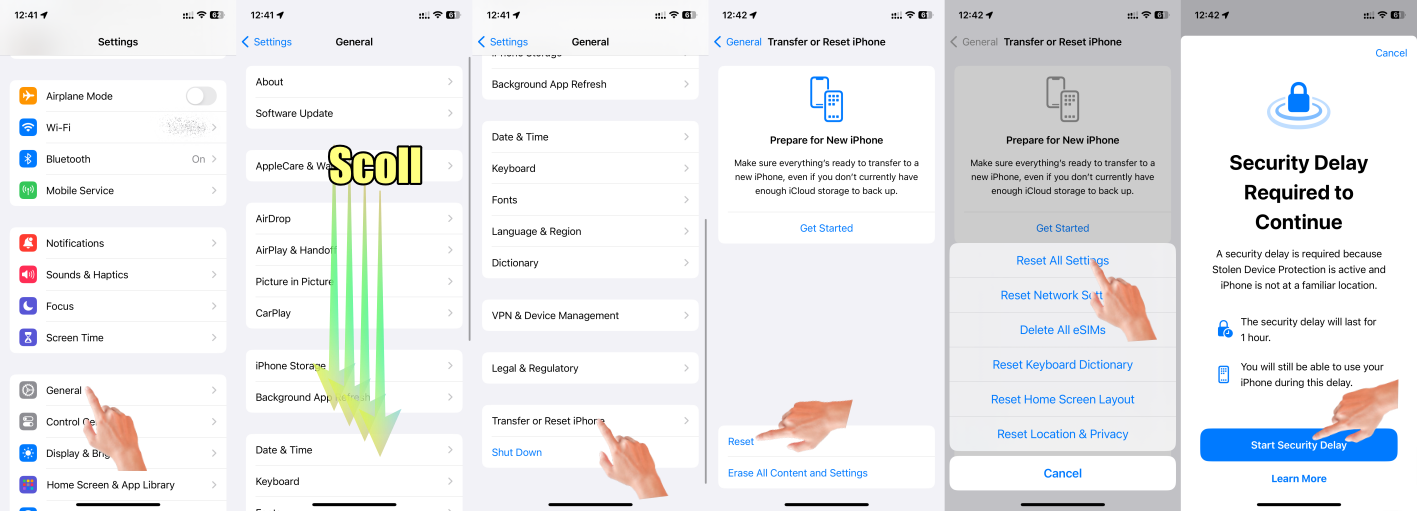


Make sure you have the latest updates installed.

  1. Update Over-the-Air (OTA) —> Update your iPhone or iPad - Apple Support (IN)
  2. Update using iTunes/Finder —> Update your iPhone, iPad, or iPod touch - Apple Support (IN)


Dec 4, 2024 9:09 AM in response to C_Bra_co

C_Bra_co wrote:

I upgraded my service and have a new iPhone 15. I transferred all data today from old phone to new one, however, no matter what I do I cannot get the new phone to access my household wifi. It indicates that it is connected but there are no signal bars. I tried to hot spot as well but to no avail. This is annoying! Can this be fixed?

Basics first:


Have you tried other Wi-Fi networks (Starbucks, MacDonalds, your local library, etc)?


Have you restarted your router by removing all power for about 15 seconds? Here’s how you know that is necessary: Go to Settings/Wi-Fi, tap on the i next to the network that is connected but not working, and look at the IP address. If it begins 196.254 that means your router is not assigning new IP addresses. Restarting it will fix that.


If that isn’t the problem see the post from SravanKrA

Dec 4, 2024 7:27 AM in response to C_Bra_co

C_Bra_co wrote:

I upgraded my service and have a new iPhone 15. I transferred all data today from old phone to new one, however, no matter what I do I cannot get the new phone to access my household wifi. It indicates that it is connected but there are no signal bars. I tried to hot spot as well but to no avail. This is annoying! Can this be fixed?

If you try everything that SravanKrA suggests and still nothing, you may need to return the phone. If you purchased if from Apple within the last 14 days, you should be able to exchange it. Don't make a Genius Bar appointment, just take everyone back.

Dec 3, 2024 11:44 PM in response to C_Bra_co

I’m afraid it can’t be fixed, unfortunately. I’ve seen similar issues across this forum, even people that made a complete DFU restore to their iPhones / iPads say that it didn’t fix it, nor even a replacement iPhone / iPad, I mean, the WiFi issues keep persisting no matter what, and it isn’t any network problem, nor wireless interference, just unexpected behavior


Dec 4, 2024 9:10 AM in response to Manullascard488

Manullascard488 wrote:

I’m afraid it can’t be fixed, unfortunately. I’ve seen similar issues across this forum, even people that made a complete DFU restore to their iPhones / iPads say that it didn’t fix it, nor even a replacement iPhone / iPad, I mean, the WiFi issues keep persisting no matter what, and it isn’t any network problem, nor wireless interference, just unexpected behavior

Sorry, but that is nonsense. It can be fixed easily unless it is a hardware failure.

This thread has been closed by the system or the community team. You may vote for any posts you find helpful, or search the Community for additional answers.

How can I fix Wi-Fi issues on my new iPhone 15?

Welcome to Apple Support Community
A forum where Apple customers help each other with their products. Get started with your Apple Account.


