Sometimes, a simple restart can resolve temporary software glitches. Turn off your iPhone, wait for a few seconds, and then turn it back on.
- Restart the device. That's it.

- Still not solved --> Force restart iPhone - Apple Support


Settings > General > Transfer or Reset iPhone > Reset > Reset Network Settings: Only network settings are removed.
- When you reset network settings, previously used networks and VPN settings that weren’t installed by a configuration profile or mobile device management (MDM) are removed. Wi-Fi is turned off and then back on, disconnecting you from any network you’re on. The Wi-Fi and Ask to Join Networks settings remain turned on.
- To remove VPN settings installed by a configuration profile, go to Settings > General > Profiles & Device Management, select the configuration profile, then tap Remove Profile. This also removes other settings and accounts provided by the profile. See Install or remove configuration profiles on iPhone in this guide.
- To remove network settings installed by MDM, go to Settings > General > Profiles & Device Management, select the management, then tap Remove Management. This also removes other settings and certificates provided by MDM. See “Mobile device management (MDM)” in the iOS Deployment Reference.
- Reset your Network Settings. Tap Settings > General > Reset > Reset Network Settings. This also resets Wi-Fi networks and passwords, cellular settings, and VPN and APN settings that you've used before.
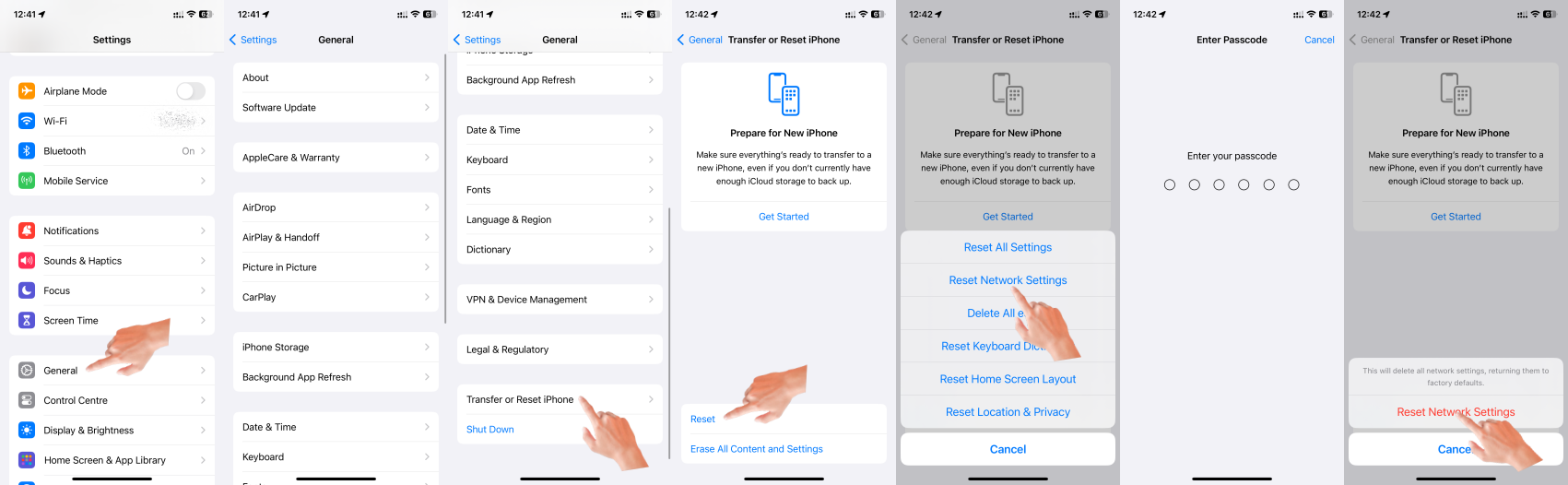
If the above fails...
Settings > General > Transfer or Reset iPhone > Reset > Reset All Settings: All settings—including network settings, the keyboard dictionary, the Home screen layout, location settings, privacy settings, and Apple Pay cards—are removed or reset to their defaults. No data or media are deleted.
- Reset All Settings: Return iPhone settings to their defaults - Apple Support:- Return iPhone settings to their defaults
- You can return settings to their defaults without erasing your content.
- If you want to save your settings, back up your iPhone before returning them to their defaults. For example, if you’re trying to solve a problem but returning settings to their defaults doesn’t help, you might want to restore your previous settings from a backup.
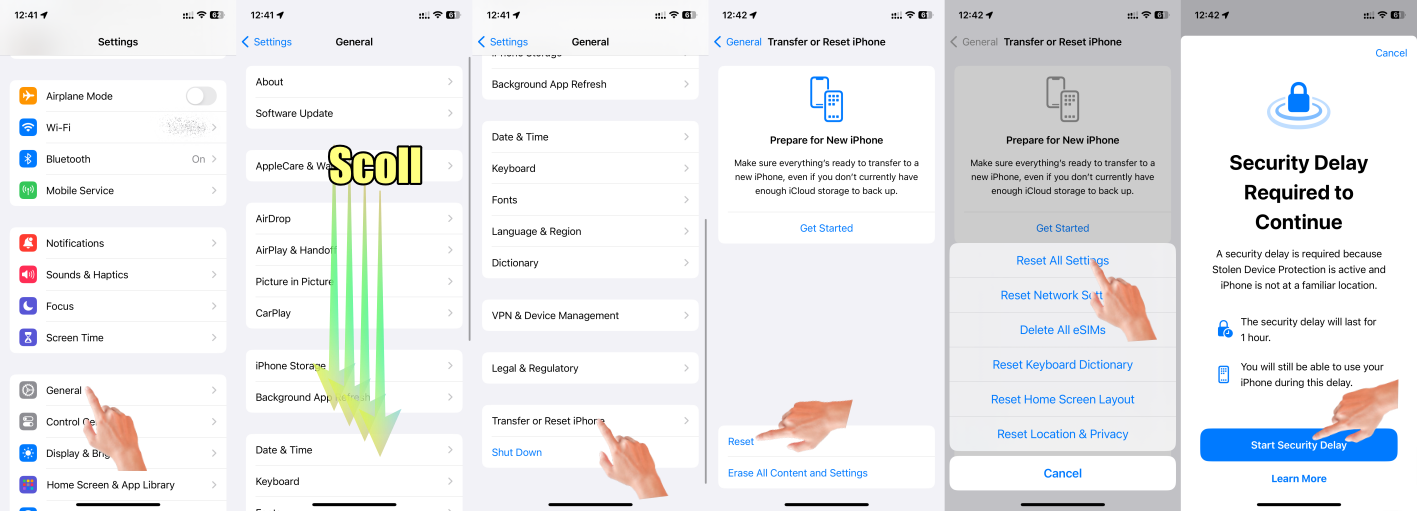
Make sure you have the latest updates installed.
- Update Over-the-Air (OTA) —> Update your iPhone or iPad - Apple Support (IN)
- Update using iTunes/Finder —> Update your iPhone, iPad, or iPod touch - Apple Support (IN)
If none of the above steps resolve the issue, it is recommended to reach out to Apple Support or visit an authorized service center for further assistance. They can provide specific guidance based on your device model and iOS version.
If nothing above works probably it could be your iPhone may have a WiFi radio or antenna problem. In that case, take your device to an Apple Retail Store or Apple Authorized Service Provider, or contact Apple Support and get the hardware tested and if needed repaired/replaced.
Find Locations - Location Selector - Apple
Contact Apple for support and service - Apple Support
Get a Genius Bar Reservation and Apple Support Options - Apple
Contact Genius Bar. Manage Reservations - My Reservations - Apple




