Best charging practices for 2024 MacBook Pro (M4)

Hi. I am new to MacBook. I got mine, 2024 MacBook Pro (M4). May I know when is the best time to charge? (At what % should I start plug in?)

do I keep it to 100% then keep it plugged in or stop when it is hitting 80%?


[Re-Titled by Moderator]

Original Title: MACBOOK PRO CHARGING

MacBook Pro 14″, macOS 15.5

Posted on Sep 25, 2025 10:05 AM

Reply
Question marked as Top-ranking reply

Posted on Sep 25, 2025 10:32 AM

The best practice is to plug into power whenever it’s convenient and run on battery only when you cannot connect to power. Your Mac uses Optimized Battery Charging, which is enabled by default. That is designed to charge the battery in a way that balances increased battery lifespan with your personal usage patterns. 


About battery health management in Mac notebooks - Apple Support


To confirm that Optimized Battery Charging is enabled, go to System Settings > Battery then click the (i) to the right of Battery Health.
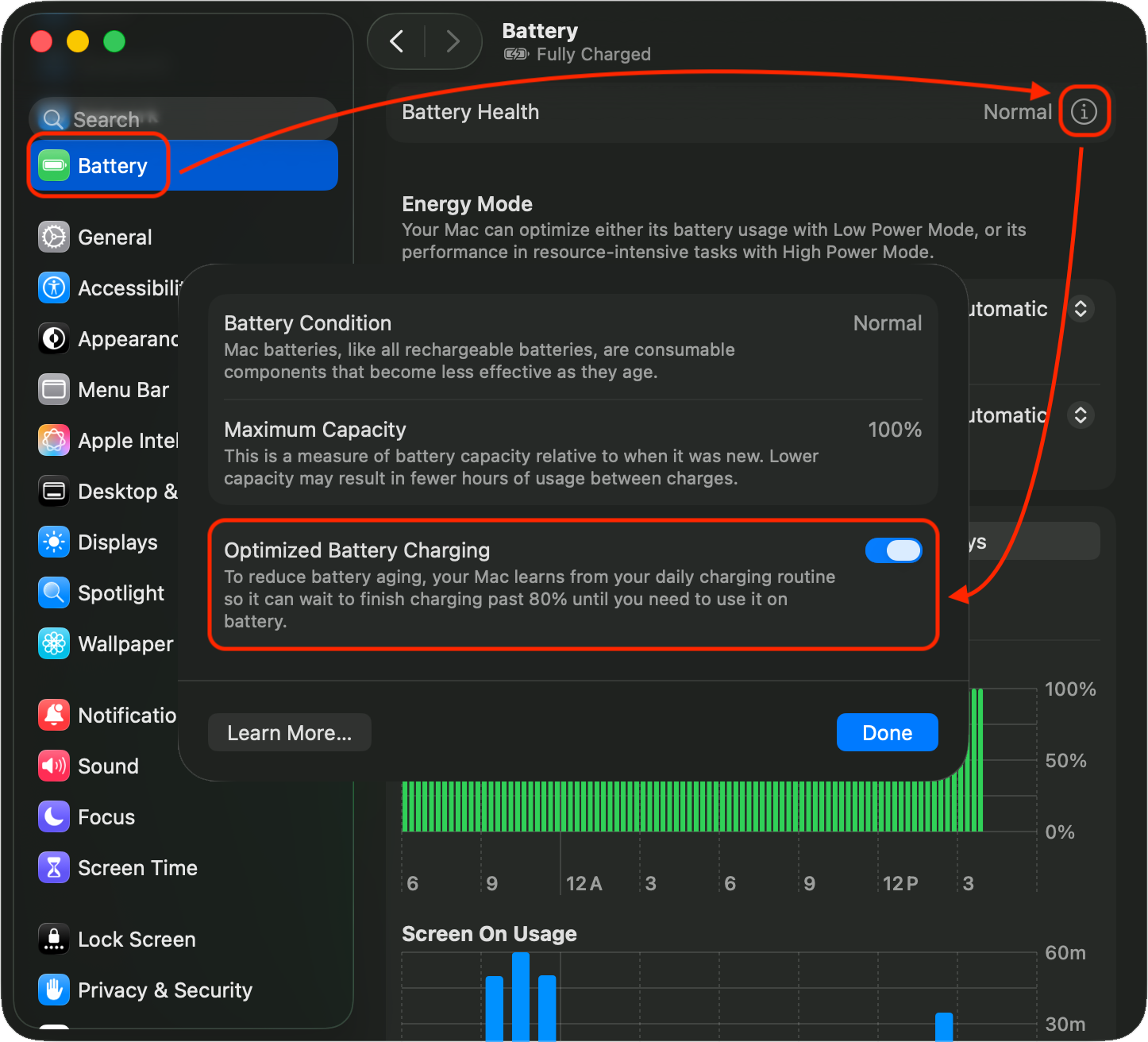


If your Mac is usually plugged in, macOS will pause charging at 80% full since that’s better for the battery long term. If you frequently run on battery, macOS will charge the battery to 100%. That behavior will change depending on your usage. For example, I use my work MacBook Pro connected to a dock for most of the week, and charging pauses at 80%. If I run on battery a few hours for a couple of days, it will start charging to 100%. If I then keep the Mac plugged in for a couple of days, it will again pause at 80%. When your Mac decides to hold the battery at 80% charge, it will bring it to that level even if the battery is fully charged and the Mac is connected to power, which is what one of my Macs did here:
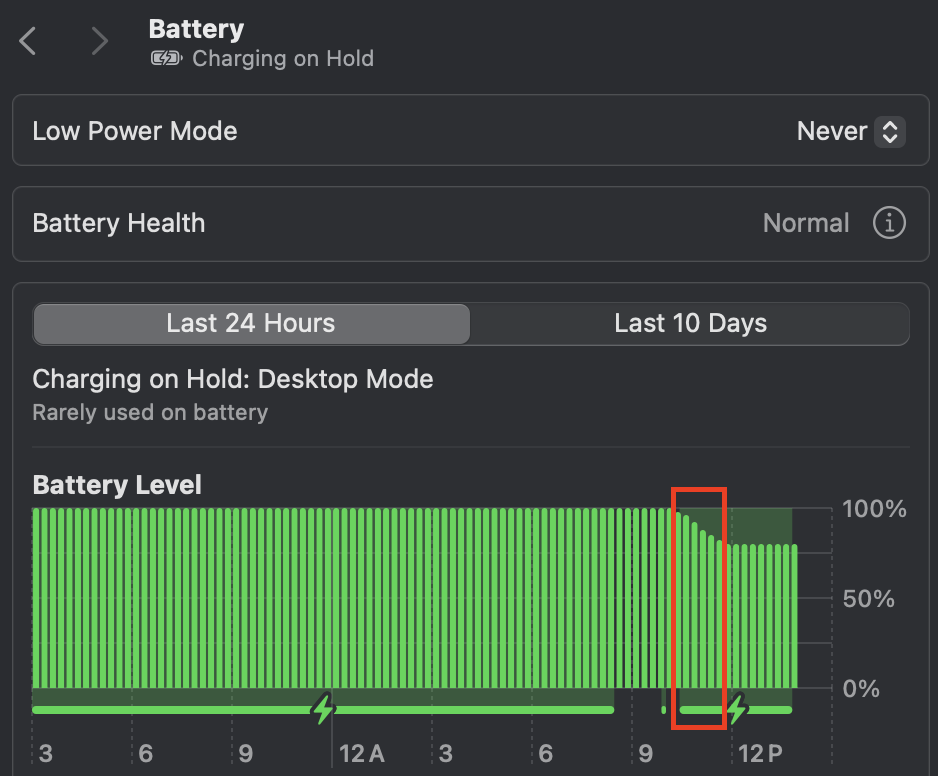


If charging is paused, you can override that by clicking on the Battery icon in the Menu Bar or Control Center (you may need to enable that in System Settings > Menu Bar) and select Charge to Full Now.



3 replies
Question marked as Top-ranking reply

Sep 25, 2025 10:32 AM in response to aryssa16

The best practice is to plug into power whenever it’s convenient and run on battery only when you cannot connect to power. Your Mac uses Optimized Battery Charging, which is enabled by default. That is designed to charge the battery in a way that balances increased battery lifespan with your personal usage patterns. 


About battery health management in Mac notebooks - Apple Support


To confirm that Optimized Battery Charging is enabled, go to System Settings > Battery then click the (i) to the right of Battery Health.


If your Mac is usually plugged in, macOS will pause charging at 80% full since that’s better for the battery long term. If you frequently run on battery, macOS will charge the battery to 100%. That behavior will change depending on your usage. For example, I use my work MacBook Pro connected to a dock for most of the week, and charging pauses at 80%. If I run on battery a few hours for a couple of days, it will start charging to 100%. If I then keep the Mac plugged in for a couple of days, it will again pause at 80%. When your Mac decides to hold the battery at 80% charge, it will bring it to that level even if the battery is fully charged and the Mac is connected to power, which is what one of my Macs did here:


If charging is paused, you can override that by clicking on the Battery icon in the Menu Bar or Control Center (you may need to enable that in System Settings > Menu Bar) and select Charge to Full Now.


Sep 25, 2025 10:31 AM in response to aryssa16

aryssa16 wrote:

Hi. I am new to MacBook. I got mine, 2024 MacBook Pro (M4). May I know when is the best time to charge? (At what % should I start plug in?)
do I keep it to 100% then keep it plugged in or stop when it is hitting 80%?

[Re-Titled by Moderator]
Original Title: MACBOOK PRO CHARGING


You do not have to micro-manage battery charging, let the built in software work for you. Use your mac as you see fit.


The rule of thumb—if you are near the mains leave it plugged in, if you need the portability then run on the battery only—this is how you help optimize your battery charging and extend the working life of your battery by reducing the cycle count.


About BHM battery health management M1/M2/M3/M4 SoC

About battery health management in Mac notebooks - Apple Support


you have an expected 1000 cycle count— it will most likely out live the life of the machine

Determine battery cycle count for Mac laptops - Apple Support


This thread has been closed by the system or the community team. You may vote for any posts you find helpful, or search the Community for additional answers.

Best charging practices for 2024 MacBook Pro (M4)

Welcome to Apple Support Community
A forum where Apple customers help each other with their products. Get started with your Apple Account.