”Aktiveringsinformationen var ogiltig” Hur löser man det?

Raderat min iPad 6:e gen och tagit bort från mitt konto. Kom på att jag ville fota av en del av systeminställningarna eftersom jag ska sälja den. Försökte installera om den via min nya iPad 9:e gen ”går inte att aktivera eftersom aktiveringsservern inte är tillgänglig”.

Försökte via windator och iTunes ”Aktiveringsinformationen var ogiltig”

Hur löser man det?

//Annika

iPad, iPadOS 26

Posted on Oct 12, 2025 2:39 AM

Reply
Question marked as Top-ranking reply

Posted on Oct 12, 2025 2:49 AM

Machine translation from Swedish:


“Activation information was invalid” How to fix it?

Deleted my iPad 6th gen and removed it from my account. Figured I wanted to take a picture of some of the system settings because I’m selling it. Tried reinstalling it via my new iPad 9th gen “cannot activate because the activation server is unavailable”.

Tried via windator and iTunes “Activation information was invalid”

How to fix it?


Start here >>> If you can't activate your iPhone or iPad (Wi-Fi + Cellular) - Apple Support


If you are experiencing difficulties with (re)activation of your iPad, you may have more success if you connect your iPad to a Windows PC (with iTunes for Windows installed - or more recent Apple Devices App) or a Mac computer (with iTunes or Finder - as appropriate for the installed version of macOS). Once connected to your computer, your iPad will be detected - and you should be able to activate using iTunes.


  1. Make sure that you have the latest version of macOS or the latest version of iTunes.
  2. Check that your computer has an Internet connection.
  3. With the cable that came with your iPad, connect your iPad to your computer. Locate your device on your computer.
  4. Wait while your computer detects and activates your iPad:
  • If you see an alert that shows "Set up as New" or "Restore from Backup", it means your iPad is activated.
  • If you get an error message that says the "activation information was invalid" or "activation information could not be obtained from the device", use recovery mode to restore your iPhone.


A restart of your WiFi Router and/or a change of DNS settings may also be helpful.


To restart you home router, disconnect power - then wait at least 30 seconds before restarting. When you router has rebooted (which may take several minutes), force-restart your iPad:


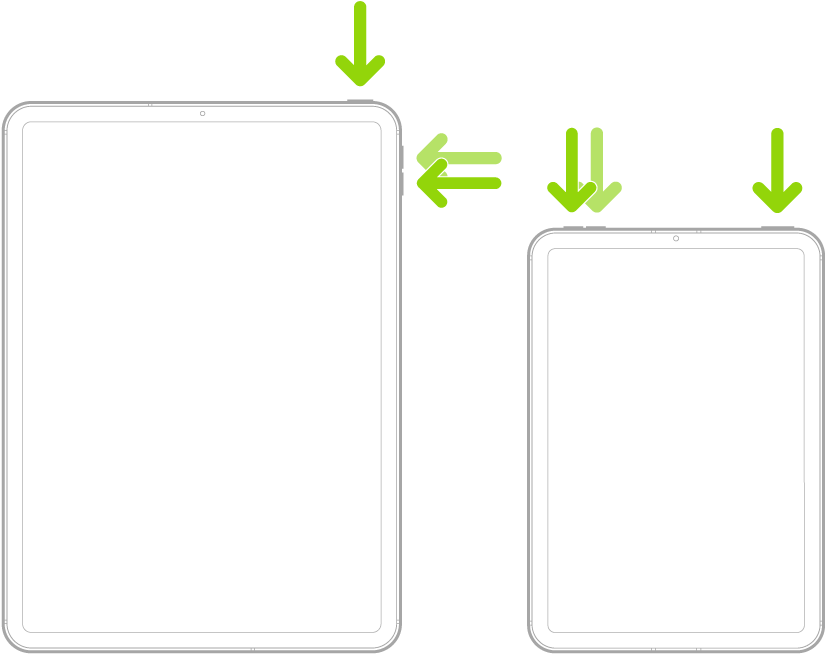
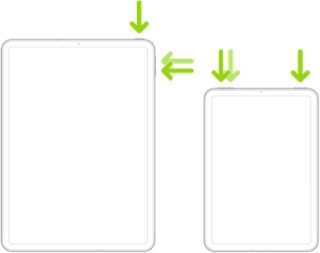
Force restart iPad (models with Face ID or with Touch ID in the top button)

If your iPad doesn’t have the Home button, do the following:

  1. Press and quickly release the volume button nearest to the top button.
  2. Press and quickly release the volume button farthest from the top button.
  3. Press and hold the top button.
  4. When the Apple logo appears, release the top button.


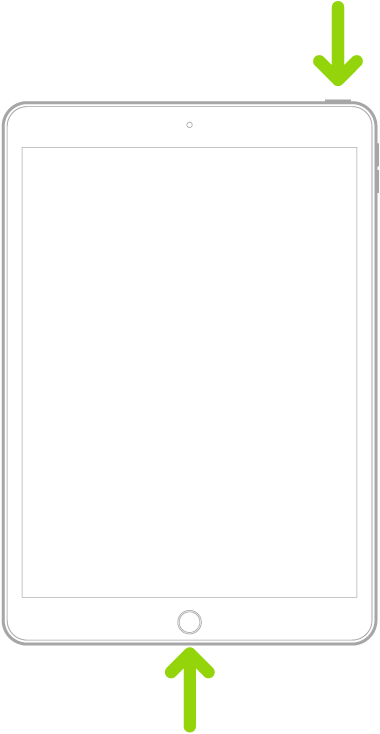
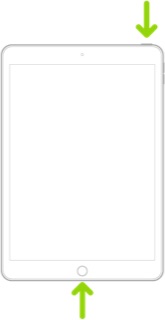
Force restart iPad (models with the Home button)

Press and hold the top button and the Home button at the same time. When the Apple logo appears, release both buttons.


For recommended DNS servers (configured at your home router and/or your iPad), you might choose one of the following Recursive DNS Providers (IPv4 and IPv6 addresses included below):


Quad9

9.9.9.9

149.112.112.112

2620:fe::fe

2620:fe::9


OpenDNS

208.67.222.222

208.67.220.220

2620:0:ccc::2

2620:0:ccd::2


Cloudflare

1.1.1.1

1.0.0.1

2606:4700:4700::1111

2606:4700:4700::1001


Should it be necessary to escalate your issue to Apple Support, the quickest route to engaging with Apple Support will be via the Support link at top-right or bottom-left of this page.

1 reply
Question marked as Top-ranking reply

Oct 12, 2025 2:49 AM in response to AnnFem

Machine translation from Swedish:


“Activation information was invalid” How to fix it?

Deleted my iPad 6th gen and removed it from my account. Figured I wanted to take a picture of some of the system settings because I’m selling it. Tried reinstalling it via my new iPad 9th gen “cannot activate because the activation server is unavailable”.

Tried via windator and iTunes “Activation information was invalid”

How to fix it?


Start here >>> If you can't activate your iPhone or iPad (Wi-Fi + Cellular) - Apple Support


If you are experiencing difficulties with (re)activation of your iPad, you may have more success if you connect your iPad to a Windows PC (with iTunes for Windows installed - or more recent Apple Devices App) or a Mac computer (with iTunes or Finder - as appropriate for the installed version of macOS). Once connected to your computer, your iPad will be detected - and you should be able to activate using iTunes.


  1. Make sure that you have the latest version of macOS or the latest version of iTunes.
  2. Check that your computer has an Internet connection.
  3. With the cable that came with your iPad, connect your iPad to your computer. Locate your device on your computer.
  4. Wait while your computer detects and activates your iPad:
  • If you see an alert that shows "Set up as New" or "Restore from Backup", it means your iPad is activated.
  • If you get an error message that says the "activation information was invalid" or "activation information could not be obtained from the device", use recovery mode to restore your iPhone.


A restart of your WiFi Router and/or a change of DNS settings may also be helpful.


To restart you home router, disconnect power - then wait at least 30 seconds before restarting. When you router has rebooted (which may take several minutes), force-restart your iPad:


Force restart iPad (models with Face ID or with Touch ID in the top button)

If your iPad doesn’t have the Home button, do the following:

  1. Press and quickly release the volume button nearest to the top button.
  2. Press and quickly release the volume button farthest from the top button.
  3. Press and hold the top button.
  4. When the Apple logo appears, release the top button.


Force restart iPad (models with the Home button)

Press and hold the top button and the Home button at the same time. When the Apple logo appears, release both buttons.


For recommended DNS servers (configured at your home router and/or your iPad), you might choose one of the following Recursive DNS Providers (IPv4 and IPv6 addresses included below):


Quad9

9.9.9.9

149.112.112.112

2620:fe::fe

2620:fe::9


OpenDNS

208.67.222.222

208.67.220.220

2620:0:ccc::2

2620:0:ccd::2


Cloudflare

1.1.1.1

1.0.0.1

2606:4700:4700::1111

2606:4700:4700::1001


Should it be necessary to escalate your issue to Apple Support, the quickest route to engaging with Apple Support will be via the Support link at top-right or bottom-left of this page.

This thread has been closed by the system or the community team. You may vote for any posts you find helpful, or search the Community for additional answers.

”Aktiveringsinformationen var ogiltig” Hur löser man det?

Welcome to Apple Support Community
A forum where Apple customers help each other with their products. Get started with your Apple Account.