No mobile signal since 26.2 update

Hi

since updating to 26.2 I have no mobile signal at all and it seems I can only connect to my home wifi but have no option for wifi calls

im in Ireland & using an iPhone 16

any help would be greatly appreciated, I get a lot of calls about medical appointments etc


thanks

iPhone 16

Posted on Dec 19, 2025 2:11 AM

Reply
Question marked as Top-ranking reply

Posted on Dec 19, 2025 3:42 AM

Carrier Update (Required): Released by your Cellular Service provider (Carrier Update), affects your Outgoing / Incoming calls, SMS, Data etc..


How to Update Carrier Settings

You can manually check for and install a carrier settings, update with these steps: Make sure your device is connected to a Wi-Fi or cellular network. Tap Settings > General > About. If an update is available, you'll see an option to update your carrier settings.

Update your carrier settings on your iPhone or iPad - Apple Support


13 replies
Question marked as Top-ranking reply

Dec 19, 2025 3:42 AM in response to frankperth

Carrier Update (Required): Released by your Cellular Service provider (Carrier Update), affects your Outgoing / Incoming calls, SMS, Data etc..


How to Update Carrier Settings

You can manually check for and install a carrier settings, update with these steps: Make sure your device is connected to a Wi-Fi or cellular network. Tap Settings > General > About. If an update is available, you'll see an option to update your carrier settings.

Update your carrier settings on your iPhone or iPad - Apple Support


Jan 31, 2026 9:57 AM in response to Yush08

Please tell me about it , having the same issue i have updated my iphone16 since then no cellular network at all. I don’t know what to do, please help

———-


Troubleshooting Cellular:


Contact your Carrier:

Being your Cellular services are not working, you need to contact your Carrier.


Troubleshooting Cellular Errors:


A. Start with these Links:


B. Install a Cellular Update:

It might be prompting you for a cellular update to install. So, go here for that. Update your Carrier Settings Manually on your iPhone or iPad - Apple Support


C. "No Service":

If "No Service" is shown on the top-left corner of your screen, go here to fix that: If you See No Service or Searching on your iPhone or iPad - Apple Support


What may have Happened:


D. “SOS”:

Go Here: : If you See No Service, Searching, or SOS on your iPhone or iPad - Apple Support

As it reads: "If you see No Service or Searching in the status bar on your iPhone or iPad (Wi-Fi + Cellular), your device isn't connected to a cellular network."

Jan 17, 2026 1:21 AM in response to frankperth

"No mobile signal since 26.2 update: Hi since updating to 26.2 I have no mobile signal at all and it seems I can only connect to my home wifi but have no option for wifi calls im in Ireland & using an iPhone 16 any help would be greatly appreciated, I get a lot of calls about medical appointments etc thanks"

-------


To the OP and ALL those Affected:


This seems to be catching on. So,...

Report this to Apple:

Do your Part: Provide Apple with feedback on this, letting them know about this issue.  Apple may not get back to you directly, but the more feedback they receive on this, the more they will know what is occurring, and what bug fixes to include in updates to come. Apple will know nothing of this, if you don't report it to them.

  1. Go Here: Feedback - iPhone - Apple
  2. Select: "Bug Report" for the "Feedback Type"
  3. Comment: that this all began after installing an update. Include the URL of this thread.
  4. Proceed from there as necessary

Dec 19, 2025 3:41 AM in response to frankperth

It's not always the iOS update's fault!  Many things can cause phone problems.  If you tell people you think it's an iOS update, it might make it harder to fix or find a solution for the real issue.


Remember, the right question often leads to the solution!


Was/Is your device Jailbroken? If that's the situation, please be informed that attributing the issues to iOS updates may not be accurate.


iOS updates aim to enhance user experience, boost security, and fix bugs rather than disrupt core features. The majority of the issues after updates might stem from underlying, unmentioned factors. Updates won't typically alter personal data but may refine settings or features. Backup before major updates for safety. Review Apple's update details and backup advice for a smooth process.


Kindly consider checking your settings and addressing any device issues before attributing the issue to external factors. This could be a pure coincidence that the iOS update affected the iPhone functions.


Before initiating a standard iOS update, it's advisable to create a backup. Have you completed this step? If yes, proceed with the restoration from the backup.


See what each update does: OS — iOS 26, About iOS 18 Updates, About iOS 17 Updates, About iOS 16 Updates, About iOS 15 Updates, About iOS 14 Updates, About iOS 13 Updates, About iOS 12 Updates, and so on...


Dec 19, 2025 3:43 AM in response to frankperth

The cellular signal strength on an iPhone is primarily dependent on the service provider and the network coverage they offer based on the plan you have selected. Different carriers have varying levels of coverage in different geographical areas, and the strength of your signal can fluctuate depending on your proximity to cell towers, obstacles like buildings or natural terrain, and overall network congestion.


It’s important to understand that there are no software settings on your iPhone that can directly boost cellular signal strength. However, if you are consistently experiencing a poor signal despite being in an area with generally good coverage, it’s worth checking a few things. First, ensure your iPhone’s software is up to date, as carrier settings updates can sometimes improve connectivity. You can also try toggling Airplane Mode on and off, which forces the device to reconnect to the network and may establish a stronger signal.



A few carriers (Cellular Service Providers) do not provide Carrier Settings in full, but they offer APN settings, for example

  • Google FI, which has APN to be entered manually as h2g2
  • MTN Ghana, which provides an APN pin to be updated manually, as the internet
  • BSNL in India, which provides APN pin to be updated manually as bsnlnet (Watch the GIF below)
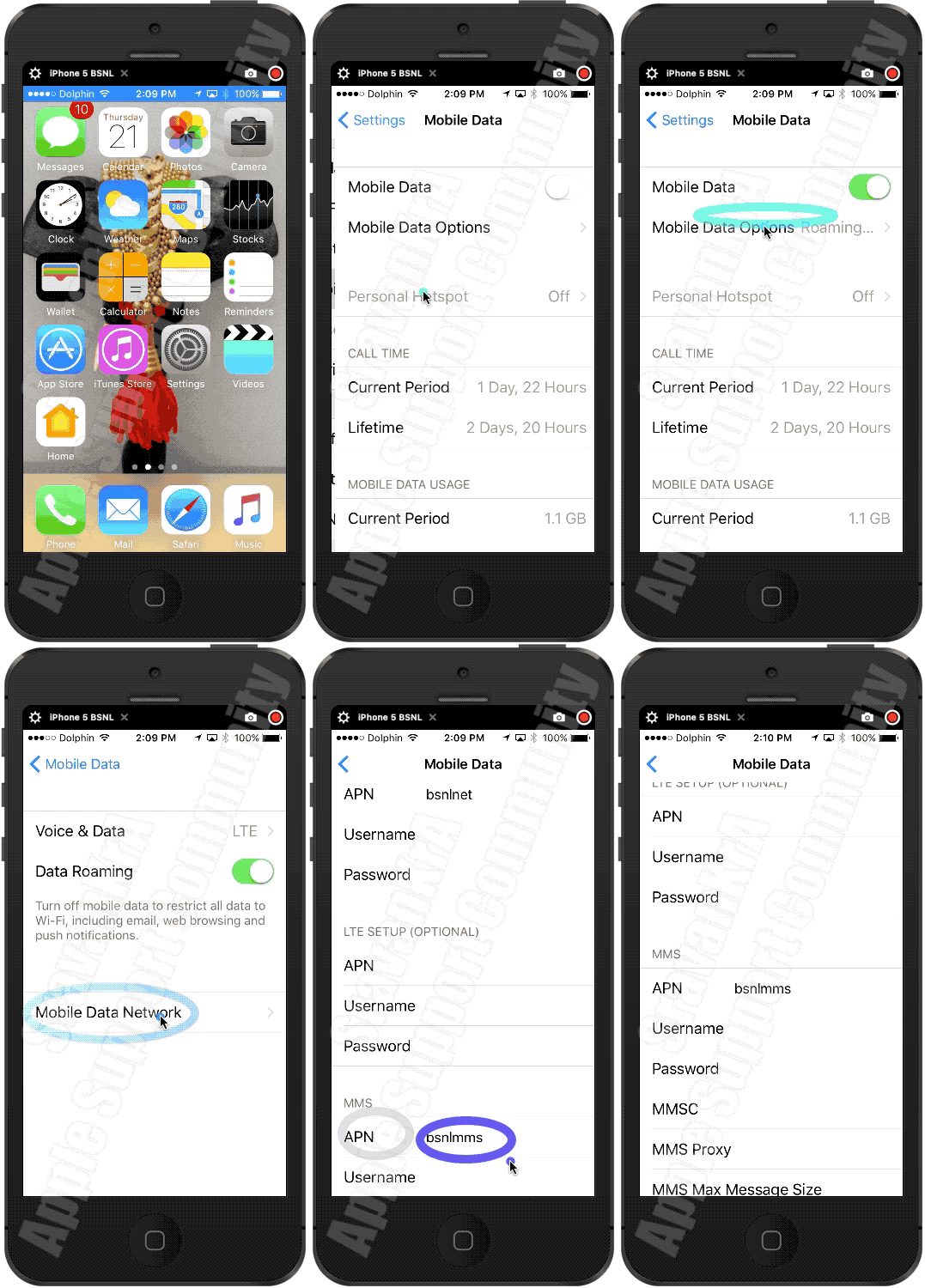

Settings > Mobile Data > APN [under Mobile Data APN] enter the APN pin


View and edit your APN settings

If your carrier allows it, you can view your APN settings in one of the following locations: Settings > Cellular > Cellular Data Options > Cellular Network. Settings> Mobile Data > Mobile Data Options > Mobile Data Network.


View and edit your Access Point Name (APN) on your iPhone ...


Use the APN pin based on your carrier. Ask them (Your Carrier) or search using any search engine.


If these steps don’t help and the problem persists, there’s a possibility that the internal radio antenna of your iPhone may be damaged. This can happen if the device has been dropped or exposed to physical stress. In such cases, having your iPhone inspected and repaired by an authorized service provider is the only solution that could restore proper signal strength. A damaged antenna can significantly impair your ability to connect to cellular networks, leading to dropped calls, slow data speeds, and limited coverage.


If you have either dropped the device accidentally or exposed it to liquid or used it beyond acceptable temperature limits then…


Take your device to an Apple Retail Store or Apple Authorized Service Provider, or contact Apple Support:


Find Locations - Location Selector - Apple


Contact Apple for support and service - Apple Support 


Get a Genius Bar Reservation and Apple Support Options - Apple


Contact Genius Bar.

Manage Reservations - My Reservations - Apple


In summary, while the quality of your cellular signal is largely out of your iPhone’s control and relies on your carrier’s network infrastructure, keeping your device in good physical condition and ensuring software updates are installed can help mitigate connectivity issues.




Dec 19, 2025 5:11 AM in response to SravanKrA

My friend, thank you for your assistance.

i spoke with my carrier.

they asked me to put my sim into another phone and leave it in for at least an hour so they can run tests.

as soon as I out the sim into my old phone I had 3 bars of signal.

so I’m still thinking the network mapping has gone awry after the update.

ill post again after they’ve called me back.

thanks again

This thread has been closed by the system or the community team. You may vote for any posts you find helpful, or search the Community for additional answers.

No mobile signal since 26.2 update

Welcome to Apple Support Community
A forum where Apple customers help each other with their products. Get started with your Apple Account.