
Apple music subscription was renewed but I can’t play music
My Apple music subscription have renewed but yet it’s still not activated
Windows, Windows 11 (26100)
My Apple music subscription have renewed but yet it’s still not activated
Windows, Windows 11 (26100)
Re:Apple music subscription was renewed but I can’t play music
My Apple music subscription have renewed but yet it’s still not activated
Wondering why you can't play music ? What happens when you try ? Error message ?
You may want to sign in, and / or add music of your choice to the Library.
See how to: Sign in to your Apple Account in Apple Music on Windows - Apple Support
Eg: says:
Sign in to your Apple Account in the Apple Music app
"Note: If you already signed in to your Apple Account in the Apple TV app,
you’re automatically signed in to it in Apple Music.
 on your Windows device.
________
If needed: There's much more info. in the above linked article.
and
See how to: Add music to build your Apple Music library on Windows - Apple Support
Eg: says:
"As you get started using the Apple Music app on your Windows device,
you can build your music library — your collection of songs and albums —
in many ways.
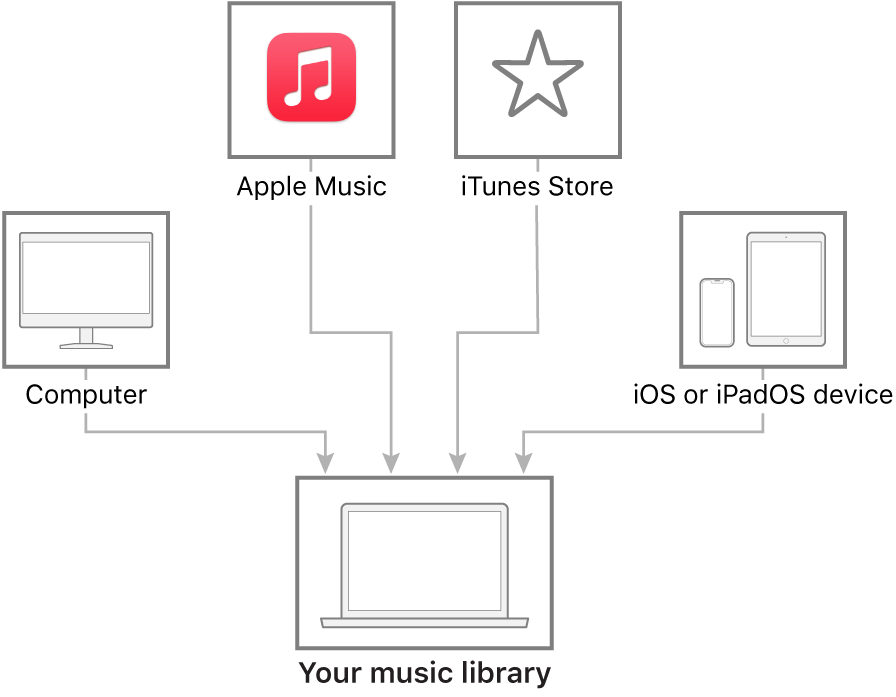
". Again... there's a lot more info. in the above linked article if needed:
____________________
Resource: Apple Music User Guide for Windows - Apple Support
Music Support Website (info. / support / contact options etc.: Music - Official Apple Support
Re:Apple music subscription was renewed but I can’t play music
My Apple music subscription have renewed but yet it’s still not activated
Wondering why you can't play music ? What happens when you try ? Error message ?
You may want to sign in, and / or add music of your choice to the Library.
See how to: Sign in to your Apple Account in Apple Music on Windows - Apple Support
Eg: says:
Sign in to your Apple Account in the Apple Music app
"Note: If you already signed in to your Apple Account in the Apple TV app,
you’re automatically signed in to it in Apple Music.
on your Windows device.________
If needed: There's much more info. in the above linked article.
and
See how to: Add music to build your Apple Music library on Windows - Apple Support
Eg: says:
"As you get started using the Apple Music app on your Windows device,
you can build your music library — your collection of songs and albums —
in many ways.
". Again... there's a lot more info. in the above linked article if needed:
____________________
Resource: Apple Music User Guide for Windows - Apple Support
Music Support Website (info. / support / contact options etc.: Music - Official Apple Support
Apple music subscription was renewed but I can’t play music
