Whether using the Windowed Apps or Stage Manager multitasking modes, Split Screen and Slide Over views remain available in iPadOS 26. As with iPadOS 18, many (but not all) Apps support opening multiple instances of the same App.
iPadOS 26 has introduced new multitasking capabilities and controls - with, optionally, Apps appearing within their own windows instead of being full-screen or appearing in side-by-side split screen. To better understand the changes, I recommend that you start with the video introduction here - and then read the remaining explanations:
Multitask on iPad with iPadOS 26 - Apple Support
iPadOS multitasking has received a significant makeover from that to which you may be accustomed in iPadOS 18.x and earlier - and may take a little time to learn and adjust your workflows. You would be well advised to review the official iPadOS User Guide and the many available online tutorials (such as YouTube) to become better acquainted with the new multitasking interface and associated gestures and controls.
Work with multiple windows at once on iPad - Apple Support
OS - iPadOS 26 - Apple
The three-dot multitasking button with which you are no doubt familiar from earlier versions of iPadOS has been replaced with the traffic-light button to access and control the revised window-based User Interface.
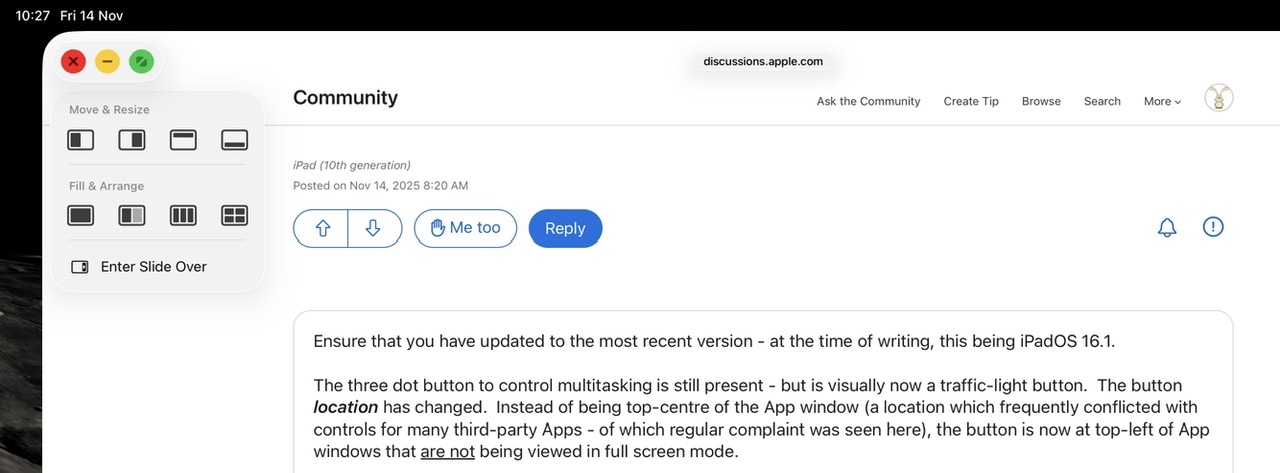
Touch-and-hold (not tap) the traffic light button to expand the full set of windowing controls - which includes a full set of windowing options and side-over:


Tapping the traffic-light multitasking button expands the control - whereas touch-and-hold of the button offers the option of arranging open windows side-by-side, as a triple, or arranged into a quad.
If an App window is being displayed full screen, swiping down from the top-edge of the screen exposes the new top menu-bar - at the left of which you will find the traffic-light button. Again, touch-and-hold to expose the full set of windowing controls:

When operating in Stage Manager mode, you'll note an additional option to quickly open an additional App window for the same App.

