How do I create a graph in numbers?

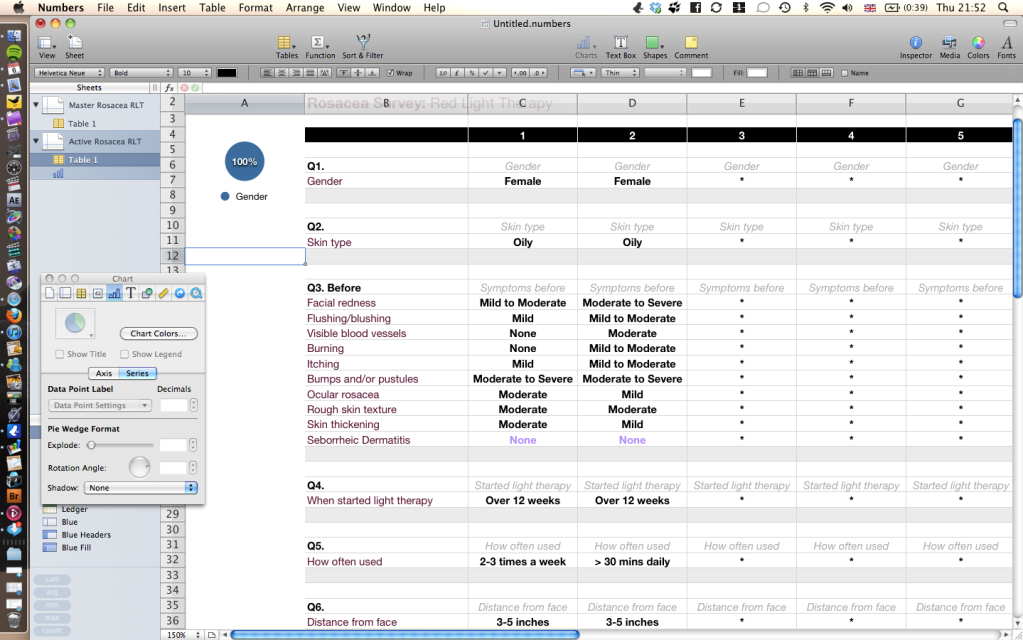
So here is what I have created: http://i1135.photobucket.com/albums/m638/moore778899/Screenshot2011-01-06at21522 8.png

All are drop down lists. You will see that it LOOKS correct in terms of Q1. But when I change one of the responses to male and select just those two cells, then create a pie chart, I only get a full blue circle again!

What cells do I click?
What am I doing wrong?

Macbook Pro 2.2 GHz 15", Mac OS X (10.5.6)

Posted on Jan 6, 2011 2:01 PM

Reply
19 replies

Jan 9, 2011 4:30 PM in response to lawero

lawero wrote:
So, now my only issue is that we're not on a scale 100% model and that the values are not showing as their % - rather 0.900 etc

PS, is there anyway I can ask Numbers to add up the total number of males/females in a formula without having to manually add them up?


Progress! Hurrah!

Scaling to 100% covered in one of my responses (with image) in one of these threads.

Re PS: Count the number of Males. Count the number of Females using the formulas in Jerry's post or the similar formulas in my most recent post here.
Add the cells containing those two counts, using a formula like =B2+C2 (replacing the cell references with the addresses of the two cells actually containing
the separate counts.

See also my note above regarding the "Never Had" responses.

Regards,
Barry

Jan 9, 2011 4:51 PM in response to lawero

Lawero,

You really would benefit from spending an evening or two with the Numbers User Guide, downloadable from a link in the Help Menu. It's not a difficult read and you don't have to memorize it, just read for familiarity. You will learn things like how to add the contents of two cells together or performing other operations.

You will also maximize your experience with Numbers if you break free of the Excel format - islands of disparate data and calculations and charts in a sea of blank cells. Make your tables small and specific to their purpose.

Good luck,

Jerry

Jan 10, 2011 11:09 AM in response to Barry

Hi,

Thank you again.

Don't want to use excel at all if I can. I prefer numbers in lot of ways.

Today at work, I accessed the database I had created very similar to this and sure enough, it recognised the drop downs if there was a numerical value, but just like numbers, it didn't if it was text.

Annoying.

Someone at work tried to help me by showing me that you can write a formula which converts text to a numerical value. So all males = 1, so then I can somehow work out the total number from that.

How do I do this in numbers?

Jan 10, 2011 1:09 PM in response to lawero

lawero wrote:
Today at work, I accessed the database I had created very similar to this and sure enough, it recognised the drop downs if there was a numerical value, but just like numbers, it didn't if it was text.


Formula? Possible values in cell =(s) the formula referenced?

Someone at work tried to help me by showing me that you can write a formula which converts text to a numerical value. So all males = 1, so then I can somehow work out the total number from that.


Formula? Possible values in cell =(s) the formula referenced?

How do I do this in numbers?


What fails when using the formulas offered previously in this discussjon? Results for each possible calue in the referenced cell(s)?

Regards,
Barry

This thread has been closed by the system or the community team. You may vote for any posts you find helpful, or search the Community for additional answers.

How do I create a graph in numbers?

Welcome to Apple Support Community
A forum where Apple customers help each other with their products. Get started with your Apple Account.