MacBook Pro Retina display burn-in?

I first noticed this after my MBP [Retina] had gone to sleep, but: when returning to the login screen (since I have it set to require a password whenever the computer is idle long enough) I noticed what appeared to a very faint ghosting primarily noticeable on darker backgrounds.


After messing around with it a bit, there seems to be a fairly consistent in-display ghosting that occurs without much time at all; I was able to leave my screen on (a little above half-brightness) for about 10-15 minutes and the ghosted "burn" would be of the screen I left it on (which I deliberately reconfigured so that everything would be a new position).


Has anyone else experienced this? Is this a normal thing that I just have to get used to? It's not really noticeable at all in standard use.

MacBook Pro (Retina, Mid 2012), Mac OS X (10.7.4)

Posted on Jun 16, 2012 10:26 PM

Reply
9,629 replies

Nov 10, 2012 10:08 AM in response to mittense

After almost 3 weeks of daily use of mt rMBP unfortunately IR start to get worse 😟


I am very dissapointed, IR is very strong with the CADSOFT Egale program I use for my work.


It is impossible to have a screensave when you do designwork.


I do this work for almost 10 years exclusively on MAC. Also have the 27" cinemascreen (which is IPS) but never ever had anything like this 😟 IT is very dissapointing for a product I paid nearly 4300 euro for.


Otherwise it is an amazing screen, but this just screws it all.


Very very dissapointed. 😟


User uploaded fileUser uploaded file

Nov 10, 2012 10:40 AM in response to mittense

This is a really long thread, and I appologize if this has been asked ad nauseum, but can anyone comment on whether the newest MBPr models are shipping with LG or Samsung, or is it still luck of the draw? I have a MBPr that I took to the Apple Store with a loose hinge (it's actually loose where the monitor attaches to the hinge itself, and is not fixable by tightening a screw). During troubleshooting, one of the "geniuses" scratched the tar out of the chassis with his screw driver, so now I have a scratched up MBPr with loose hinge. Apple Care is offering a replacement, but I fear getting an LG as my current unit is a Samsung. So, any thoughts? Are most of the current units LG or Samsung? 50/50?


Really ashamed of purchasing from Apple, and will no doubt remember my hassles when I consider buying future products.

Nov 10, 2012 1:02 PM in response to noiseordinance

Nobody knows for sure but it seems like it's a gamble as to what you will get with a new order, with maybe more people getting LGs than Samsungs, and most people seem to get Samsungs when they do screen replacements.


I think shame is not a productive emotion for this circumstance. ****** off and angry is more like it - directed all at Apple. At the very least they need to be publicizing the potential for the IR if it is an issue that is not going away, which is what it seems like at this point, so that new buyers wouldn't get suckered in until it's too late. At least you'd know going into it and could decide whether that's ok for your situation.


Seriously good luck with this - let us know what happens.

Nov 10, 2012 1:32 PM in response to noiseordinance

One of the "geniuses" left a screw on the table and put my laptop ontop... then pushed it over to me. "scraaatch"... there goes resale value haha. He didn't notice and when he was putting in the laptop details he wrote "minor scratches on the bottom".... I wan't to tell him "you did that".... but he wouldn't have beleived me.

My last laptop that I took in came out with a wiggly screen as well. These "geniuses" need to be trained better :/

Nov 10, 2012 2:27 PM in response to mittense

I just want to contribute my full IR story to this thread. I bought a very early rMBP in June, which came with a LG display. I started noticing IR after about a month (without reading about it before) and it got worse with time. After it was at a point where the IR was seriously influencing my work I took the machine to the apple store. At the genius bar they seemed to be aware of the issue, and they told me that they would talk to some technicians and call me back as soon as they have some news. One genius "secretely" told me about the LG vs. Samsung issue, and that they probably can't guarantee me that IR will be gone when they replace the display.


I received a call about 1.5 weeks later. At the apple store they first tried to convince me that there is nothing they can do about it, and that the IR is just natural. Since, I'm out of the two week period they couldn't do anything. I argued against this, since the IR clearly didn't show up in the first two weeks, and that it really seriously influences my work. After insisting on it, they ran the checkerboard test, and the pattern was still visible after a minute. One indeed has to be aware that the background color they use in this test is clearly darker than the "darkest solid grey"-background in Mac OS X. Thus, the IR is relatively hard to notice. Nevertheless, since my display failed I was granted a replacement.


It took again a week after I brought my laptop in, and the replacement was done in one evening. It is a Samsung and somehow I have a feeling that this wasn't a coincidence. Given the long time they were "investigating" the problem, I think they might have made sure that the replacement display is a Samsung.The colors of the display are indeed "warmer" (I wouldn't call it yellow though), and I actually prefer them over the colder ones from the LG. However, this is probably a matter of taste. After two weeks there are no other problems with the display, and there is absolutely zero IR.


My conclusion: Every LG has IR; Samsung doesn't, but be aware that colors are different (matter of taste); The checkerboard test with the dark background is hard to fail; One has to insist on a replacement, but otherwise I can't complain about the work of the geniuses.

Nov 11, 2012 9:23 AM in response to mittense

About 4 months ago I bought my first Mac A friend of mine brought a Macbook Pro 15 "Retina Display


After the past 3 months of bliss with the machine, and me acclimate to the environment MacOs, I started researching on the machine and saw that there was a recurring problem on some machines: BURN-IN EFFECT or Image Retention.


I followed the test MacRumors site and saw it was one of the unlucky owners of a Macbook Pro Retina Display (LG Panel) with this problem. The problem does not bother me either, since some image in less than 5 minutes. But honestly a machine for $ 2,200 U can not present a problem for older Plasma TVs.


I called immediately to Apple Brazil and the attendant said: "I know of this problem, Lord!" . I was angry with connection and hung up.


My question is: Does anyone in Brazil has managed to fix this problem?


---


Em Português:


Há cerca de 4 meses comprei meu primeiro Mac. Um amigo meu trouxe um Macbook Pro 15" Retina Display


Após passados os 3 meses de êxtase com a máquina, e me ambientar com o ambiente MacOs, comecei a pesquisar sobre a máquina e vi que havia um problema recorrente em algumas máquinas: O EFEITO BURN-IN ou Retenção de Imagem.


Segui o teste do site MacRumors e vi que era um dos azarados donos de um Macbook Pro Retina Display (Painel LG) com este problema. O problema não me incomoda tanto, visto que a imagem some em menos de 5 minutos. Mas sinceramente uma máquina de U$2.200 não pode apresentar um problema de TVs de Plasma antigas.


Liguei imediatamente para a Apple Brasil e o atendente disse : "Não conheço este problema, Senhor !" . Fiquei irritado com ligação e desliguei.


Minha pergunta é: Alguém do Brasil já conseguiu reparo para este problema ?

Nov 11, 2012 1:50 PM in response to gabrielcardial

So thankful that I found this thread, but it leaves me so sad...


I have just cancelled my apple store order for a RMBP 15" 2.6GHz, 16GB RAM, 768GB SSD, Superdrive, and TB adaptors.


Im currently using a 2008 unibody core2duo machine, that is getting seriously tired, but I will definately be waiting after hearing all the stories. I rarely have £3000 to drop on a computer, and can't afford to have any build issues with it. My work involves hours a day of CAD, and I know the retention issue would drive me crazy.


I've been an Apple user for years, and have had the odd issue with gear, as is to be expected (my 2008 macbook pro I am typing on is a third replacement, due to the well documented NVIDIA graphics card issue that plagued an early batch.


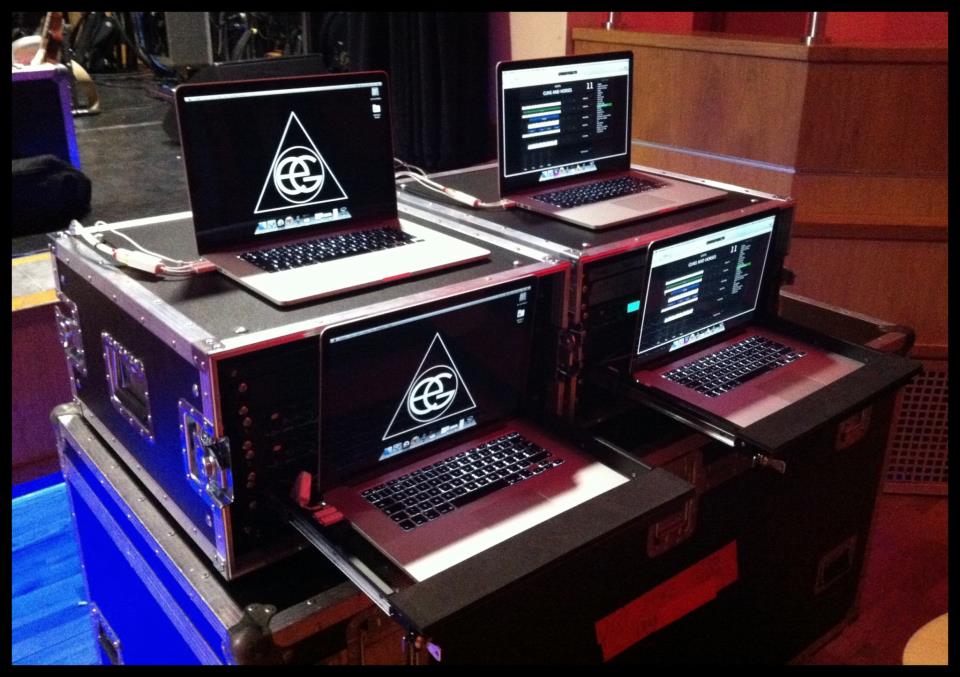
I work in the entertainment industry, and recently built a new keyboard rig and playback system for a major international touring artist (you can figure it out from the pic) - which consisted of 4 of the above spec RMBP, which I was incredibly impressed with, having just used them for a week before handing the rig over to the touring tech. Obviously for this purpose, image retention is not much of an issue, as they boot up and run ableton/mainstage and then get switched off again.


But for my own personal work computer this just isnt acceptable. What is more worrying, is that Apple diddnt notice this, or dont have the QC up to scratch for its outsourced components. People like myself base our business and reputation on the quality and reliability of these computers, and we pay a price premium accordingly. What other compenents could suddenly deteriorate over time, and leave a rather embarrassed bunch of musicians on stage or live tv!


(notice in the pic there are 2 rigs, each with a live redundant backup - I dont take any chances)


I understand that it may be outside of Apples control, but for £3000 there needs to be some serious QC improvements.


Apple, you make the best stuff, and you have loyal customers becuase of it. But you've just lost a sale because I honestly dont know if my laptop will arrive with image retention, yellow ghosting, flickering display, overheating, crunching noises, or any other amount of symptoms.


I really hope this gets resolved, I would like to be confident in your products again.
User uploaded file

This thread has been closed by the system or the community team. You may vote for any posts you find helpful, or search the Community for additional answers.

MacBook Pro Retina display burn-in?

Welcome to Apple Support Community
A forum where Apple customers help each other with their products. Get started with your Apple Account.
