HKEY_LOCAL_MACHINE32 error when installing itunes

Im trying to download itunes on a windows7 64 OS and when it tries to download the quicktime portion of it it gives me an HKEY_LOCAL_MACHINE32 error,i tried downloading and installing the stand-alone installer and it says the same thing,it says i do not have sufficent privlages,which i do,but i went searching through my registry using regedit,it does not show up anywhere in my registry please help 😟

itunes-OTHER, Windows 7

Posted on Dec 27, 2013 5:28 PM

Reply
21 replies

Mar 3, 2014 9:31 AM in response to a-g-r

If you use this command to try to install iTunes64.msi (put in C:\) then the details may be in the log.


msiexec /i C:\iTunes64.msi /l*v C:\Log_iTunes64.txt


I'm going to take a punt, having seen a failure elsewhere, that the line that fails is the one that adds iTunesHelper to the start-up list, though I don't know if doing it manually will help in this particular case, but you could try this and then see if iTunes64.msi will install.


1. Please triple-click on the relevant block of text below to select it and then pressCTRL+C to copy it.


32-bit system


cmd /k REG ADD HKLM\Software\Microsoft\Windows\CurrentVersion\Run /v iTunesHelper /t REG_SZ /d "\"C:\Program Files\iTunes\iTunesHelper.exe\""


64-bit system


cmd /k REG ADD HKLM\Software\Microsoft\Windows\CurrentVersion\Run /v iTunesHelper /t REG_SZ /d "\"C:\Program Files (x86)\iTunes\iTunesHelper.exe\""


2. Press the WinLogoKey+R to open the Run... dialog.


3. Paste the text into the box with CTRL+V and then press enter/return. Overwrite the value if prompted.


If there is an error please post back the exact text.


Should you get an "Access denied" error and you know your way around Regedit you could take a look at the current permissions of the Run key and make sure that you have Full Control. This is what I see...
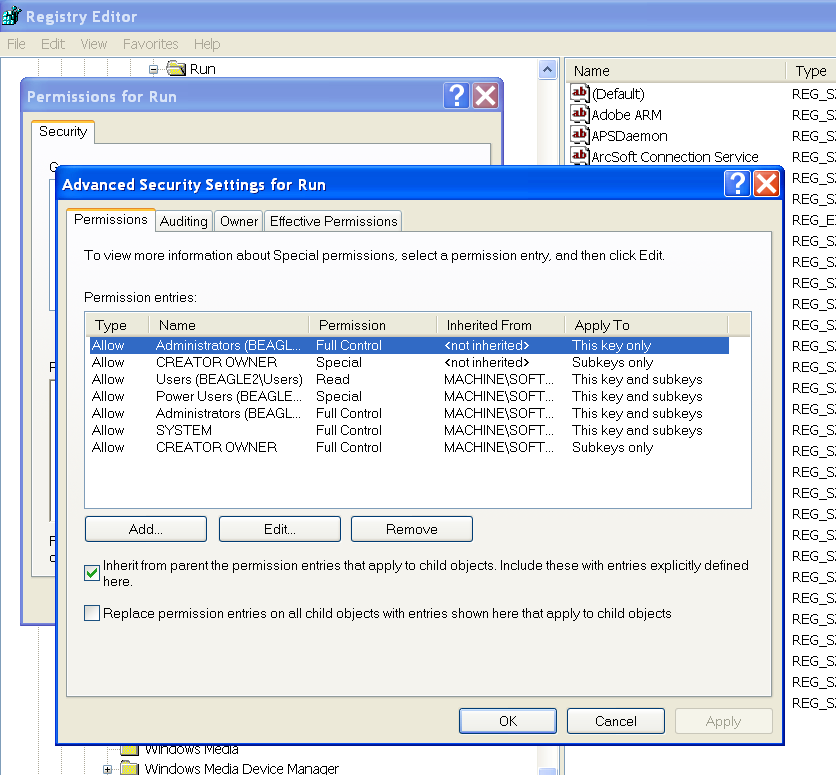

User uploaded file


I have full control since my standard login is a member of the Administrators group which has full control.


Sorry if there is some redundant info. but it may help someone else.


tt2

Dec 27, 2013 6:03 PM in response to TwistedxWayz

I don't have a 64-bit machine to hand right now, but I assume that HKLM32 is a separate store for 32-bit registry keys. Are you saying that you can't find HKEY_LOCAL_MACHINE32 or can't find HKEY_LOCAL_MACHINE32\SOFTWARE\Microsoft\Windows\CurrentVersion\Run? Perhaps the iTunes installer makes an unwarranted assumption that the key should exist. If it doesn't you can create it.


tt2

Mar 1, 2014 12:32 PM in response to TwistedxWayz

I have the same error. Nothing works - I have tried installing and uninstalling from the admin account and adding extra privilages to the Windows registry keys - 32bit and 64bit. I have also tried repairing my existing (11.1.8) version of iTunes and get the same error. Quicktime is the same. In the meantime iTunes has been uprevved to 11.1.5 and this doesnt work either. Come on iTunes get your act together - the prolonged silence on this issue is embarrassing!

Mar 3, 2014 1:59 AM in response to turingtest2

The error message does refer to \MACHINE32. If this is refering to a 32 bit key why is it not just \MACHINE - I don't know. Some have suggested it may refer to the 64bit key in WOW but that does not make sense either. The exact message is below:


Could not open key:

HKEY_LOCAL_MACHINE32\SOFTWARE\Microsoft\W

indows\CurrentVersion\Run. Verify that you have

sufficient access to that key, or contact your support

personnel.


Something has gone badly wrong with the programming here and the silence from iTunes is deafaning at the moment.

Mar 3, 2014 5:12 AM in response to a-g-r

You can try downloading 7-Zip (free), or a free trial of WinRAR, and unpack the iTunesSetup.exe or iTunesSetup64.exe file into its components then try installing them individually in alphabetical order (don't try to install SetupAdmin.exe, or iCloud.msi unless you have Vista). You may get a more useful error message regarding the problem.


If you unpack the components to the root of the C: drive, these commands can be used to log the installs of individual components.


msiexec /i C:\AppleApplicationSupport.msi /l*v C:\Log_AAS.txt

msiexec /i C:\AppleMobileDeviceSupport.msi /l*v C:\Log_AMDS.txt

msiexec /i C:\AppleMobileDeviceSupport64.msi /l*v C:\Log_AMDS64.txt

msiexec /i C:\AppleSoftwareUpdate.msi /l*v C:\Log_ASU.txt

msiexec /i C:\Bonjour.msi /l*v C:\Log_Bonjour.txt

msiexec /i C:\Bonjour64.msi /l*v C:\Log_Bonjour64.txt

msiexec /i C:\iTunes.msi /l*v C:\Log_iTunes.txt

msiexec /i C:\iTunes64.msi /l*v C:\Log_iTunes64.txt


Which components you have depends on whether you've unpacked the 32-bit or the 64-bit installer.


If you can spot which value is being written to this non-existent key it might be possible to make the correct edit to the registry under HKEY_LOCAL_MACHINE.


tt2

Mar 3, 2014 6:27 AM in response to turingtest2

tt2

I tried installing the components indiviually as you suggest and everything is fine until it gets to iTunes64.msi. Event viewer gives the following error details:

Product: iTunes -- Error 1402. Could not open key: HKEY_LOCAL_MACHINE32\SOFTWARE\Microsoft\Windows\CurrentVersion\Run. System error 5. Verify that you have sufficient access to that key, or contact your support personnel.


The error applies to both installing and removing iTunes and Quicktime. I have not found a way to 'see' what it is trying to write yet although the 'Run' keys do exist and I have given them all full access rights.

Mar 3, 2014 12:21 PM in response to turingtest2

tt2

I tried your fix. The iTunesHelper key succeeded. I ran the iTunes install from C:\ with your script but it still failed. I did get back a verbose script however. It fails here:


MSI (s) (B4:1C) [19:53:46:550]: Note: 1: 1402 2: HKEY_LOCAL_MACHINE32\SOFTWARE\Microsoft\Windows\CurrentVersion\Run 3: 5

MSI (s) (B4:1C) [19:53:46:550]: Executing op: RegRemoveValue(Name=iTunesHelper,Value="[#iTunesHelper.exe]",)

RemoveRegistryValues: Key: \SOFTWARE\Microsoft\Windows\CurrentVersion\Run, Name: iTunesHelper

MSI (s) (B4:1C) [19:53:46:550]: Note: 1: 1402 2: HKEY_LOCAL_MACHINE32\SOFTWARE\Microsoft\Windows\CurrentVersion\Run 3: 5

Error 1402. Could not open key: HKEY_LOCAL_MACHINE32\SOFTWARE\Microsoft\Windows\CurrentVersion\Run. System error 5. Verify that you have sufficient access to that key, or contact your support personnel.

MSI (s) (B4:1C) [19:53:49:763]: Product: iTunes -- Error 1402. Could not open key: HKEY_LOCAL_MACHINE32\SOFTWARE\Microsoft\Windows\CurrentVersion\Run. System error 5. Verify that you have sufficient access to that key, or contact your support personnel.

Apr 10, 2014 7:35 PM in response to a-g-r

SUCCESS!

I too had this problem on Windows 7 64bit.

Long story short, after searching and skimming, trying some of the various suggestions I found (with regard to the registry permissions) and no positive results, I changed my focus to simply resetting my entire registry permissions to their defaults. I've frequently tested the efficacy of my antivirus and malware prevention solutions on this machine, not to mention lots of experimentation as I am an IT Technician. It's no surprise I've mucked something up in the process. With little to risk, as I just backed this system up in preparation for a reinstallation of Windows, I decided to take a more broad sweeping approach.

I found a few search results using the very powerful search fu key words "reset registry permissions to default" (DUH)

I found a video on YouTube and another from a site called WindowsReference.com that cover the same process.

I even rediscovered a site called Tweaking.com that had a handy utility that does exactly what I wanted, which is fully automated. The latter worked for me.

This thread has been closed by the system or the community team. You may vote for any posts you find helpful, or search the Community for additional answers.

HKEY_LOCAL_MACHINE32 error when installing itunes

Welcome to Apple Support Community
A forum where Apple customers help each other with their products. Get started with your Apple Account.
