This is a sticky problem, for sure. Confusion is understandable, and you are not alone.
By the way, what make and model is your router? AirPort Extreme? Time Capsule? Other?
I don't think you can delete the parenthetical names directly (there may be a way, but it's a hassle).
Here is a strategy you can try.
First, on each computer displaying extra name with parenthetical, do the following:
Control-click on System Prefs icon in the dock and go to Network prefs.
Select and copy the computer's IP address just below the "Configure IPv4" pulldown. (Mine is 10.0.1.2 with the red arrow in the pic).
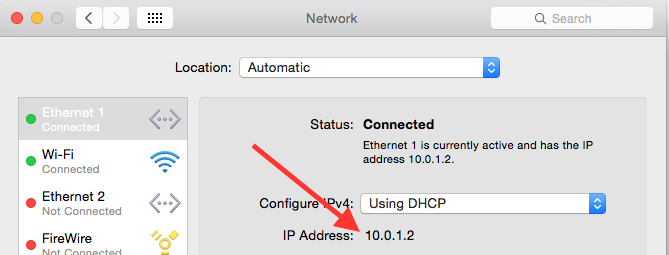
Then from the "Configure IPv4" pulldown choose "Using DHCP with manual address" and in the now-empty field for IP Address paste or enter the IP address you just copied. Then click Apply.
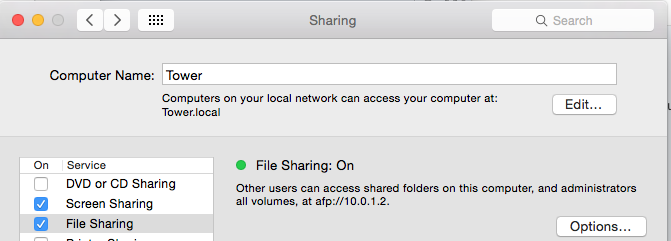
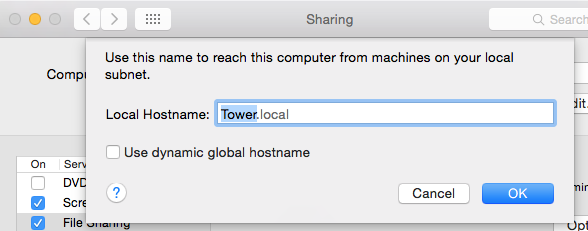
Next, still in System Preferences, go to Sharing and in the list of Services on the left select File Sharing. If the Computer Name at the top does not have any parenthetical number, do nothing. But if Computer Name has a parenthetical number, click "Edit" and in the Local Hostname box change it to the desired name without parentheses (and with no spaces or apostrophes, only alphabetic characters and hyphens as appropriate) and click OK.
Quit System Preferences and Restart.
After you have done this for all computers which have been displaying parenthetical numbers, restart your router.
This may not get rid of the parenthetical numbers, but it should help make sure that you always have an unnumbered computer name in the list. Always use the unnumbered computer name and just ignore the ones with parenthetical suffixes.
It's a start, and worth a try.


