after 10.2 update- imported clips displaying black

I downloaded all updates for FCP, compressor, and system updates. Currently running a brand new Mac Pro, 32GB RAM, dual GPUs, the whole 9 yards. I am running my FCP library from a Caldigit 3 drive raid array, in raid 0. After updating to 10.2, all of my camera clips show only black, no video, but i have audio.


There are no warnings at all in any of my projects or events, the clips are just black, with working audio. I was successful in updating the libraries when i updated FCP to 10.2. The clips I have are recorded from a Panasonic AG-AC160, recorded AVCHD, 1080p24. Any ideas?!

I can skim through audio, and the thumbnails appear for each clip in the events browser, but when i play them, All i get is audio, with a black screen in the viewer. They were working fine yesterday, and the only thing I changed was the 10.2 update. I'm stumped!

Mac Pro, OS X Yosemite (10.10.3), FCP 10.2

Posted on Apr 13, 2015 11:58 AM

Reply
150 replies

Apr 16, 2015 3:37 PM in response to Tom Wolsky

Thanks Tom.

That's a nice pickup - QuickTime X incorrectly reporting the frame rate of the clips.


I'm going to attempt to sum up what we know thus far:

1. The AVCHD clips from the AF100 camera (and other Panasonic AVCHD cameras) that misbehave are: 1080p 25 & 1080p 30. The other frame rates and resolutions appear to behave.

2. The problematic clips DO display correctly in QuickTime 7 and in Compressor 4.2.

3. The problematic clips DO NOT display correctly in QuickTime X on some systems (black footage with audio only).

4. QuickTime X incorrectly reports the frame rate of these AVCHD clips. (e.g. 1080p 25 clip is reported as being 24.75 fps)

5. On some FCPX systems the clips appear consistently black and only audio plays. On these systems, transcoding the footage to Optimised or Proxy results in a clip that is black, has no audio, and is sometimes Zero Bytes in size in the finder.

6. On some FCPX systems the clips behave inconsistently, sometimes flickering or fading to/from black. On these systems, transcoding the footage to Optimised or Proxy usually works, but sometimes doesn't (resulting in a black clip). On these systems sometimes sharing/exporting a project containing original AVCHD footage fails, especially if the clips have transitions or effects. Sometimes sharing/exporting succeeds if there are no transitions or effects applied to the AVCHD clips.

7. On almost all systems the appearance of the clip thumbnails in the browser can fluctuate from normal to partially black, to completely black.

8. Some users have reported that changing their 1080p project to 720p enables them to export their project, but this doesn't work for others.

9. On some systems problematic clips do not display as expected in the finder and cannot be previewed from the finder.


If I've forgotten any info please chime in.


Just going to finish by posting a screenshot of my finder which shows how the problematic clip's thumbnails don't display correctly and how the transcoded clips result in files that are zero bytes in size.
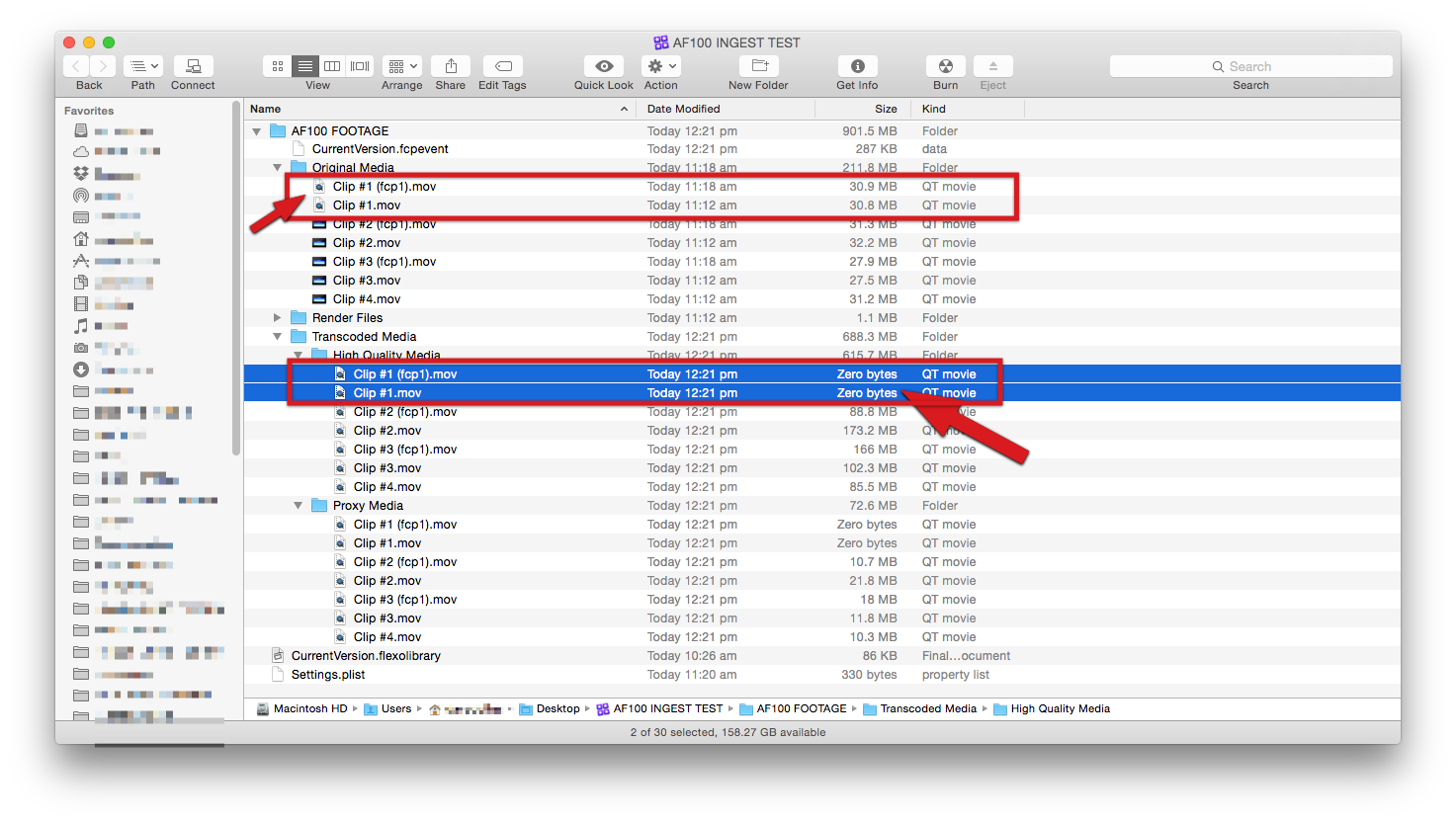

User uploaded file

Apr 16, 2015 9:18 PM in response to laxdefence5

I did not read this entire thread, but I have the same issue and found a work-around using EditReady. I'm on 10.10.2 running FCP10.1.3 and I use EditReady (https://www.divergentmedia.com/editready) to re-wrap my AVCHD footage. This way I can see all my clips inside of FCP or in Finder as MOV files, re-wrapped with zero quality loss.


When this "black video" happened to me I called Divergent Media tech support. The tech agent took the call even though he was at NAB and talked me through the issue. He said that Apple admitted that there was a bug with 10.10.2 that caused this black video issue. Apple told him that it would be fixed in the "future." The agent assumed that 10.10.3 would remedy the situation but he had not tested it yet.


So, the work-around that Divergent Media gave is .... drill down into the AVCHD package until you get to the MTS files. Drag them one-at-a-time into EditReady and they will all render/re-wrap correctly. Saved my *** when I thought I had shot the entire production with a bad card or something.


For those without EditReady, maybe try importing just one clip at a time in the FCP Import dialogue and see if that helps.


C'mon Apple, fix this thing.


EDIT: My footage came from a Panasonic AG-AC90 (AVCHD) 1080/30p

Apr 17, 2015 1:18 AM in response to laxdefence5

I'm in the same situation... I plugged my RAID into my MacBook Pro Retina and magically the files play... Plugged it back into my new MacPro, they don't play... It has to be something with the system, because the project and library played on my other mac.


I have the same camera, and about 2 years of a documentary footage and a large project size.


When you bought your mac did it come with Mavericks installed or Yosemite? Mine came with Mavericks and I had to upgrade it to Yosemite first. I wonder if this has anything to do with the video issues.

This thread has been closed by the system or the community team. You may vote for any posts you find helpful, or search the Community for additional answers.

after 10.2 update- imported clips displaying black

Welcome to Apple Support Community
A forum where Apple customers help each other with their products. Get started with your Apple Account.

