Photos with unavailable original files cannot be opened.

I received an error message in Photos : Photos with unavailable original files cannot be opened. I need to locate the original again but they were uploaded in Photos... I don't have them separately on a hard-drive! I was simply trying to edit the photo's in an Album

What is going on here?


Photos is really a big step back for me as Photographer with 100k + photos in its library!

iMac, OS X Yosemite (10.10.3)

Posted on Jul 27, 2015 7:02 AM

Reply
21 replies

Jul 27, 2015 9:28 AM in response to Danny Tomcatter

No not using the cloud since my files are simply too big; I stopped using it

How did you stop using iCloud? Did you wait until all original image files had been downloaded again from iCloud? If you just turned it off, your originals may not have been downloaded again to your Photos library. Did you follow the procedure described on this Help page: https://help.apple.com/photos/mac/1.0/?lang=en#/phtf5e48489c in the paragraph "Stop using iCloud Photo Library" ?

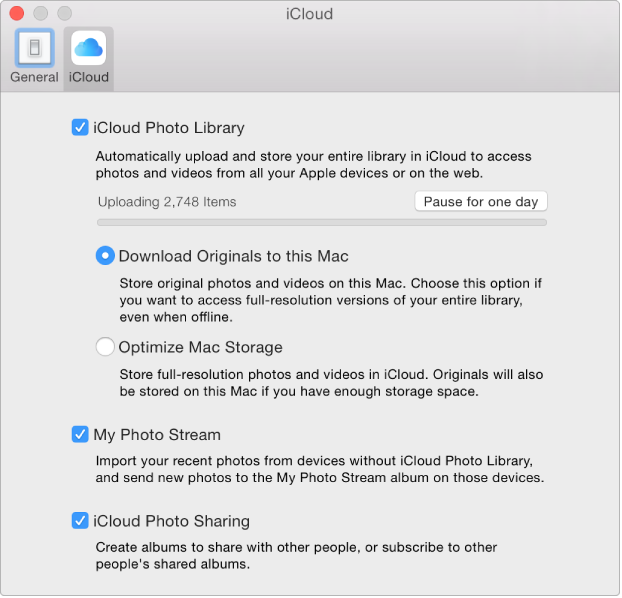
Important: If you decide to turn off iCloud Photo Library, first be sure to select “Download Originals to this Mac” in the iCloud pane of Photos preferences, so all your original photos can be downloaded from iCloud to your Mac. Be sure to allow time for your originals to download before turning off iCloud Photo Library completely.

  1. Choose Photos > Preferences, then click iCloud.User uploaded file
  2. Deselect the iCloud Photo Library checkbox to turn it off.

After you turn off iCloud Photo Library, the Photos app on your Mac can’t access your iCloud library, and any edits you make to photos on your Mac won’t appear on your other devices. Your library remains in iCloud and available to other devices that use iCloud Photo Library. To turn off iCloud Photo Library on all your devices, open the iCloud pane of System Preferences, click the Manage button, then click Photo Library. Click “Disable and delete.” Your photos and videos will be deleted from iCloud Photo Library in 30 days, unless you click Undo Delete before that time.

Jul 27, 2015 9:45 AM in response to Danny Tomcatter

Open your Photos Library and look inside: We need to know, if the originals are actually missing or if Photos can just not access them.


Select the Photos Library in the Finder, ctrl-click it, then use the command "Show Package Contents".

Open the folder Masters inside the window that will open, then the older 2015. The originals are stored in subfolder Year, Month, Day of the date when you imported them. Are your missing originals still in the library?

User uploaded file

Jul 27, 2015 8:44 AM in response to Danny Tomcatter

Photos with unavailable original files cannot be opened. I need to locate the original again but they were uploaded in Photos... I don't have them separately on a hard-drive!

Can it be that the photos in question have accidentally been imported as referenced - with the “Copy items to the Photos library” checkbox disabled in the preferences? See this Help page: https://help.apple.com/photos/mac/1.0/?lang=en#/pht1ed9b966d


If the photos had been imported as managed files, there may be a permissions problem preventing Photos from accessing the original files. Where is your Photos library stored? Is it in the Pictures folder or on an external drive? If on an external drive, how is the drive formatted and connected?


If you enable file vault, his can also prevent Photos from accessing the originals.


Have you been running cleaning apps like CleanMyMac? This can cause photo applications to lose the connection between the edited versions and the originals in the Photos library.

Jul 27, 2015 9:02 AM in response to Danny Tomcatter

fourth time - what is the format of the external drive


there are many "mac compatible" formats - the only one that works for Photos is Mac OS extended (journaled) - we need to verify the format of the drive please - which is who I have ask twice before and Léonie ask once


Remember we can not see you so we only know what you tell us and when we ask questions it is because the exact answers are important to trying to help you


LN

Jul 27, 2015 9:28 AM in response to Danny Tomcatter

Thank you - so we know that is not the problem


Now there is a new question from Léonie

No not using the cloud since my files are simply too big; I stopped using it

How did you stop using iCloud? Did you wait until all original image files had been downloaded again from iCloud? If you just turned it off, your originals may not have been downloaded again to your Photos library.

LN

Jul 27, 2015 1:57 PM in response to Danny Tomcatter

So I can see the photos still in Photos but there is nothing I can do with them? Not exporting or ...

If the originals are not available you cannot export or edit the files. You should be able to drag the thumbnails from the Photos browser to a folder on your Desktop to save at least the preview jpegs.

Can you see the filenames of the missing originals in the Info panel, when you open the Info for one of the thumbnails? Then search your Mac with FindAnyFile for the missing original image file. I just noticed that Photos moved some of my originals to folders in the Masters folder, that do not correspond to the Import date but to the date I assigned with "Adjust Date & Time".


You can download FIndAnyFile here:

The trial is free:

http://apps.tempel.org/FindAnyFile/index.htmlhttp://apps.tempel.org/FindAnyFile/index.php

This thread has been closed by the system or the community team. You may vote for any posts you find helpful, or search the Community for additional answers.

Photos with unavailable original files cannot be opened.

Welcome to Apple Support Community
A forum where Apple customers help each other with their products. Get started with your Apple Account.