no mail sounds after installing El Capitan

I just installed El Capitan and the first thing that I have noticed is that the normal sounds that apple mail puts out do not come out of the speakers. iTunes works fine but not then mail sounds. Any help would be appreciated

Posted on Sep 30, 2015 7:03 PM

Reply
333 replies

Dec 20, 2015 6:47 AM in response to nicolefrompully

I have a POP and IMAP account and as previously reported they still continue to produce the mail received sound and trigger the notification banner following latest OS update, so it can work. I read a while back if banners is not functioning properly to go into Notifications (System Preferences) and untick/retick the various options for the problem app (apparently it resets something!) - with respect to the mail received sound try putting a custom sound file in your ~/Library/Sounds folder then open Mail Preferences/General and if you select "New mail sound" you should see it appear at the bottom without the need to import - just select it and either close Preferences or click on another tab first and then close Preferences (the latter some report forces the setting change!).


Not importing or using any of the pre installed sounds, for me anyhow gets around the intermittent problem which is also being reported by others, give it a go and see if things improve.

Dec 20, 2015 10:33 AM in response to nicolefrompully

Was worth a try, never had the mix up you are experiencing, just lost the mail received sound which has probably been more straight forward for Apple to fix - only other suggestion is to create a temp new user account and try from that (you will have to add your mail account also) - but if that works not sure how you would use that info to sort your original one out.

Dec 22, 2015 1:42 AM in response to Birgit Rhoads

@ Birgit Rodes, @ Granny-v I am on 10.11.2, but this did not bring back sounds. Also had issue where every time I opened Mail, my accounts were offline and I had an exclamation mark and error message. But all I had to do was click on 'Bring accounts online' and they were automatically online. Also had an issue where password was being asked (and I know my password) but it wasn't accepted. But if I clicked on escape I was connected anyway. Whatever.... I now created an IMAP account and all those problems have disappeared thankfully. Hope you guys manage to find a solution.

Dec 22, 2015 8:05 AM in response to plind

Well, I feel pretty dumb right now. I've been following these posts and searching for a solution to the lack of Mail sounds for quite sometime and just found the solution to my problem (the "Rule" solution was working for incoming mail just fine, but no whoosh for outgoing.)


I use external speakers via the headphone jack and apparently when upgrading to Yosemite the Sound Effects were rerouted to my internal speakers (I just never noticed it as all other sounds were working.) Upgrading to El Capitan didn't resolve my lack of attention.


"System Preferences/Sound/Sound Effects" Play Sound Effects through: Headphones Problem solved


I have POP email accounts

Dec 27, 2015 8:08 AM in response to nicolefrompully

Yes, I also have experienced the same problems you describe.


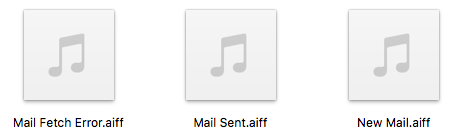
One thing I do notice in the Mail.app package contents is that THERE IS NO SOUND FILE for fetching mail when none is found. This must be a Change in El Cap. For those worrying about not getting the "No new mail sound" after a fetch, you won't get one - because it doesn't exist! Here is a pic straight from the package contents (these are the only sound files in the package):

User uploaded file

I played the "Mail fetch error.aiff" sound, and it is a totally different sound from the quiet beep you would get if there is no mail. It's a sound to alert you that there is TROUBLE FETCHING MAIL, not that there is no mail to fetch. The other two sounds are what is to be expected. I ALWAYS get the mail sent sound, so I am not worried about that. What I am concerned with is the erratic behavior of the New Mail sound. I have actually gotten it upon new mail arrival a few scant times, but 99% of the time nothing.


I also get the behavior where it will play the New Mail sound when I DELETE a new email as others have posted about.


This thread has been closed by the system or the community team. You may vote for any posts you find helpful, or search the Community for additional answers.

no mail sounds after installing El Capitan

Welcome to Apple Support Community
A forum where Apple customers help each other with their products. Get started with your Apple Account.