Time machine backup not running

My Time Machine backups aren't running automatically. I can do a backup using the "Back Up Now" menu item, but they won't run automatically.


Any ideas what to try?

iMac (Retina 5K, 27-inch, Late 2014), OS X El Capitan (10.11)

Posted on Oct 3, 2015 11:41 AM

Reply
240 replies

Oct 28, 2015 7:12 PM in response to Larry Nolan

Larry Nolan wrote:

I'm in the process of running First Aid on my Time Machine volume and have disconnected the USB cable to the APC UPS. I will restart after the First Aid run completes. Will report back on the status of hourly Time Machine runs after the restart.

FWIW, I also ran First Aid on both my TM drives (I use two) & on my iMac's internal drive. That did not help -- it just took a lot of time to do. Disconnecting the USB cable from my APC UPS before starting up seems to be the only thing that works to avoid the issue, & after startup plugging it back in does not cause the scheduled backups to stop.


So basically, as long as the cable isn't connected during startup, everything works fine.

Oct 28, 2015 11:38 PM in response to Ruprick the Monkey Boy

I think there are actually multiple problems piled into this single thread, all of them relating to Time Machine, but having different causes. Many of them are USB related, especially when a UPS is connected. Your error above though makes me think of a different problem I've seen in El Capitan and that is the rather dramatic failure of attempts to write to network drives mounted using SMB.


I discovered the samba server problem while trying to edit a simple text file and it crashed every time. I can copy the file locally, edit/save and then copy the file back to the samba server, but I cannot write to the file while it exists on the server. This worked fine prior to El Capitan, so I opened a ticket. I see you have a Western Digital MyCloud drive, which I believe uses smb (samba protocol). If you could copy a text file over to the drive, then try opening/editing/saving it at that location you can see if it fails for you as well. If the mac can't "update" files via smb, then I imagine Time Machine would fail every time it tries to start using the drive.

Oct 28, 2015 11:58 PM in response to Troy Shadbolt

This is a follow up to my experiment where backups worked correctly with a restarted MacMini (late 2012) with CyberPower UPS attached via USB for an entire day (10/27). Today, (10/28) is stopped working again, but a new quirk appeared. I was watching the machine closely when Time Machine was supposed to start, and while it worked for about 3 hours, it then failed and a window pop up displayed on the screen, but disappeared before I could read it. I checked the Time Machine entry in System Preferences and it said something about the backup being delayed until power was restored-- Time Machine thought it was running on the UPS! Those pop up windows were the machine saying it was running on back up power, but only for a few seconds. Those few seconds were nearly to the second when Time Machine was supposed to start.


That makes me think the problem we are all seeing is USB chatter related. Somehow the startup signal for Time Machine to access the drive is getting confused with the UPS power reporting. Short of somehow grabbing the USB chatter (which I have no clue how to do), I don't know how end users will be able to resolve this other than simply disconnecting the UPS from the computer's USB. While I'll miss the auto shutdown feature, I'd much rather have the machine perform scheduled backups.


Separately, for those having failures related to Time Machine backups to samba servers (network attached drives) might want to read this article.

http://apple.stackexchange.com/questions/210778/trouble-using-time-machine-with- smb-share-in-osx-el-capitan

Oct 29, 2015 3:02 AM in response to R C-R

Hi, R C-R! I attach a clip. Can help me, kindly, to I known how to modify my last post?... I want to remove my reference to Be.a build, because I did not know that one can not talk of the be.a version. Apple, instead, deleted another my post. For this reason, therefore, I reinserted here my last post, just edited, and I attach an evident clip of the Warning window at login. Sincerely, Vincent.


From 10.11, if the USB UPS cable is connected, in my iMac 27'' (mid 2014 full optional!) this window appears:

<<Warning! You are using power supply with UPS. Save documents and shutdown your computer.>>

each time that OS X start up or restarts.

Important! Because this alert appears for a short time, care should be taken when appears the window to insert the login password.

(A trick: you can record a little movie with an iPhone)


This problem is associated to serious issue: if the USB cable of the Backup-UPS power supply is connected, Time Machine does not perform properly the hourly backups. If I disconnect the Backup-UPS cable from the USB port and I start OS X, instead, the hourly TM backup properly works.


My UPS is a APC Power-Saving Back-UPS ES 8 Outlet 700VA 230V model ES 700G by APC (now it is renamed BE700G-IT) and with Lion and Yosemite it works well. The Power icon of the Menu Bar, say that my iMac is 100% powered, also in El Capitan.


Obviously, i tried also with some clean installations of El Capitan, stable or beta version, but the problem persists.

I sent various feedback to Apple, from site and with Feedback Assistant.


Excuse me for my bad English 😕
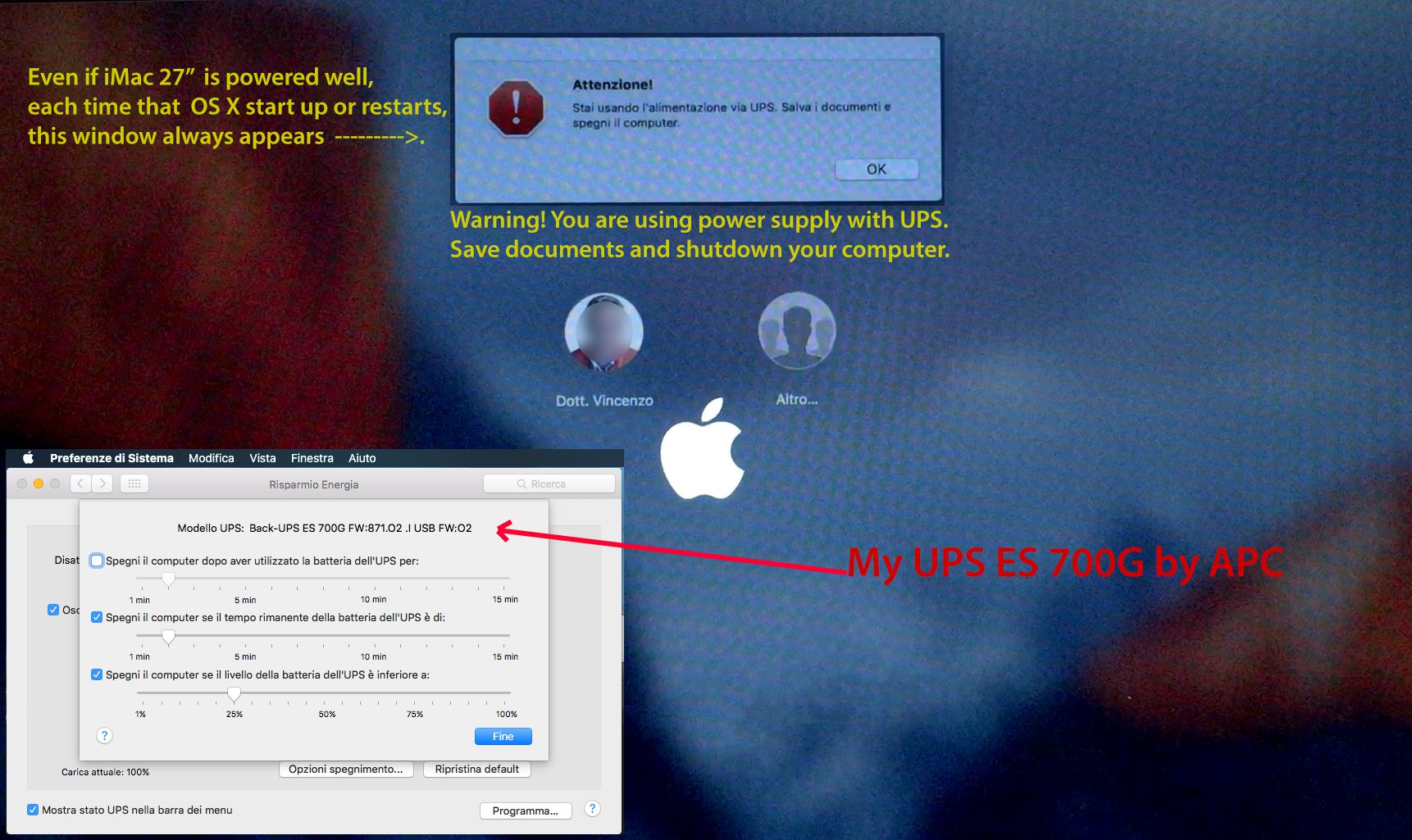
User uploaded file

😊

Oct 29, 2015 3:57 AM in response to Pinturikkio

You can't edit a post after the 15 minute grace period allowed for that. That is to prevent confusion or "gaming" the system, which could happen if users are allowed to repeatedly edit their posts whenever they want.


However, your new post, & particularly the annotated screen shot you included with it, make your point quite well, so I hope it will be allowed to remain visible to us.

Oct 29, 2015 5:59 AM in response to FlyignDiver

I have reported previously that I also have this same problem. While trawling the site for other users with the same problem I came across a number of them that also had UPS systems connected via a USB port and some of these reported that Time Machine restarted its scheduled backups if the UPS system was disconnected.


Not sure that I saw the (or even understood) the connection I disconnected my UPS and re-started my computer. Since then, Time Machine has re-started it's scheduled backups - go figure?


The only common denominator I can now see is the USB ports - my UPS and the external disk used by Time Machine are both connected to my iMac via USB.


Hope this may help.


Cliff

Oct 29, 2015 6:41 AM in response to Cliff Drew1

Cliff Drew1 wrote:

The only common denominator I can now see is the USB ports - my UPS and the external disk used by Time Machine are both connected to my iMac via USB.

One of my Time Machine backup drives is connected to my iMac via USB but the other is a Time Capsule connected to it by ethernet. Even if I unmount & disconnect the USB drive, if I startup the iMac with my APC UPS cable connected to it, only the first scheduled backup occurs to the TC.


From this I suspect the issue is related to how El Capitan handles USB ports at startup time, but it doesn't have anything directly to do with attached USB drives. The presence of a USB cable attached to a UPS at startup time seems to be enough just by itself to trigger the issue.

Oct 29, 2015 7:01 AM in response to William Tomcanin

Hi William! I sent various feedback to Apple, from site and with Feedback Assistant, with complete system logs and Time Machine logs and with the clip I posted over.

I hope that Apple fix this issue because at the end of my Feedback I wrote:

"... If you see, from my attached logs, that Time Machine worked... it is because I frequently disconnected the UPS USB cable to permit Time Machine to save the important medical job info of my computer.

If my system logs are not from first El Capitan installation, it is because I have tried to remedy by different installations: from OS X or with clean installations with USB Key. In this moment, the Backup-UPS is connected and I just logged off and just restarted El Capitan.

Important Legal Note: I suggest Apple must remedy quickly or Apple risks a class action!... Not all users are capable as me... Myself, at first, I did not realize that Time Machine was not working, with El Captain connected to Backup-UPS, almost up to five days! I almost lost years of work! 😮

As Steve said: "So! This issue is a priority!"

Oct 29, 2015 9:29 AM in response to FlyignDiver

I just received a call from "Al" in Apple Engineering gathering info on my experiences, what works, what doesn't work, and how I got from point A to point B where I am today.


Which - for the record, the UPS is plugged in, TimeMachine is working on both the USB and Network Drives in a regular fashion (though the network backup is so slow it's causing the USB drive to miss hourly backups - but that is a firmware issue on the MyCloud drive)

Oct 29, 2015 9:50 AM in response to Larry Nolan

Time Machine is doing hourly backups again on 10.11.1. Last night I did a First Aid (long) on my external USB Time Machine drive; once it was completed I disconnected the APC UPS cable from the iMac USB port and restarted OS X 10.11.1. This morning I set the system sleep to NEVER , reconnected the USB cable from the UPS (APC brand) and went out.


Upon returning just now the backup folder on the external drive shows backups at 8:01am, 9:13am, 10:14am, 11:14am.


I'll have to remember to disconnect before restarts until Apple corrects this problem. I'll update the bug report I filed with my results.

🙂

This thread has been closed by the system or the community team. You may vote for any posts you find helpful, or search the Community for additional answers.

Time machine backup not running

Welcome to Apple Support Community
A forum where Apple customers help each other with their products. Get started with your Apple Account.



