Pictures are not showing up in Messages on Macbook Pro

Hi,


Lately I noticed that my text and picture messages aren't synching up to iMessage on my MBP.


User uploaded file


For example, I sent a photo before the "I need to find this costume lol" text message and it doesn't show up.


Help?


I made the same post before, but accidentally clicked that a reply from another user solved my issue. Just as an update: I reset my network settings, I sign out of my apple account, I toggled with the iMessage button, I restarted both my MBP and iPhone 6.

MacBook Pro (Retina, 15-inch, Mid 2015), OS X Yosemite (10.10.4)

Posted on Oct 25, 2015 12:42 AM

Reply
31 replies

Oct 25, 2015 2:59 PM in response to Anime1215

Hi,


Which Messages Folder ?


~/Library/Messages

~/Library/Containers/com.apple.iChat/Data/Library/Messages


The pic should be in the Attachments folder in the first one (there is an Alias in the second that points to first)


There seems to be an issue with sending pics over the AIM service and Zipping them or sending them in a folder seem to help.

Files labelled as .pegs have contained malicious code in the past and it seems the AIM Server is not allowing unzipped pics to be sent In line at present.

I see from your pic that it is an iMessages Conversation that you are having issue with.


Have you tried restarting the computer ?


User uploaded file

9:59 p.m. Sunday; October 25, 2015


 iMac 2.5Ghz i5 2011 (Mavericks 10.9)
 G4/1GhzDual MDD (Leopard 10.5.8)
 MacBookPro 2Gb (Snow Leopard 10.6.8)
 Mac OS X (10.6.8),
 Couple of iPhones and an iPad

Oct 25, 2015 4:18 PM in response to Ralph-Johns-UK

Hi Ralph Jones,


Thank you for taking the time to help me.


I went and deleted everything in ~/Library/Messages. I went into ~/Library/Containers/com.apple.iChat/Data/Library/Messages after you mentioned it in your post, I didn't even realized it existed, and I have two folders in it: Archive and Attachment.


Yes, I've tried restarting my computer and to no resolution. I also received a video message from someone this morning and it appears on my iPhone but not the Mac.

User uploaded file


Right above "Wow. Those are cool. Who made Nathan's?" is suppose to be a video message from the sender, but it doesn't appear on my MBP.

Oct 26, 2015 1:20 PM in response to Anime1215

Hi,


In the Containers path the Attachment is an Alias that points to the ~/Library/Messages/Attachments folder itself.


Deleting this will mean the item are not put in the attachments folder.

This is why the Details drop down only shows File type icons instead of Thumbnails of the Pics.


That still leaves the fact that Pic were not showing up in the first place.

In the window Menu is the File Transfer window item.

If you open this does it list the more recent Pics ?


I must admit to not having used the Video or Audio Messages option and I don't know if it can only be sent to the iPhone Number or the Apple ID and whether it is supposed to sync to the other.


I am not sure if the first pic in the first post is before or after you started removing things.


User uploaded file

8:20 p.m. Monday; October 26, 2015


 iMac 2.5Ghz i5 2011 (Mavericks 10.9)
 G4/1GhzDual MDD (Leopard 10.5.8)
 MacBookPro 2Gb (Snow Leopard 10.6.8)
 Mac OS X (10.6.8),
 Couple of iPhones and an iPad

Oct 26, 2015 2:03 PM in response to Anime1215

Hi,


That "Vendor Request Failed" is a new one on me. I have not seen that before.


Is there any difference in what you get to see if you use the "i" on the ones that show the Info icon compared to the ones with the Search Spyglass icon ?

I am hoping the Spyglass ones will show you the file in the Finder even if it is not showing you in the Chat.


User uploaded file

9:03 p.m. Monday; October 26, 2015


 iMac 2.5Ghz i5 2011 (Mavericks 10.9)
 G4/1GhzDual MDD (Leopard 10.5.8)
 MacBookPro 2Gb (Snow Leopard 10.6.8)
 Mac OS X (10.6.8),
 Couple of iPhones and an iPad

Oct 26, 2015 2:28 PM in response to Anime1215

Hi,


On you computer do you have a test Mac User Account ?

I have created one on mine so that I can do things like set up Messages and the iMessages account and test things.


If you have not could you create a Mac User Account in System Preferences > User and Groups

Give the same status as your current Mac User Account (Admin or not).

Can you log in to that account and then set up at least iMessages in the Messages app ?


It may pick up on the most recent iMessages sent to you.

More likely it will not as they have been sent to your Computer already.

Can you test sending a Pic from here and also whether a Contact can send you one ?


IF it does not work here it will be something about the app (or an issue at the server end).

If it does work then it will be an issue with your main Mac User account (And that will be harder to track down)


User uploaded file

9:28 p.m. Monday; October 26, 2015


 iMac 2.5Ghz i5 2011 (Mavericks 10.9)
 G4/1GhzDual MDD (Leopard 10.5.8)
 MacBookPro 2Gb (Snow Leopard 10.6.8)
 Mac OS X (10.6.8),
 Couple of iPhones and an iPad

Oct 26, 2015 3:11 PM in response to Anime1215

Hi,


If the Mac is the one not getting the Pics and the iPhone can receive the one sent to you (iPhone Number or Apple ID) then it would seem from the way you explain it that the issue is on the Mac.


If it is not work in a text Mac User account then it would seem to be the Mac version of the app and not your settings.


You might need to Reinstall the OS How to reinstall OS X on your Mac - Apple Support

This should not touch your Setting or additional Apps you have installed.

It should replace the OS and the App that come with the OS.


It is late here and there will be a delay of many hours before I am back.


User uploaded file

10:11 p.m. Monday; October 26, 2015


 iMac 2.5Ghz i5 2011 (Mavericks 10.9)
 G4/1GhzDual MDD (Leopard 10.5.8)
 MacBookPro 2Gb (Snow Leopard 10.6.8)
 Mac OS X (10.6.8),
 Couple of iPhones and an iPad

Oct 27, 2015 2:16 PM in response to Anime1215

HI,


I find in these cases rarely does Upgrading the OS solve the issue.


There are possibles we could try:-

Start up in Safe Mode

Reset the PRAM/NVRAM How to Reset NVRAM on your Mac - Apple Support (The keys are CMD+ALT+P+R as for the original PRAM reset but on Intels it is called NVRAM - non volatile RAM).


These two actions clear some caches and settings that other maintenance things cannot reach in normal function.

The thing with Safe Boot is to check whether the app works as you expect in your Mac User account.

If it does it might be enough to make it work in normal function (just Restart again).


The NVRAM reset does a deeper reset than a straight forward Restart.


User uploaded file

9:16 p.m. Tuesday; October 27, 2015


 iMac 2.5Ghz i5 2011 (Mavericks 10.9)
 G4/1GhzDual MDD (Leopard 10.5.8)
 MacBookPro 2Gb (Snow Leopard 10.6.8)
 Mac OS X (10.6.8),
 Couple of iPhones and an iPad

Oct 28, 2015 2:29 PM in response to Anime1215

Hi,


That is in El Capitan as well (judging by the post times)


It does tell us something.

However what that is has me guessing at the moment.


Safe Mode starts up the computer but does not load every single extension.

It loads just the bare basics to make the OS work.


It also prevent User Installed Fonts being active during the Safe Mode.

A Font issue might explain this.


Open the Font Book.

Scroll to the bottom and check that the AppleGothic (All one word) Font is active, not Duplicated and Validates from the File Menu.

Repeat for Helveitca Neue and Lucida grande

In the past there have been issues with Helvetica Fractions. Turn it Off if you have it. (It used to have display issue back in iChat but it might be causing something else now)


I take it that in a normal Boot the Issue still arises ?


User uploaded file

9:29 pm Wednesday; October 28, 2015


 iMac 2.5Ghz i5 2011 (Mavericks 10.9)
 G4/1GhzDual MDD (Leopard 10.5.8)
 MacBookPro 2Gb (Snow Leopard 10.6.8)
 Mac OS X (10.6.8),
 Couple of iPhones and an iPad

Oct 29, 2015 2:14 PM in response to Anime1215

Ummm,


This is a little poser isn't it ?


Generally speaking the Mac does not see Pics or other filers sent to the Apple ID ? (I am presuming that it is the Apple ID and not the iPhone Number)

IS the iPhone set to "Start Conversations From" the Apple ID or the iPhone Number ?

What is the Mac set to ?


If you specifically set the iPhone to Send from the iPhone Number and leave the Mac at the Apple ID and then send from the iPhone to the Apple ID does the Mac then see the pic ?


On the Mac in the chat that should have the Pics and Files the "To" spot name becomes a Drop Down.

In the iMessages you sent to yourself does it list the iPhone Number ?
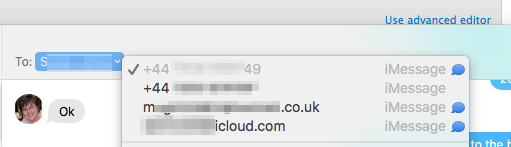
User uploaded file


It should be greyed out as the Active one.


In the ones that have had the issue is the iMessages sent to the iPhone Number or Apple ID ?

It should not make any difference as it should sync either to all the other devices. I am just looking for possibles at this stage.


In the Finder use the Go Menu > Go to Folder and enter this path in the dialogue box that appears.

~/Library/Containers/com.apple.soagent/Data/Library/Preferences


If you don't do so already use the View Menu > Show View Options and selected the Modified Column.

Also set the style to Cover Flow.


Then find the com.apple.messageshelper.FileTransferController.plist item.

There are several of these message.helper items that are actual .plists here and not Aliases pointing to the ~/Library/Preferences folder.


Does the listed .plist have a Modified date for the last time and Date you sent or received a pic or file ?


The SOAgent is a support app that helps with the Messages app.

I am wondering if this is an item that is not Loaded when in Safe Mode.



User uploaded file

9:14 pm Thursday; October 29, 2015


 iMac 2.5Ghz i5 2011 (Mavericks 10.9)
 G4/1GhzDual MDD (Leopard 10.5.8)
 MacBookPro 2Gb (Snow Leopard 10.6.8)
 Mac OS X (10.6.8),
 Couple of iPhones and an iPad

Oct 30, 2015 12:58 PM in response to Anime1215

Hi,


In the last pic you are calling the iPhone Number.

However in the pic before it is using the iPhone number to make that call.

My suggestion was that the Mac should be set to "Start Conversations From" the Apple ID and at that point you try to send a Pic specifically to the Mac (Apple ID).


I am not really sure this is going to tell us anything but I would like to exclude the possibility that the Pic does not appear because it is "sent" to the iPhone Number.


At this stage Apple Support might be a better place to ask why Safe Mode works and a regular boot does not. They may have more specific information about which items are "turned off" that might let the app work.


The two Macs showing in the iPhone settings can sometimes happen when the Mac is upgraded as it can appear to be a "New Mac" due to the new OS when in fact it is the same one.

User uploaded file

7:58 pm Friday; October 30, 2015


 iMac 2.5Ghz i5 2011 (Mavericks 10.9)
 G4/1GhzDual MDD (Leopard 10.5.8)
 MacBookPro 2Gb (Snow Leopard 10.6.8)
 Mac OS X (10.6.8),
 Couple of iPhones and an iPad

Nov 1, 2015 10:32 PM in response to Ralph-Johns-UK

Hi,


Seems like Apple solutions was to, basically, do a reinstall of my OS, but wiping my computer clean. The technician stated that since my messages are working in Safe Mode, that it must be a 3rd party software on my computer, however, he didn't see anything that could have cause it.


Point is, problem is solved, but I have to reinstall my programs again (Office, Adobe, etc..)

This thread has been closed by the system or the community team. You may vote for any posts you find helpful, or search the Community for additional answers.

Pictures are not showing up in Messages on Macbook Pro

Welcome to Apple Support Community
A forum where Apple customers help each other with their products. Get started with your Apple Account.