Ummm,
This is a little poser isn't it ?
Generally speaking the Mac does not see Pics or other filers sent to the Apple ID ? (I am presuming that it is the Apple ID and not the iPhone Number)
IS the iPhone set to "Start Conversations From" the Apple ID or the iPhone Number ?
What is the Mac set to ?
If you specifically set the iPhone to Send from the iPhone Number and leave the Mac at the Apple ID and then send from the iPhone to the Apple ID does the Mac then see the pic ?
On the Mac in the chat that should have the Pics and Files the "To" spot name becomes a Drop Down.
In the iMessages you sent to yourself does it list the iPhone Number ?
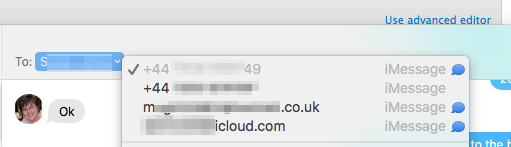
It should be greyed out as the Active one.
In the ones that have had the issue is the iMessages sent to the iPhone Number or Apple ID ?
It should not make any difference as it should sync either to all the other devices. I am just looking for possibles at this stage.
In the Finder use the Go Menu > Go to Folder and enter this path in the dialogue box that appears.
~/Library/Containers/com.apple.soagent/Data/Library/Preferences
If you don't do so already use the View Menu > Show View Options and selected the Modified Column.
Also set the style to Cover Flow.
Then find the com.apple.messageshelper.FileTransferController.plist item.
There are several of these message.helper items that are actual .plists here and not Aliases pointing to the ~/Library/Preferences folder.
Does the listed .plist have a Modified date for the last time and Date you sent or received a pic or file ?
The SOAgent is a support app that helps with the Messages app.
I am wondering if this is an item that is not Loaded when in Safe Mode.

9:14 pm Thursday; October 29, 2015
iMac 2.5Ghz i5 2011 (Mavericks 10.9)
G4/1GhzDual MDD (Leopard 10.5.8)
MacBookPro 2Gb (Snow Leopard 10.6.8)
Mac OS X (10.6.8),
Couple of iPhones and an iPad

