
How do I delete a number from a group text message
How do I delete a number from a group text message I created
iPhone 6, iOS 9.3.1
How do I delete a number from a group text message I created
iPhone 6, iOS 9.3.1
Add or remove someone from a group iMessage conversation
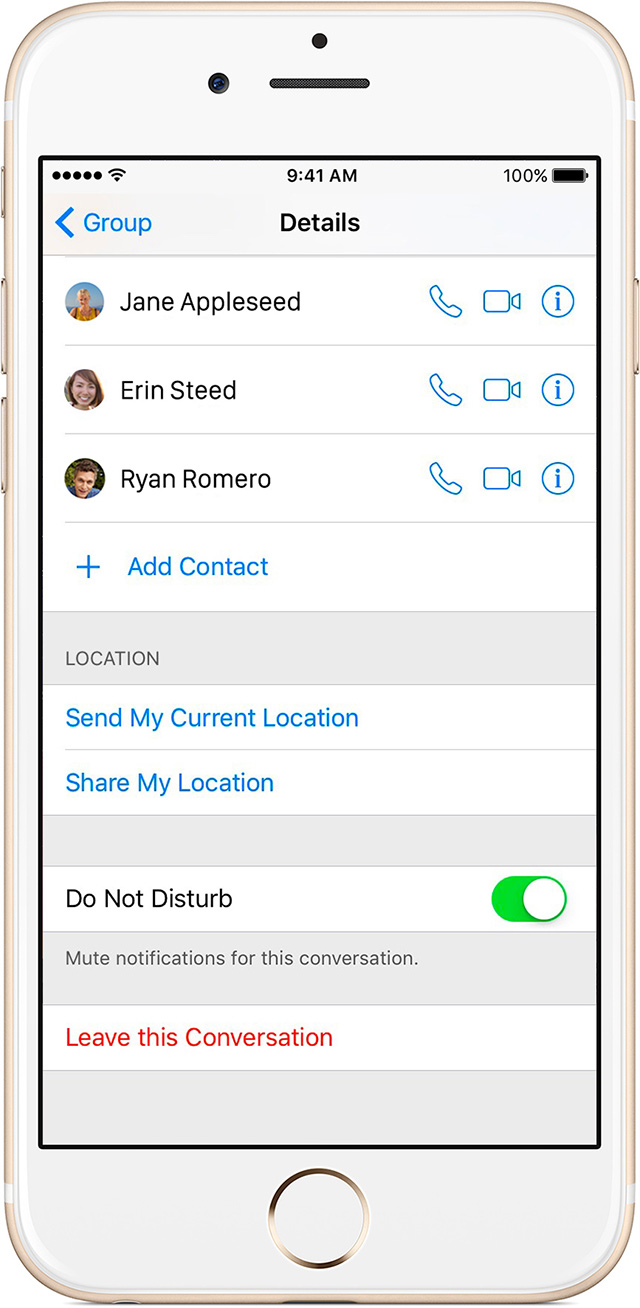
Anyone in the group message can add or remove someone from the conversation. To add a person to a group message, tap Details, then tap Add Contact.
You can remove a person from a group message that has at least four people. Tap Details, then swipe from right to left on the name of the person you want to remove. Then tap Delete.
from > Send a group message with your iPhone, iPad, or iPod touch - Apple Support
Add or remove someone from a group iMessage conversation
Anyone in the group message can add or remove someone from the conversation. To add a person to a group message, tap Details, then tap Add Contact.
You can remove a person from a group message that has at least four people. Tap Details, then swipe from right to left on the name of the person you want to remove. Then tap Delete.
from > Send a group message with your iPhone, iPad, or iPod touch - Apple Support
You can't delete or add anyone to a group text it's the dumbest thing ever!!!!! If you have an android you can do it. Apple won't let you.
Who has a convo with ALL Apple devices? That's vanishingly rare.
cjmpro wrote:
How do I delete a number from a group text message I created
Send a group message with your iPhone, iPad, or iPod touch - Apple Support
you can only add and remove user from a group imessage, can't do it if there is a non Apple device user in the group.
I can't delete a number from a group text with 8 people. I can't believe how unfriendly this is. I'm sure at least one is an android phone. I can hardly believe this isn't fixed in a year!
ChitlinsCC wrote:
Add or remove someone from a group iMessage conversation
Anyone in the group message can add or remove someone from the conversation. To add a person to a group message, tap Details, then tap Add Contact.
You can remove a person from a group message that has at least four people. Tap Details, then swipe from right to left on the name of the person you want to remove. Then tap Delete.
from > Send a group message with your iPhone, iPad, or iPod touch - Apple Support
This only works for all using an Apple device in a imessage group conversation.
this will not work if there is a non apple device user in the group message.
directly from the link you posted:
Add or remove someone from a group iMessage conversation
Anyone in the group message can add or remove someone from the conversation. To add a person to a group message, tap Details, then tap Add Contact.
You can remove a person from a group message that has at least four people. Tap Details, then swipe from right to left on the name of the person you want to remove. Then tap Delete.
Look, you started this with the snarky "go cry to your carrier" comment. I was pointing out that it wasn't a carrier problem, as on other platforms it works fine on the same carrier. Then, you followed up with the typical "go back to Android" comment. Not terribly helpful, and truthfully the reason the Apple community gets a bad rap.
This problem is basic functionality that should haven included, and moreover, has been complained about for over a year. I have supported Apple since 1984, but it's endlessly frustrating that basic functionality issues are missing, and then not addressed in a timely fashion.
I'm done, thanks for playing.
Does not work for anyone in the group.
I have an iPhone 5c, how do I delete a number from a group text? Please don't tell me to go into the details and swipe right to left on the number/name and tap delete. THAT DOES NOT WORK!!!
Thanks for any help that actually works. This is "Apple" after all.
This information is no longer valid. I tried doing so with my current group and it will not allow me to do so. Was there a problem with an of the iOS updates? I'' currently using an iPhone 6 (I refuse to get a 7, due to no aux jack.) and I'' on the current iOS system. Please advise. Thank you!
HHow do I get rid of group messages?
I Want to tell 6 people I'll be there tomorrow -but I don't want to create a group (which seems to happen automatically)
one of them replies and their message goes to the other members I have messaged
stupid!
This article may help to delete a contact from a group:
this really *****, Apple
All well and good... when I arrived here and began composing my reply the OP was all that was here - stating merely [emphasis is mine]
cjmpro Apr 15, 2016 2:20 PM
How do I delete a number from a group text message I created
iPhone 6, iOS 9.3.1
bkind3 wrote:
This does not work in iOS 10.2.1.
yes it does, did you look at the link and read all the replies, you can't remove someone from a MMS group message (green text) only from a group imessage (blue text) which is provided in the link I gave in my original response.
How do I delete a number from a group text message





